

What's the Most Cost-Effective Way to Run Ceph at Home?
What's the most cost-effective way to run Ceph at home? It starts the way most homelab adventures do: you mess with something in a VM long enough that the itch to build it for real becomes unbearable. That's where one user found themselves when they put exactly that question to the r/homelab crowd.
Ditching Ceph? The Best Storage Alternatives for Small Proxmox Clusters
The responses were helpful, and together they gave a snapshot of how regular folks build reliable, distributed storage at home without spending like an enterprise IT department. The variations are as wild as you'd expect, with old pizza box servers, mini-PCs, and NVMe-backed flash arrays all somehow roped into Ceph clusters.
If you're heading down this path, here's what people are doing, what actually works, and where it all gets expensive fast.
The range of builds: from desk drawers to datacenter leftovers
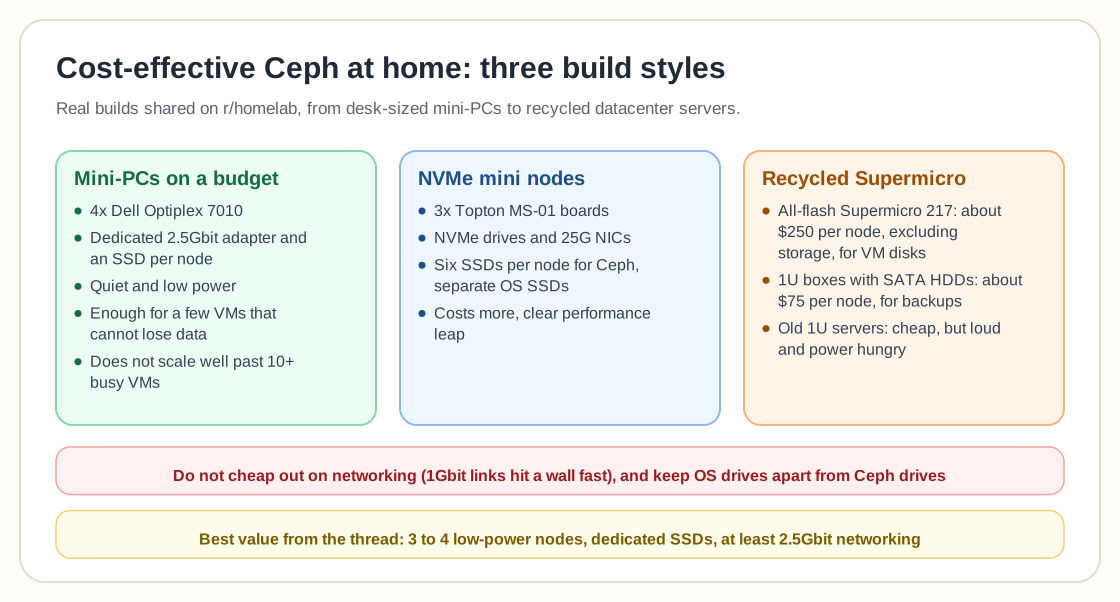
One of the cheapest setups came from someone running Ceph on four Dell Optiplex 7010 mini-PCs, each with a dedicated 2.5Gbit adapter and its own SSD. Simple, tight, and effective. They admitted performance wasn't going to win any benchmark trophies, but for real-world use, particularly a few VMs that couldn't afford to lose data, it was more than enough.
The appeal of this build is that you get isolation across nodes, dedicated storage, and a separate networking pipe for Ceph traffic, all without loud, power-hungry rack gear. There's a ceiling, of course. "It doesn't scale well," they said. "I'll probably notice degradation once I hit 10+ VMs with noticeable I/O."
Someone else chimed in with a slightly more polished take: three Topton MS-01 boards, each loaded with NVMe drives and 25G NICs. This setup used six SSDs per node for Ceph and separate SSDs for the OS, and they even tacked on USB SATA drives for additional storage layers. It's not as wallet-friendly, but the performance leap is obvious.
Then came a user with two Ceph clusters. One was an all-flash setup in a Supermicro 217 chassis with 6x 2.5-inch bays per node, their main cluster for VM disk images and container storage. They estimated about $250 per node, excluding storage, which is still relatively affordable for what it's doing. The other cluster was just some 1U Supermicro boxes with basic 3.5-inch SATA HDDs, built purely for backups and redundant copies, at about $75 per node.
The thread showed a pattern. People either build Ceph from the ground up with lightweight, power-efficient nodes, or they recycle older enterprise hardware and give it new life with a layer of distributed intelligence.
Don't cheap out where it hurts
The thread made something else clear: you can go cheap, but not everywhere. Networking matters a lot. The person with the Optiplex mini-PCs said plainly that their 2.5Gbit link would eventually be the bottleneck, and anyone still trying to get away with 1Gbit links will hit performance walls almost immediately once they push Ceph beyond basic workloads.
Storage matters too. SSDs show up in most of the builds shared, but the really effective setups split OS drives from Ceph drives. One user went as far as dedicating M.2 slots to Ceph OSDs while reserving SATA or USB-attached drives for backups, and that separation seems to make a noticeable difference.
Finally, scaling strategy matters. You can start small with two or three nodes, but Ceph really starts to shine when it has more space to breathe. The guy with the Supermicro clusters said he'd happily expand if he had the budget, which says a lot: it worked well enough that he'd invest more if he could.
The pros, the cons, and the tradeoffs
The core advantage is cost. Most of the builds in the thread hover between $75 to $250 per node, which is laughably low next to what real enterprise clusters go for. Because Ceph is software-defined, you get redundancy, scalability, and decent performance without shelling out for proprietary SANs.
You also actually learn something. One user recommended skipping Proxmox's built-in Ceph tooling entirely and setting up the cluster manually. "You actually learn what you're working with when you set it up yourself," they said. That sentiment echoed through the thread: Ceph is not a plug-and-play toy, and if you're serious about it, expect to get your hands dirty.
The cons are just as clear. Performance will take a hit if you don't plan for network overhead, and cheap nodes mean higher failure risk. Scaling from three to six to nine nodes takes more than plugging in machines, because you have to keep the network clean, the data replicated, and the recovery times reasonable.
Power and noise are the other drawback. Older 1U servers are cheap and easy to find, but they're loud and draw more power than you'd think. Unless you've got a basement rack or a soundproofed room, that "cost-effective" gear will cost you some peace and quiet.
Ceph isn't for everyone, but it's definitely for some
A final, thoughtful response came from someone comparing Ceph to MinIO as an on-prem object storage alternative. Their cloud bills, particularly API call charges, had become so inflated that they were exploring in-house options using Kubernetes, Ceph, or MinIO.
They asked the community whether they should go all-in on local node storage or mix in SAN-based backends. That's a whole separate blog post, but it shows that Ceph reaches well beyond homelab tinkerers. Done right, it can become a serious tool for offloading cloud workloads and reducing cost at scale.
That context makes the homelab versions even more impressive. If you can build a modest, resilient Ceph setup at home with a couple of mini-PCs, a few SSDs, and a fast network card, imagine what you could do in a small business environment.
The bottom line
So, what's the most cost-effective way to run Ceph at home? Based on the real-world builds the community shared, it's probably a cluster of three to four low-power nodes, each with dedicated SSDs and at least 2.5Gbit networking. Reuse what you've got, buy storage slowly, and don't try to make Ceph do everything at once.
The goal is a smart build rather than the fastest or the biggest one. If that sounds like you, you're officially in the Ceph club.
Still deciding between Ceph and ZFS in the first place? See our Ceph vs ZFS comparison for the general tradeoffs, or our HA-focused breakdown if failover is the priority.