

Proxmox HA Storage: Ceph vs ZFS Replication vs NAS Failover Compared
If you've ever stared at a rack of Proxmox servers and wondered whether Ceph, ZFS or a NAS is the right storage for high availability, you're not alone. High availability (HA) in Proxmox is a dream many chase, but how you achieve it depends heavily on which storage strategy you bet on. Each comes with its perks, pitfalls, and straight-up misconceptions. Based on some heated, insightful (and sometimes hilarious) user stories floating around online, many teams are clearly still figuring out which direction to go.
Moving 10,000 Workloads: Can Proxmox & Ceph Really Replace VMware?
This post skips the buzzwords and marketing fluff and looks at what actually works, what doesn't, and which of these options makes the most sense for your Proxmox setup. (If you just want the general Ceph vs ZFS comparison without the HA/NAS angle, see our broader Ceph vs ZFS breakdown.)
The Ceph hype, and when it's totally worth it
Ceph has become the unofficial king of distributed storage, especially in hyper-converged environments like Proxmox. When you do it right, it's fast, self-healing, and incredibly tough. The integration with Proxmox is smooth: you can spin up OSDs, monitor health, and manage pools directly from the GUI. For many, it "just works."
Try to Frankenstein a Ceph setup out of a single monster "storage node" and a few compute boxes with tiny SSDs, though, and everything starts falling apart.
One user nailed it: the chaos comes from the way people set Ceph up, and Ceph itself isn't the problem. If you're centralizing 80% of your storage on one node, you're building a SAN with extra steps, and Ceph isn't going to save you from yourself.
Modern Ceph setups don't need a dozen nodes either. Several admins chimed in saying their three-node Ceph clusters ran great, with full redundancy, performance, and no weirdness, as long as they avoided mixing drive types, kept RAID controllers out of the picture, and maintained decent networking (think 25/40/100GbE, not your dusty office switch).
For a smooth ride, use enterprise SSDs, avoid SMR drives like the plague, and make sure your HBAs are in IT mode.
ZFS: the "good enough" workhorse that just won't quit
ZFS isn't sexy, and it doesn't have the marketing push of Ceph. It's beloved for a reason, though: it works, and it works well.
In smaller Proxmox deployments, ZFS with replication can get you surprisingly close to what most would consider "HA." Is it true high availability? Not exactly. You might have a few minutes of downtime during a node failure, but for a lot of environments, that's an acceptable tradeoff.
The main advantage here is simplicity. ZFS replication is dead easy to set up, even across nodes. You can point a VM's dataset to replicate to two or three other boxes, and if one dies, you just boot from the replica. It's not instant, but it's reliable.
As one admin bluntly put it: "Lots of people greatly exaggerate their uptime requirements and overengineer their cluster design because of that. ZFS is just perfect for lots of cases."
There's also the performance angle. ZFS does great with local disk IO, especially when paired with fast SSDs and plenty of RAM. It also gives you granular snapshotting, compression, and checksumming, all baked in.
That said, ZFS doesn't scale the way Ceph does. Once you get beyond 4 or 5 nodes, replication management can start to get tedious, and real HA, with fencing and failover, becomes harder to maintain manually.
NAS: the old guard still holding on
Then there's NAS, the traditional way: a couple of head nodes with a shared disk shelf, exporting NFS or iSCSI to your Proxmox cluster. It works and it's familiar, and in many ways it's still a solid choice for certain setups.
If you've got a solid HA-capable NAS (TrueNAS, XigmaNAS, Synology, etc.) and the proper dual-head redundancy, you can achieve real high availability on the storage layer. The trick is doing it right.
The catch is that open-source options for true HA NAS are limited. TrueNAS, for instance, only offers high availability on their proprietary hardware. Others like XigmaNAS do support CARP/HAST setups, but they're not exactly plug-and-play. You'll be getting your hands dirty with FreeBSD quirks and tuning scripts manually.
Even if you pull it off, your Proxmox nodes are still tied to external storage, so you lose a lot of the benefits of hyper-convergence, like simplified scaling and fault tolerance.
Performance can also be hit-or-miss. While some setups with fast SSDs and high-speed links can hold their own, Ceph in a properly distributed setup has proven to outperform many commercial NAS appliances in both throughput and resilience.
The elephant in the server room: bad expectations
One thread runs through all these discussions: misconfigured hardware.
It's almost a trope now: someone buys eight compute nodes with tiny SSDs and a single "storage beast" with 200TB, then wonders why their Ceph setup is acting weird. Or they blow $700k on SQL licenses for a box with 96 underclocked cores because "more is better," without realizing their workloads don't scale that way.
As one DBA savagely put it: "HA = Head Up Ass." He's not wrong.
The best storage strategy in Proxmox often comes down to building for the architecture you're actually using. Don't wedge Ceph into a centralized storage model, don't expect ZFS to be Ceph, and don't assume NAS will scale like distributed storage just because the GUI has an HA checkbox.
So, which should you use?
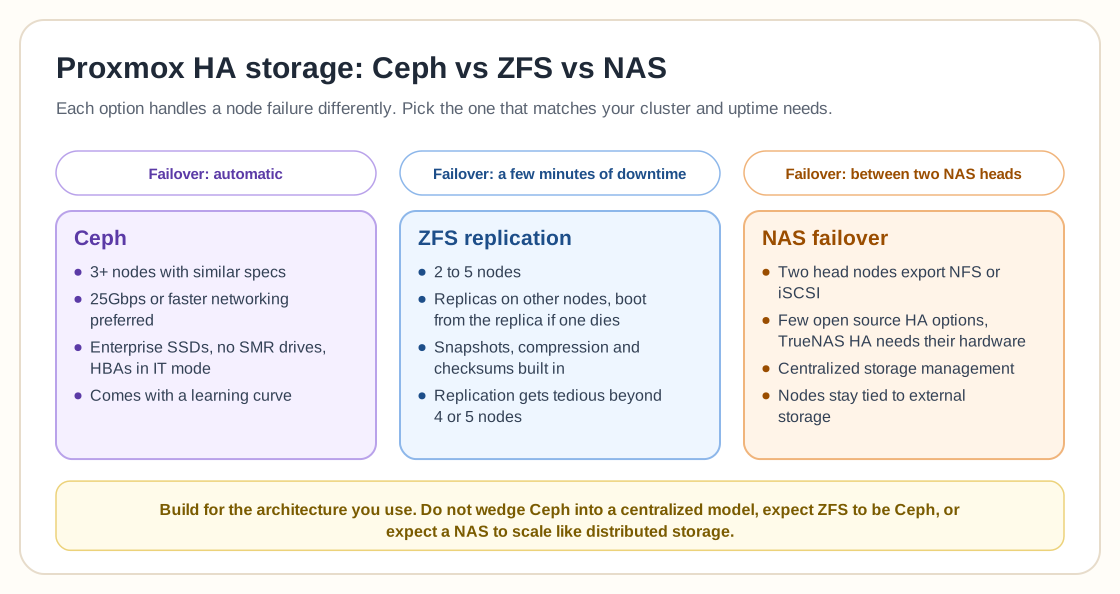
Here's how it breaks down by scenario.
Use Ceph if…
- You're running 3+ nodes with similar specs
- You want true high availability and automatic failover
- You can wire up high-speed networking (25Gbps or better preferred)
- You're OK with a learning curve (or already comfortable with Proxmox and Linux)
Use ZFS if…
- You have a smaller cluster (2 to 5 nodes)
- You can tolerate brief downtime in favor of simplicity
- You want solid performance and built-in snapshotting
- You're looking for a no-fuss way to get replication going fast
Use NAS if…
- You already have reliable dual-head NAS hardware
- You're fine relying on external storage
- You prefer centralized storage management
- You don't need cloud-scale flexibility
Final thoughts
High availability comes down to picking the right tool for your setup. Ceph, ZFS, and NAS each bring serious strengths to the table, but they can just as easily backfire if you deploy them carelessly.
Don't fall into the trap of overengineering your cluster or copy-pasting someone else's architecture without understanding why it works. Take the time to assess your actual needs (uptime, budget, skill level, and scale), and then build a system that is maintainable as well as highly available.
At the end of the day, the best HA setup is the one that doesn't wake you up at 3 a.m. with broken quorum and a blinking console cursor.