

Ceph Is a Beast, ZFS Just Works: Proxmox Homelab Storage Debate
Ceph vs ZFS on Proxmox is a homelab argument that never quite settles. This round started with a simple home lab reorganization. A user decided to separate their NAS from their Proxmox setup, a tidy, technical move that spiraled into a passionate debate about two of the most talked-about storage solutions in the virtualization world: Ceph and ZFS replication. What began as a routine upgrade quickly became a crash course in the philosophy of storage itself: performance versus simplicity, control versus chaos, power versus peace of mind.
Is Ceph Overkill? The Ultimate Short VMware-to-Proxmox Migration Guide
For the uninitiated, this is a story about home lab builders rather than some cloud giant's infrastructure. These are the tinkerers who run clusters out of basements and garages and care about redundancy and uptime by choice, because it scratches a deeply satisfying itch. They measure performance in milliseconds, but also in how long it takes to get dinner on the table while the cluster migrates a container.
So when one user posted about reorganizing their setup (a two-node Proxmox cluster with a Raspberry Pi as quorum) and asked whether to use Ceph or ZFS replication, the floodgates opened. What followed was a raw, unfiltered look into the self-hosted community, with equal parts technical wizardry, shared frustration, and genuine camaraderie.
Quick comparison
| Ceph | ZFS (with replication) | |
|---|---|---|
| Minimum nodes | 3 (5+ recommended) | 1 |
| Storage model | Real-time shared storage | Async snapshot replication |
| Live migration | Near-instant (RAM only) | Waits for latest sync (seconds) |
| RAM overhead | ~3-5GB per OSD daemon | Flexible ARC cache, self-tuning |
| Networking needs | 10-25GbE+ recommended | Standard gigabit is often fine |
| Node failure behavior | Cluster-wide impact if quorum lost | Other nodes keep running independently |
| Best for | 3+ node HA clusters with fast networking | Homelabs, 1-5 node setups, simplicity |
If your setup needs the failover-specific angle, covering HA, quorum behavior, and NAS as a third option, see our Ceph vs ZFS vs NAS breakdown for HA storage.
The allure of Ceph: power, scale, and pain
"Ceph is a beast," one user wrote. "If you feed it enough OSDs and network speed, it's like a wet dream. Bare minimum hardware? Don't bother." That line could double as Ceph's unofficial slogan.
Ceph was born for scale. It's the kind of distributed storage system you find humming inside data centers, handling petabytes like it's nothing. It provides true shared storage, meaning every node in your cluster sees the same live data all the time. In a high-availability setup, Ceph is the golden ticket: instant failover, smooth live migrations, and virtually no downtime.
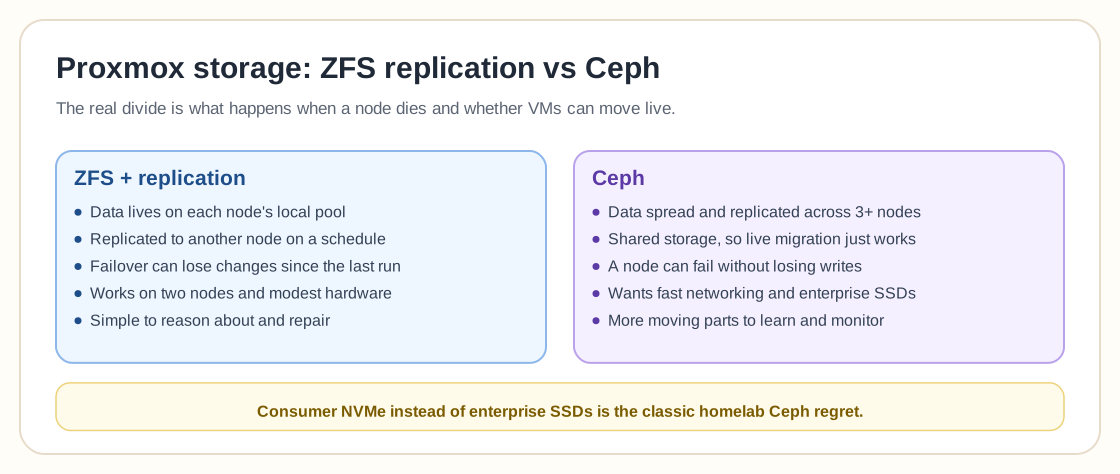
All that power comes at a price. Ceph's complexity can make or break a home setup. It demands multiple nodes (three at minimum, five or more if you want to sleep at night), high-speed networking, and careful maintenance. And when something does go wrong, it tends to go spectacularly wrong.
"Ceph is fine if you have the time to maintain and troubleshoot issues," said one seasoned admin. "ZFS just works because it's simple to maintain."
That "simple to maintain" part lands with the home lab crowd. Most hobbyists don't have the luxury of 24/7 monitoring, redundant power, or a spare switch waiting in the wings, because they have day jobs. Ceph, for all its brilliance, often feels like running a Formula 1 car on a suburban street.
One user put it bluntly: "Ceph during major code updates is not worth it." Another admitted that an upgrade once nearly took their entire production environment down. Ceph isn't so much unstable as unforgiving. You either respect its architecture, or it will remind you why it was built for data centers instead of living rooms.
ZFS replication, the workhorse
Then there's ZFS, the understated overachiever. Where Ceph spreads data dynamically across nodes in real time, ZFS takes a simpler, snapshot-based approach. You can set it to replicate changes at intervals: every 15 minutes, every 5 minutes, or even every minute if you're brave. It's asynchronous, meaning there's always a small risk of data loss if one node fails between replications, but for many home users, that trade-off is worth it.
After all, most homelabs don't host mission-critical workloads. "My VMs and LXC containers don't change so much," one user explained. "So this may not be a problem."
That sums up the appeal. ZFS replication doesn't promise perfection, but it offers enough. It's fast, efficient, and fits neatly into the DIY ethos, reliable without requiring a team of sysadmins on call.
In practice, users report replication times as short as three seconds for small virtual machines. One person replicates half a dozen Linux VMs every fifteen minutes, each replication taking only a few seconds. Another runs seven HA guests, all syncing under five seconds. For them, Ceph is more than overkill; it's unnecessary.
There's something poetic about that. ZFS offers a kind of pragmatic confidence: trusting your setup, knowing your limits, and accepting the occasional imperfection for the sake of sanity.
When "good enough" is perfect
At work, one commenter said, they use both systems: Ceph for the Windows team's five-node cluster, ZFS replication for smaller two-node setups. Both work well. But at home? "There I have one tiny single Proxmox, a working backup system, and a cold standby pre-installed PVE. That's enough."
That sentiment runs through the community: perfection is expensive in attention as well as in hardware. Ceph, with its constant synchronization and overhead, eats bandwidth and resources. ZFS minds its own business until you tell it to act. And for the average home lab, which might be running a mix of file servers, Plex containers, and maybe a few development VMs, "good enough" is often the best possible option.
Another user summed it up neatly: "For your home lab, don't try to overdo it." That's a mature attitude. Tinkering is supposed to be fun and shouldn't turn into a part-time job maintaining a mini data center.
Live migration, the real divide
One of the biggest differences between Ceph and ZFS replication shows up during live migration, when you move a running virtual machine from one node to another without shutting it down.
With Ceph, migration is almost instantaneous. Since all nodes see the same data, you're really just transferring the RAM state. ZFS replication, however, has to sync the latest disk changes first, which takes a little longer.
"Live migration will go faster with Ceph, as there's nothing to sync," one user explained. "With ZFS it will take the time to sync latest changes first."
Again, context matters. For lightly used VMs, which make up the majority of home labs, the difference is negligible. The OP of the original thread tested it themselves: "I have made a test cluster now with ZFS. It takes 8 seconds to migrate a LXC." Most people would gladly accept eight seconds in exchange for simplicity and lower maintenance.
The hidden lessons of a home lab
These discussions have an almost philosophical undercurrent. Beneath the benchmarks and replication intervals sits a broader question: how much complexity is too much?
Ceph is seductive because it promises control: perfect redundancy, constant synchronization, professional-grade reliability. It also demands constant attention. ZFS feels more like the friendly neighbor who doesn't overstay their welcome.
"Ceph can't run on two nodes," another user reminded. "You need at least three - but you really want five or more." That alone disqualifies it for most small setups.
Others pushed back. "You can run Ceph on even-numbered nodes. I have four. Works like a charm." Even they admitted that Ceph's requirements, from networking to storage to monitoring, scale up fast. What feels fine in a four-node test can become a nightmare when hardware fails or upgrades roll out.
One veteran put it best: "Ceph requirements are said so stupidly high, but for self-hosting it's more than enough." It's the engineer's usual tug-of-war between what's possible and what's practical.
The consumer NVMe problem
The OP confessed to one small mistake: buying consumer-grade NVMe SSDs instead of enterprise ones. "Hope it will be fast anyway," they wrote, half joking.
That tiny detail says a lot about the home lab mindset. Consumer parts are cheaper, but they don't always hold up under sustained writes, which is a problem for both Ceph and ZFS and more punishing for Ceph. Enterprise drives have higher endurance ratings and better performance under stress, but they're expensive, and for a hobby setup the math doesn't always add up.
So the OP planned another experiment. "Today I have a 10Gb backbone," they said, "but going to test Thunderbolt 40Gb between nodes. Think my consumer NVMe will bottleneck."
That mix of thrift, curiosity, and pure technical enthusiasm defines the home lab world. You don't just buy hardware; you learn it, break it, rebuild it, and make it do things it was never meant to do.
Why ZFS keeps winning hearts
When the dust settled, the consensus leaned heavily toward ZFS replication because it fits the rhythm of home lab life. Being flashier or faster had little to do with it.
Ceph, despite its undeniable power, feels like bringing a sledgehammer to a thumbtack. ZFS is approachable, predictable, and, most importantly, recoverable.
"If something goes wrong with Ceph storage, the entire cluster is affected," said one user who'd lived through the nightmare. "With ZFS, each node is storage independent, so if one or two go down, the rest keep going." That kind of resilience, more than any promise of perfection, is what makes ZFS so appealing.
The verdict: build for joy as well as redundancy
In the end, the debate about file systems doubled as a reminder of what draws people to self-hosting in the first place: the joy of creation, the thrill of control, and the satisfaction of making something yours.
Ceph is a marvel of engineering, a distributed system capable of running the world's data centers. ZFS is the workhorse, the tool that "just works." Sometimes, especially in the hum of a basement server rack or the glow of a repurposed ThinkCentre running Proxmox, that's all you really need.
As one user put it, almost poetically: "Don't try to overdo it." In a community obsessed with uptime, that's a surprisingly grounding thought. Sometimes the best system is the one that lets you sleep through the night, even if it can't do everything.
Resources
Frequently Asked Questions
Is Ceph or ZFS better for Proxmox?
Ceph is better when you need true shared storage and instant live migration across 3+ nodes with fast networking, which is what it was built for. ZFS with replication is better for smaller clusters (1-5 nodes) where you want simplicity, lower resource overhead, and can tolerate a few seconds to minutes of replication lag instead of zero-downtime failover. Most homelabs are better served by ZFS; production HA clusters with the hardware to match lean Ceph.
Can you run Ceph on a single node?
Technically yes, but it defeats the point, because Ceph's value is distributing data across multiple nodes for redundancy and shared access. A single-node Ceph deployment adds significant overhead and complexity versus just using ZFS or LVM locally, with none of the high-availability benefit. Proxmox officially recommends at least 3 nodes for Ceph, with 5+ preferred for comfortable fault tolerance.
How much RAM does Ceph vs ZFS need?
Ceph OSD daemons typically want around 3-5GB of RAM each on top of your VM/LXC workload, so a node running several OSDs can need significantly more headroom than a comparable ZFS box. ZFS's main RAM appetite is its ARC cache, which is flexible and self-tunes. It performs better with more RAM but doesn't have Ceph's hard per-daemon overhead. As a rule of thumb, budget more RAM per node for Ceph than for ZFS at the same storage capacity.