

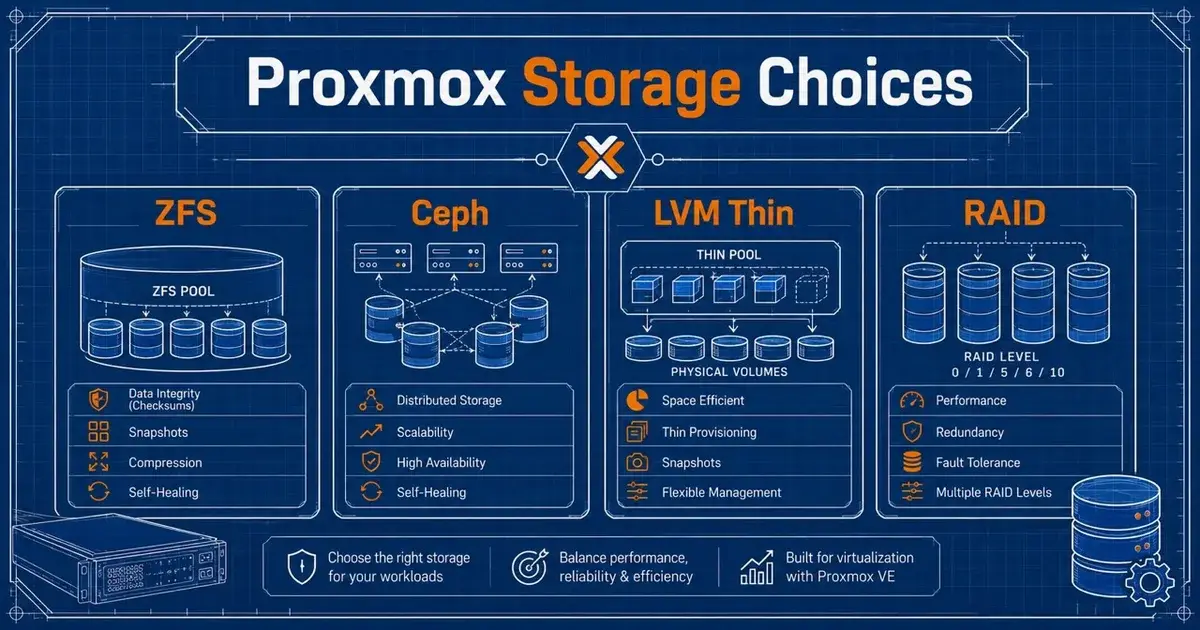
Proxmox Storage: ZFS vs Ceph vs LVM Thin vs RAID
For most single-node Proxmox systems, I would choose ZFS when I want local redundancy and snapshots, or LVM Thin when I want simple local block storage. For a multi-node cluster that needs distributed shared storage, Ceph is the more natural fit. Hardware RAID still has a place, but it belongs under storage stacks designed to use a RAID controller, though not under ZFS or Ceph.
ZFS, Ceph, LVM Thin and RAID solve different layers of the storage problem, so treating them as four interchangeable products is a mistake. RAID combines disks for redundancy or performance. ZFS is a filesystem and volume manager. LVM Thin is local thin provisioned block storage. Ceph is a distributed storage system.
What storage does Proxmox VE 9 support?
Proxmox VE 9 supports local and shared storage backends through a common storage layer. VM disks and container volumes can live on local LVM, LVM Thin, ZFS, directory storage, NFS, iSCSI, Ceph RBD and other supported backends. That flexibility is useful, and it also makes bad combinations easy.
Choose storage by failure model first. Ask whether one host can fail, whether one disk can fail, whether VMs need live migration, how much recent data can be lost and how much operational complexity the team can support.
If you are designing HA, Proxmox HA Storage: Ceph vs ZFS Replication vs NAS is a useful companion to this guide.
When should you choose ZFS for Proxmox?
ZFS is the best general purpose choice when one Proxmox host owns the disks and you want software managed redundancy, checksumming, snapshots, compression and efficient clones.
Proxmox integrates ZFS directly. VM disks are stored as ZFS volumes, containers can use ZFS datasets, and Proxmox also supports ZFS replication between nodes.
A two-disk mirror is a common small server design because either disk can fail without losing the pool. Larger systems can use RAIDZ layouts or multiple mirror vdevs depending on capacity and performance needs. ZFS is especially attractive when you want the hypervisor to understand the local storage instead of hiding all disks behind a RAID controller.
The cost is memory and operational discipline. ZFS uses RAM for caching, and pool design is not something to decide casually after the server is full.
The community debate around this is covered in Ceph Is a Beast, ZFS Just Works.
Should you put ZFS on a hardware RAID controller?
No. Proxmox explicitly advises against using ZFS on top of a hardware RAID controller that manages its own cache, because ZFS needs direct communication with the disks. Use an HBA or a controller mode that exposes the disks directly.
I treat this as one of the most important Proxmox storage rules. A RAID controller can hide drive behavior that ZFS expects to see, and you end up stacking two different systems that both believe they own redundancy and caching policy.
If you already have a server with a good battery backed hardware RAID controller and you do not want to replace it, conventional LVM or a filesystem on the RAID logical volume may be the cleaner design.
When is LVM Thin better than ZFS?
LVM Thin is better when you want straightforward local block storage with thin provisioning, snapshots and clones and do not need ZFS features.
Proxmox commonly sets up LVM Thin as local-lvm after a default installation on ext4 or XFS based systems. The LVM Thin backend supports snapshots and linked clones, but it is local storage and cannot be shared. It is simple and quick to understand.
The main operational risk is overcommitment. Thin provisioning lets virtual disks advertise more logical capacity than the pool has physically consumed, which is useful until the thin pool approaches 100 percent. A full thin pool can turn a capacity problem into a VM availability problem, so monitor data and metadata usage and leave enough free space for growth.
Mr.PlanB has a separate guide on Proxmox LVM Thin storage bloat and capacity problems.
When should you choose Ceph for Proxmox?
Ceph makes sense when several Proxmox nodes need shared distributed storage and you want storage to survive host or disk failures without depending on one external SAN or NAS.
Proxmox integrates Ceph management directly into the cluster. In a hyperconverged design, the same servers provide compute and Ceph storage. That is powerful, but installing Ceph does not give you HA for free.
Proxmox recommends at least 10 Gbps network bandwidth dedicated to Ceph traffic, and fast SSD and NVMe clusters can justify considerably more. You also need enough nodes, drives and failure domains for replication to make sense.
Ceph adds background traffic for replication, recovery, rebalancing and scrubbing. A three-node cluster with a single slow storage network can feel fine until a disk or node fails, which is exactly when Ceph has more work to do.
I choose Ceph when shared storage and node independence justify that complexity.
Is Ceph better than ZFS for a three-node cluster?
Ceph is better when the cluster must keep the same VM storage accessible from all nodes after a host failure. ZFS is better when simplicity and local performance matter more and you can accept replication based recovery.
With Ceph, the VM disk is already distributed, so HA can restart the VM on another node that sees the same RBD storage. With local ZFS replication, another node holds a replicated copy created on a schedule. The recovery point depends on the last successful replication, and the copies are separate disks instead of one shared disk. Those are different guarantees.
Pick Ceph because your recovery requirements need distributed shared storage, and not because the GUI makes installation look easy.
Where does hardware RAID still fit?
Hardware RAID still fits servers where a dedicated RAID controller presents protected logical volumes to Proxmox and the storage layer above it expects that arrangement.
Proxmox installation guidance says local storage can use hardware RAID with battery backed write cache, while ZFS and Ceph should use disks without hardware RAID underneath. That makes hardware RAID plus LVM a reasonable conventional design on some enterprise servers.
The tradeoff is visibility. The RAID controller becomes responsible for disk health, write cache protection, rebuild behavior and redundancy, so make sure monitoring can see controller status and failed drives.
RAID is also not a backup. Mirroring a deleted or encrypted file simply gives you redundant copies of the same problem.
What is the difference between RAID and ZFS redundancy?
RAID protects against some disk failures. ZFS can also provide disk redundancy, and it combines that with checksumming and storage management. A ZFS mirror resembles RAID1 at the redundancy level, while RAIDZ layouts provide parity based protection, but the implementation and data integrity model are different.
For Proxmox, the operational question is which layer owns the disks. If ZFS owns them, let ZFS handle redundancy. If a hardware RAID controller owns them, present the resulting logical volume to a storage layer that expects it. Avoid building redundant layers simply because both are available.
Which storage supports snapshots and clones?
ZFS and LVM Thin both support Proxmox snapshots and clones efficiently, and Ceph RBD also supports snapshot capable VM storage through Proxmox.
Traditional LVM is more limited than LVM Thin for this use case. Hardware RAID by itself does not provide Proxmox VM snapshots; snapshot behavior comes from the storage backend above or alongside the RAID layer. That's why picking "RAID" doesn't answer the VM storage question, since you still need to decide what Proxmox will place on top of that RAID volume.
Which storage is best for live migration and HA?
Shared storage is the simplest model for live migration and HA because all eligible nodes can access the same VM disks. Ceph, NFS, iSCSI and Fibre Channel can provide that property in different designs. Local ZFS and LVM Thin do not become shared simply because the hosts are clustered.
Proxmox can migrate local disks by moving storage data during migration, and ZFS replication can maintain copies on other nodes. Those features are useful, but their timing and recovery characteristics differ from shared storage.
If HA is a hard requirement, decide the storage architecture before you deploy the VMs.
What would I choose for common Proxmox setups?
For one small server with two SSDs, I would usually choose a ZFS mirror.
For one server with a good hardware RAID controller already in place, I would consider RAID plus LVM Thin if replacing the controller adds no real benefit.
For a simple lab where I want fast provisioning and snapshots and can restore from backup if the host dies, LVM Thin is perfectly reasonable.
For three or more production nodes that need distributed shared storage and can support dedicated fast networking, I would evaluate Ceph.
I would not install Ceph on a single node simply because it appears in the menu, put ZFS on hardware RAID, or thin provision a pool without capacity alerts.
Storage should make failure behavior clearer. If the design needs a diagram and a paragraph of caveats just to explain where one VM disk lives, simplify it before adding more workloads.
Frequently Asked Questions
What is the best storage for Proxmox VE 9?
ZFS is a strong default for local redundant storage, LVM Thin is simple for local VM storage, and Ceph fits clusters that need distributed shared storage. Hardware RAID can still make sense with conventional LVM or file systems.
Should you use hardware RAID under ZFS in Proxmox?
No. Proxmox documentation says not to put ZFS on top of a hardware RAID controller with its own cache management, because ZFS needs direct communication with the disks.
Does Proxmox Ceph need 10 GbE?
Proxmox recommends at least 10 Gbps of dedicated network bandwidth for hyperconverged Ceph traffic. Faster networks can make sense when SSDs or NVMe drives generate more traffic.