

What is an offsite backup?
An offsite backup is a recoverable copy stored outside the primary location or failure domain of the production environment. For a small office that may mean a backup in another building; for a cloud workload it may mean another region, account or provider; for a homelab it may mean an encrypted copy on a remote server, cloud storage, or a removable disk stored elsewhere.
Offsite backup is one part of the 3-2-1 rule. See the 3-2-1 backup rule guide for the full framework.
Offsite does not automatically mean safe
A backup can sit hundreds of kilometres away and still share the same failure path: production and backup using the same credentials, a permanently mounted remote share, deletions that synchronize immediately, or an encryption key that only exists in production.
The UK National Cyber Security Centre states that cloud and on-premises backups are not ransomware resistant by default. Backup services should resist destructive actions, preserve access, protect earlier versions, and alert users to significant changes.
A useful offsite design separates location, storage, credentials and destructive authority.
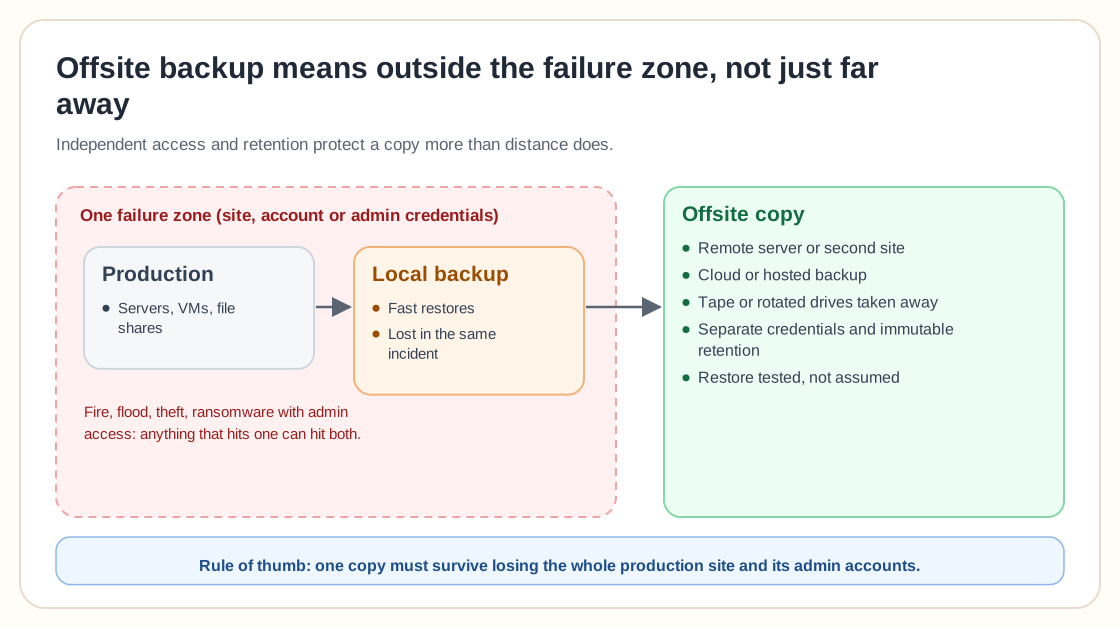
Offsite vs cloud vs replication vs offline
These terms are related but mean different things.
Replication continuously or periodically copies changes to another system. That helps availability, but it may also copy accidental deletions, corrupted data or ransomware encryption. A remote replica with no independent retention may fail as a backup; a useful offsite backup should provide version history, retention and a way to recover an earlier clean point.
An offsite backup is stored somewhere else; an offline backup is disconnected during normal operation. A backup can be any combination of the two. A remote PBS server is offsite and online, while LTO tape stored externally is offsite and offline.
Main offsite backup options
AWS describes cloud storage as a durable offsite destination for on-premises backups and supports backup workflows through object storage and storage gateways.
How far away should an offsite backup be?
There is no universal distance. The copy should be far enough away that the same likely physical event will not affect both locations. Consider flood zones, wildfire areas, power grids, building ownership, regional internet providers, weather patterns and cloud regions.
A backup in the building next door may protect against server theft but not a major fire or flood. A backup in another region provides stronger geographic separation but increases transfer and recovery time. Choose the location according to the risks you are trying to separate.
AWS recommends storing backup copies in other regions and accounts where appropriate as part of backup policy design. A different region can reduce geographic risk; a different account can reduce administrative risk. Using both may provide stronger separation.
A practical Proxmox offsite architecture
Proxmox Backup Server supports remote servers and synchronization jobs for copying datastores between PBS installations. Its documentation recommends an offsite instance because it is less likely to be affected by ransomware operating on the local network.
Pull versus push synchronization
In pull-based sync the destination server connects to the source and retrieves data, so the source doesn't need broad delete access on the destination, which can make destructive authority easier to separate. In push-based sync the source sends data to the destination, useful when the destination cannot initiate connections. Whichever direction is used, restrict credentials to the minimum required permissions.
Prevent synchronized deletion
Synchronization becomes dangerous when deletion at the source automatically removes data from the destination: an attacker who controls the source could delete snapshots and wait for the deletion to propagate. Proxmox documentation notes that synchronization can be configured so missing source snapshots are not automatically removed from the target, which helps prevent a compromised source from triggering deletion of offsite copies. The offsite destination should apply its own retention policy rather than blindly reflecting the source.
Bandwidth planning and transfer lag
Offsite backup depends on network capacity. Estimate initial data volume, daily changed data, backup window, available upload bandwidth, compression, deduplication and protocol overhead. Use measured throughput rather than the advertised internet speed.
Initial seeding
The first offsite transfer may be much larger than daily incremental changes. Options include letting the first transfer run over several days, temporarily increasing bandwidth, performing the initial copy locally, shipping encrypted media, or selecting only critical workloads first.
Transfer lag can create a hidden RPO gap
The local repository may have a recent recovery point while the offsite repository remains several hours behind, so define separate RPO expectations for local and offsite recovery. See the RPO vs RTO guide for the underlying concept.
Encryption, identity separation and retention
Offsite backup data should normally be encrypted during transfer, at rest, on removable media and in cloud storage. Encryption creates another requirement: key recovery. Do not keep the only decryption key inside the environment the backup is intended to recover. Test restoration using the protected copy of the key.
Identity and credential separation
A strong offsite backup should not rely completely on normal production identity. Consider separate backup administrator accounts, separate cloud accounts and multifactor authentication, restricted service accounts, and alerts for login and policy changes. The account that creates backups does not always need permission to delete them.
Retention at the offsite location
The offsite copy should have an intentional retention policy of its own instead of mirroring the current local state. The local repository may keep more frequent short-term backups while the offsite repository keeps fewer but longer recovery points, reducing transfer and storage demand while preserving protection against late-discovered incidents.
Immutability and offsite backup solve different problems
Offsite storage protects against loss of the primary location. Immutability protects recovery points from deletion or modification during a defined period. A remote online backup can still be deleted; an immutable local backup can still be lost with the building. Combining offsite placement with immutable or offline retention gives stronger protection.
Monitoring and testing an offsite restore
Monitor more than job completion: last successful local backup, last successful offsite transfer, transfer lag, remote verification status, repository capacity, retention changes, deletion attempts and expiring credentials. An offsite copy can stop updating for weeks unless delay is monitored; alert when the newest remote recovery point exceeds the approved age.
CISA recommends maintaining offline encrypted backups and regularly testing their availability and integrity in a disaster recovery scenario.
An offsite recovery test should assume local resources are unavailable. Test access to the repository, emergency credentials, encryption keys, provider access, replacement infrastructure and recovery timing. Do not test only by downloading one small file from the local office; test the recovery path you would actually use after site loss.
Restoring large datasets
A large offsite backup may take days to download. Consider available destination bandwidth, provider retrieval speed, expedited retrieval options, physical media export, and minimum viable service, and restore the most important systems first.
Choosing an offsite backup destination
Define the recovery scenario
Decide whether the copy must protect against server loss, site loss, ransomware, administrator compromise, or long-term retention needs.
Define RPO and RTO
Determine maximum acceptable age of the offsite copy, maximum acceptable recovery time, and the minimum viable data volume.
Measure data and change rate
Record initial data size, daily changed data, growth rate, and compression/deduplication potential.
Compare complete costs
Include storage, requests, retrieval, egress, hardware, power, connectivity, support, media transport and staff time as well as the advertised per-terabyte price.
Review security controls
Confirm encryption, multifactor authentication, separate accounts, retention lock, deletion protection, audit logs and emergency recovery.
Test restoration
Perform a representative restore before treating the destination as production ready.
A practical homelab and small business example
A homelab can prioritize family photos, documents, password manager data and configuration for offsite protection while leaving rebuildable media libraries and test VMs local-only. A small business plan should identify which systems are copied offsite, maximum acceptable transfer delay, minimum retention, recovery location and deletion authority.
Common offsite backup mistakes
A NAS in the same room shares the same physical risks. Move one copy to another failure domain.
A compromised account may delete production and backup copies. Separate identities and permissions.
Accessible network storage may be encrypted or deleted by malware. Restrict connectivity and destructive access.
Source deletion may remove remote recovery points. Use independent retention and deletion controls.
The local backup may be current while the offsite copy is days old. Monitor recovery point age.
Retrieval, egress, requests and support may dominate recovery cost. Calculate complete lifecycle cost.
A one-megabyte file test does not prove a ten-terabyte environment can recover within the RTO. Test at representative scale.
The encrypted offsite backup becomes unusable after site loss. Protect keys independently.
Remote storage may still allow immediate deletion. Add immutable or offline protection where required.
Large replaceable datasets can consume bandwidth and budget needed for critical data. Classify workloads.
Data may survive while network, hypervisor, firewall and application settings are lost. Back up recovery documentation too.
Provider failure, account suspension or commercial changes may affect recovery. Understand export options and keep independent documentation.
Offsite backup checklist
0 / 30Frequently asked questions
An offsite backup is a recoverable copy stored outside the primary physical location or infrastructure failure domain.
It protects recovery data when production and local backups are affected by the same incident, such as fire, theft, flooding, ransomware or site loss.
Yes, cloud backup can provide an offsite copy. Cloud storage should still be evaluated for retention, deletion protection, credentials, costs and restore performance.
It can when it is located in another failure domain and has appropriate access controls, retention, monitoring and restore testing.
No. A remote online repository may still be reachable through compromised credentials or synchronization. Add account separation, restricted deletion, immutability or offline media.
It should be far enough away that the same likely physical incident will not affect both locations. The appropriate distance depends on local risks and recovery requirements.
The schedule should follow the required offsite RPO, available bandwidth, data change rate and workload importance.
Not necessarily. Local storage may retain frequent recent backups, while offsite storage keeps fewer but longer recovery points.
Yes. A remote Proxmox Backup Server can synchronize backup data between PBS installations. Permissions, deletion behaviour, verification and remote retention should be configured carefully.
Either model may be appropriate. Pull-based synchronization can help limit source control over the destination, while push may suit network environments that allow outbound connections more easily.
Yes, when the tape is transported and stored outside the primary location. It should be encrypted, inventoried, retrievable and periodically tested.
They can be suitable for small environments when drives are encrypted, rotated consistently, disconnected after use, and stored securely elsewhere.
Recover representative data or complete systems while assuming the local repository is unavailable. Validate access, keys, infrastructure, applications, RPO and RTO.
Prioritize irreplaceable data, identity, databases, configuration, credentials, business records, and systems required for minimum viable recovery.
Build another recovery path
The value of an offsite backup comes from independence. The copy should not depend completely on the same building, storage hardware, administrator account, identity platform or deletion policy as production.
Start with the systems that would be most difficult to recreate. Create a local backup for fast recovery, send another copy to a genuinely separate destination, protect it from destructive access, and monitor how far behind it is. Then restore from that copy without using the local repository. You can trust an offsite backup once it has survived separation, kept the required history, and restored a usable service within the required time.