

What is a backup retention policy?
A backup retention policy is a documented set of rules that determines how long backup recovery points remain available. For example, a policy might keep seven daily recovery points, four weekly, twelve monthly and three yearly. When a recovery point falls outside every retention window, the backup platform may prune or expire it.
A complete policy documents more than a number of days. It covers which systems are included, backup frequency, retention tiers, storage destinations, immutability periods, deletion approval, recovery testing and ownership.
NIST storage security guidance recommends managing data copies and backups through documented protection and retention policies across their lifecycle.
Frequency and retention are different
Backup frequency describes how often a new recovery point is created. Retention describes how long that recovery point is kept.
A system can run backups every hour while retaining only the latest 24 hours. Another can back up once daily and retain each copy for seven years. Frequency controls potential data loss, and retention controls how far back you can recover. Longer retention also increases storage cost, cloud spend and privacy exposure, so the policy has to weigh recovery value against cost and risk.
Start with recovery requirements before any template
For each workload, define its Recovery Point Objective and how far back recovery history should reach:
The maximum acceptable amount of data loss, measured in time. A four-hour RPO may require backups or recoverable snapshots at least every four hours.
How far back users or administrators may need to recover: one day for temporary dev systems, thirty days for ordinary file recovery, years for regulated records.
A practical starting retention schedule
This example works as an initial model. It is not a universal requirement.
This schedule provides detailed recent recovery points while keeping fewer versions as they age. A high-change database may need more frequent copies; a static project archive may only need monthly or yearly protection.
Grandfather, father, son retention
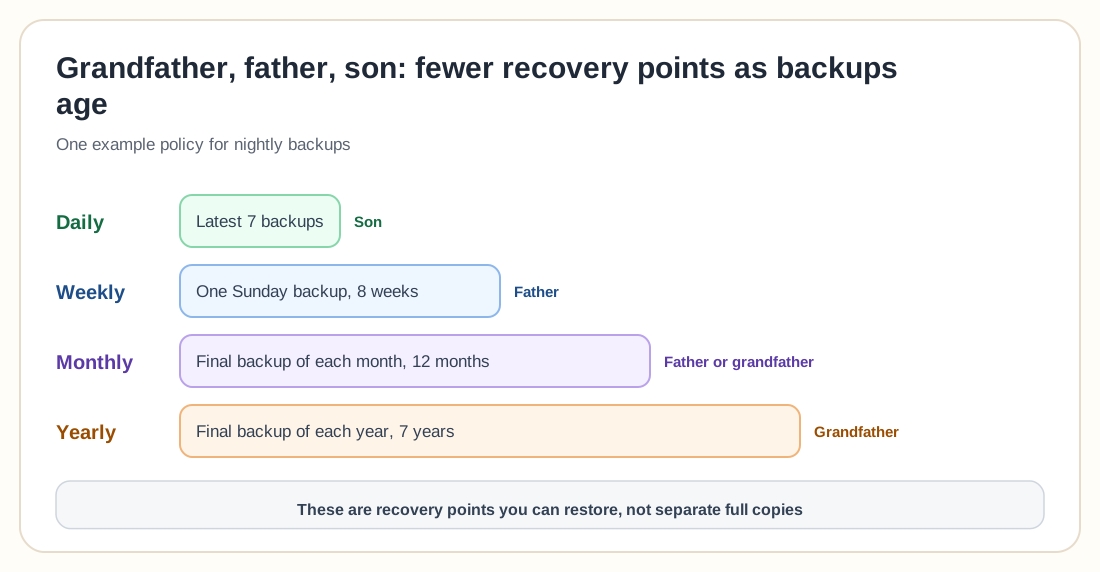
The grandfather, father, son model, commonly shortened to GFS, groups recovery points into different generations.
Microsoft describes GFS retention as a policy structure that supports daily, weekly, monthly and yearly recovery points with different retention periods.
Imagine backups run every night. A policy could retain the latest seven daily backups, one Sunday backup for eight weeks, the final backup of each month for twelve months, and the final backup of each year for seven years. This does not necessarily mean 111 fully independent copies. Modern backup systems may use incremental data, deduplication or synthetic full backups, and the policy only describes which recovery points remain addressable, which says little about raw storage use.
Retention by workload
One policy rarely fits every system.
Virtual machines
A starting policy might keep 7 to 14 daily copies, 8 weekly copies and 6 to 12 monthly copies. Critical VMs may need more frequent recovery points and longer retention, while temporary test machines need much less.
Databases
Databases often require a combination of full, incremental or differential backups plus transaction logs. The retention policy must preserve every component required to restore to the selected point. Keeping one full backup without the required incremental chain or logs may make some recovery points unusable.
File servers
File servers commonly benefit from longer version history because deletion and corruption may not be reported immediately. A practical starting point: 30 daily versions, 12 monthly versions, selected yearly archives.
Identity systems
Retention must be long enough to recover from configuration errors or compromise that remained undetected for an extended period. The backup should also include the configuration and credentials required to perform recovery.
Kubernetes workloads
A Kubernetes retention policy needs to cover persistent volume data, cluster resource definitions, manifests, Secrets, custom resources and any external databases or object storage. Keeping only persistent volume snapshots may not provide a complete application recovery path.
Personal and homelab data
A simple policy could keep seven daily backups, four weekly, twelve monthly, one annual archive and one offline copy of critical data.
Proxmox Backup Server retention
Proxmox Backup Server supports retention rules based on the number of recent, hourly, daily, weekly, monthly and yearly backup snapshots to keep. Pruning removes backup snapshot references that no longer match the selected retention rules; garbage collection later reclaims unreferenced data from the datastore.
A backup can satisfy more than one retention category. The latest backup may also qualify as the daily backup, and the final backup of the week may qualify as both a daily and weekly recovery point. Check retention against the platform's actual selection logic instead of adding up every configured number.
Proxmox recommends limiting delete permissions and performing pruning directly on the Proxmox Backup Server through controlled prune jobs, which reduces the destructive access available to production systems or backup clients.
Retention, immutability and legal retention
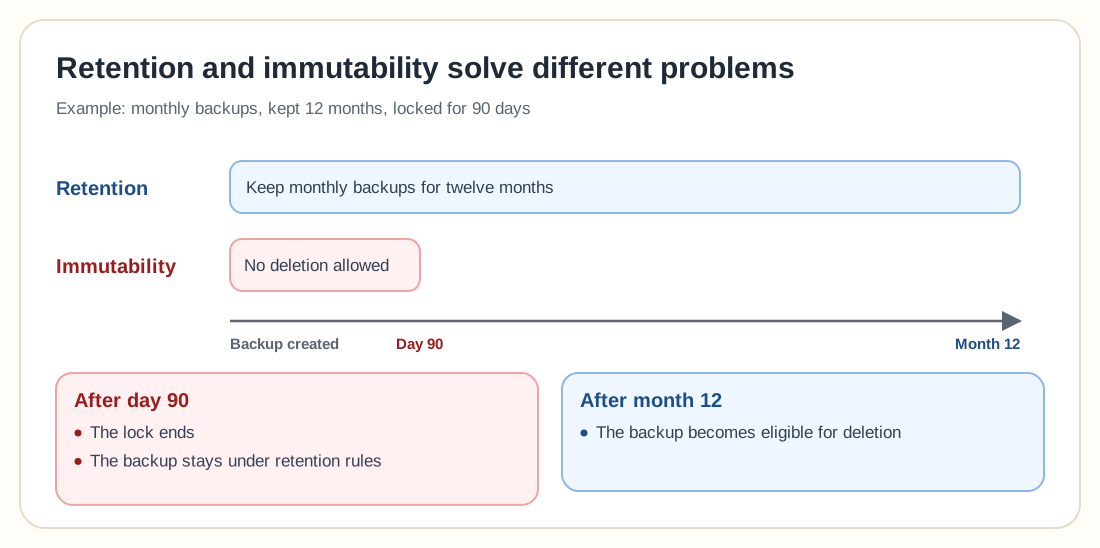
Retention and immutability solve different problems. Retention determines how long a recovery point should be kept; immutability prevents the recovery point from being changed or deleted during a protected period.
For example: a retention policy says keep monthly backups for twelve months, while an immutability policy prevents deletion for the first 90 days. After 90 days the backup remains per retention rules but may no longer be technically locked; after twelve months it becomes eligible for deletion.
CISA recommends maintaining offline or immutable backups and regularly testing their integrity and availability.
Retention is not legal retention
A backup retention policy supports recovery. A records retention policy supports legal, regulatory, contractual and business recordkeeping requirements. These policies may overlap, but one cannot stand in for the other. A seven-year legal requirement does not automatically mean every server backup must be retained for seven years. A better architecture exports required records to a controlled archive while applying a shorter operational retention period to ordinary system backups. Consult qualified legal or compliance professionals before setting retention periods for regulated data.
Design your policy: eight steps
Inventory workloads and data
List every system requiring protection: owner, data type, business importance, size, daily change rate, RPO, RTO, required history, legal requirements, backup destination. Do not apply a retention policy to systems nobody understands.
Classify workloads
Create a small number of practical protection classes (critical, important, standard, temporary, archive), and avoid creating so many classes that nobody can manage them.
Define recovery windows
Consider immediate operational errors, user deletion discovered after several days, corruption discovered after weeks, security incidents discovered after months, and annual or contractual reporting requirements.
Select retention tiers
Define detailed short-term recovery and increasingly sparse long-term recovery, for example hourly for two days, daily for thirty days, weekly for twelve weeks, monthly for twelve months, yearly for seven years.
Estimate storage requirements
Consider initial protected data, daily change, compression, deduplication, database churn, deleted data, immutable period, growth rate and safety capacity. A 10 TB system with a high daily change rate can consume more backup storage than a much larger but mostly static dataset.
10 TB of protected data with a 3% daily change rate, daily backups and 30-day daily retention gives a rough uncompressed estimate of 10 TB × 3% × 30 days = 9 TB for changed data alone. That excludes the initial full backup, monthly recovery points, metadata and safety capacity. Measure real backup jobs whenever possible rather than relying on the estimate alone.
Set deletion authority
Document who can change retention, delete individual recovery points, disable backup jobs, shorten immutable retention, remove a datastore, or access encryption keys. Use separate backup credentials and multifactor authentication where supported.
Test recovery across the retention window
Test more than the newest copy. Restore from yesterday, last week, last month, an older protected recovery point, the offsite repository and archive or tape media. This confirms that older backup chains, media and encryption keys remain usable.
Review the policy regularly
Review when data growth changes, new systems are introduced, cloud or tape costs change, recovery objectives change, regulations change, an incident occurs, or restore testing reveals gaps.
Common retention mistakes
The newest backup may already contain corruption, encryption or unwanted deletion. Preserve historical versions.
Unlimited retention increases cost and makes sensitive data harder to govern. Create approved expiration rules.
Critical databases and temporary test machines do not need identical protection. Classify workloads.
Running backups every hour does not guarantee that hourly recovery points remain available. Configure both settings.
Do not remove the previous monthly or yearly recovery point until the new protected copy has completed and been verified.
Protected backups cannot be pruned until the lock expires. Plan storage before enabling long retention.
Recent restores may work while older backup chains, tapes or keys have problems. Test across the retention window.
Operational backups are a poor substitute for a governed archive. Separate recovery retention from records retention.
A compromised production account should not be able to remove every recovery point. Restrict deletion and policy changes.
A small configuration mistake can remove more recovery points than expected. Use preview, simulation or dry-run functions first.
Backup retention policy checklist
0 / 20Frequently asked questions
A backup retention policy defines how long backup recovery points are kept, which versions survive, where they are stored and when they may be deleted.
The correct period depends on recovery needs, incident discovery time, business requirements, storage cost and legal obligations. A common starting model keeps daily, weekly, monthly and yearly recovery points for progressively longer periods.
GFS means grandfather, father, son. It keeps frequent recent backups and progressively fewer weekly, monthly or yearly recovery points as backups age.
Thirty days may be enough for ordinary file recovery, but it may not cover corruption or security incidents discovered after several months. Important systems often need additional weekly, monthly or yearly versions.
Seven to thirty daily backups is a common starting range. The appropriate number depends on how quickly problems are detected and how much storage is available.
Snapshots can be governed by retention rules, but snapshots stored only on the production system should not be treated as independent backups.
No. Retention determines how long a backup should remain. Immutability prevents deletion or modification for a protected period.
They can normally become eligible for deletion after the immutable protection period expires, subject to the backup retention and storage platform rules.
Only when there is an approved business, legal or archival reason. Unlimited retention creates cost, privacy and governance risks.
Proxmox Backup Server can retain snapshots according to latest, hourly, daily, weekly, monthly and yearly rules. Prune jobs remove expired snapshot references, while garbage collection later reclaims unreferenced datastore data.
Not automatically. Backup retention supports recovery. Legal records retention supports approved preservation requirements. The two policies should be coordinated but may use different systems and periods.
Review it at least annually and whenever recovery requirements, storage growth, infrastructure, security risks or legal obligations change.
Keep enough history to recover with confidence
A backup retention policy should preserve useful recovery options without letting data and costs grow indefinitely. Detailed recent backups help with everyday mistakes, and weekly and monthly recovery points help when damage is discovered later. Yearly copies support approved long-term requirements, and offline or immutable retention gives you another recovery path when ordinary backup systems are attacked.
Start with the systems that matter most. Define their recovery requirements, create daily, weekly and monthly retention tiers, protect selected recovery points, and test older backups before trusting the policy.