

The rule at a glance
The goal is to prevent one hardware failure, configuration error, ransomware incident, theft or physical disaster from destroying every copy at the same time.
The rule is simple enough for a homelab and flexible enough for a business environment. The difficult part is deciding what counts as an independent copy and making sure those copies can actually be restored.
CISA describes the rule as three copies of important files, two different storage types and one copy stored away from the main location.
The rule reduces dependency. When one system fails, another copy remains available. When the entire location is affected, the offsite copy provides another recovery path.
What the number 3 means
You should have three total copies: your working production data, plus a first and second backup copy. The production copy is the data your applications, virtual machines, computers or file servers currently use, so you do not duplicate it manually. For example:
Three copies provide room for overlapping failures. A failed production disk may be recoverable from the local backup. If the local backup is also damaged, corrupted or unavailable, the third copy remains.
More copies do not automatically provide more protection. Three backups stored on the same NAS can still disappear together.
What the number 2 means
The traditional interpretation recommends two different media types, such as disk and tape. Modern environments should also consider separate storage systems and separate failure domains. Two USB drives connected to the same computer may technically be separate devices, but they remain exposed to the same malware, power event, theft and user account.
A stronger design pairs a local disk backup for fast recovery with object storage, tape or a remote backup server for independent recovery. The second storage system should not depend on the same controller, administrator account, power source or physical server as the first.
Using different media helps, but independence matters more than collecting different device types.
What the number 1 means
At least one backup copy should be stored offsite. An offsite backup protects against incidents that affect the entire primary location:
An offsite copy could be:
Offsite does not automatically mean protected. A cloud repository controlled through the same compromised administrator account may still be deleted, and a remote NAS permanently mounted to the production network may still be encrypted by ransomware. Location separation should therefore be combined with access separation.
What doesn't count as a backup
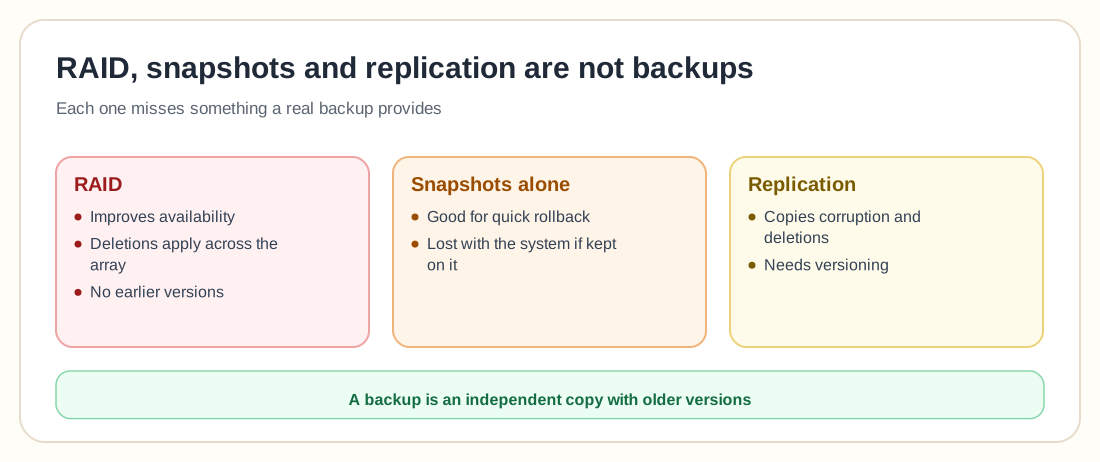
Why RAID is not a backup
RAID improves storage availability when a drive fails. It does not create an independent historical copy of your data. RAID normally cannot protect you from:
When a file is deleted from a RAID array, the deletion is applied across the array. RAID faithfully preserves the current state, including unwanted changes. Use RAID to improve availability; use backups to recover earlier or independent versions of the data.
Why snapshots alone are not enough
Snapshots are useful for quick rollback, testing and recovering recently changed files. A snapshot stored on the same production system is not an independent backup. If the pool, array, server or administrative account is compromised, the snapshots may disappear with the original data.
Snapshots can be one layer of a backup strategy when they are replicated or copied to another protected system. They should not be the only recovery method.
Why replication is not the same as backup
Replication copies data from one system to another. That helps with availability, but it may also copy:
Versioning and retention determine whether the destination can recover an earlier state. A replicated copy with no historical versions may provide redundancy without providing useful recovery.
Beyond the basics: the 3-2-1-1-0 rule
The basic 3-2-1 rule is still a sound foundation, but modern attacks often target backup systems directly. Ransomware operators may try to delete backup jobs, remove snapshots, erase repositories, compromise cloud accounts and disable recovery administrators.
The NCSC notes that data stored on premises or in the cloud is not ransomware resistant by default. Its guidance recommends protection against destructive actions, access loss and corruption of later backup versions.
This has led many organizations to extend the rule to 3-2-1-1-0:
The extra copy should resist modification or deletion. Possible options include:
The zero means that backups are checked and restores are tested. A backup job marked successful does not prove that the application, database or virtual machine can be recovered.
CISA recommends maintaining offline encrypted backups and regularly testing their availability and integrity in a disaster recovery scenario.
Reference architectures
A practical 3-2-1 architecture for Proxmox
A small Proxmox environment could use the following design:
The local PBS copy provides fast restores. The remote or cloud copy protects against loss of the primary site. The protected copy provides another recovery path when online backup credentials or repositories are compromised. Read the Proxmox Backup Server guide for deduplication, remote sync and offline backup considerations.
A practical strategy for a homelab
A homelab does not need enterprise software to follow the rule. One possible setup:
The goal is copies that are independent of each other, and a simple setup can achieve that.
A practical strategy for a small business
Critical systems should be prioritized according to how much data the business can afford to lose and how quickly the systems must return. These requirements are commonly expressed through:
The maximum acceptable amount of data loss, measured in time.
The maximum acceptable period before the system must be operational again.
A system with an eight hour backup schedule cannot reliably meet a one hour recovery point objective.
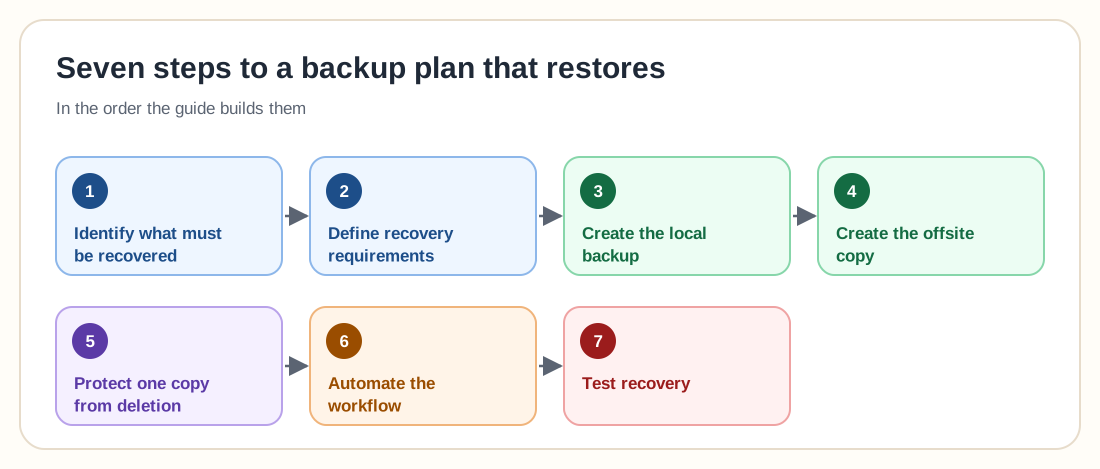
Build your strategy: seven steps
Identify what must be recovered
Start with the data and systems that would cause real damage if lost. Not every temporary file needs the same protection.
Define recovery requirements
For each system, record the following. This prevents a backup schedule from being selected without understanding the actual business requirement.
Create the local backup
The first backup should normally support quick recovery. Place it on a separate storage system where possible, so the backup system does not share every failure point with production.
Create the offsite copy
Copy the backups to another physical location or independent cloud platform. Consider:
Read the cloud backup options guide when comparing online destinations.
Protect one copy from deletion
Use an offline or immutable copy for important systems. Limit who can change retention policies or delete backups. Where possible, production administrators should not have unrestricted control over every backup layer.
NIST guidance published in June 2026 recommends keeping a backup copy offline or otherwise protected so an attacker cannot reach or compromise it.
Automate the workflow
Manual backups are easily forgotten. Automation should reduce repetitive work without hiding failures. Automate:
Test recovery
Test different recovery levels. Record how long the restore takes and what prevents it from completing.
NIST warns that organizations may have backups without regularly confirming whether those backups can restore their systems.
Common 3-2-1 backup mistakes
Separate folders and datasets do not protect against the loss of the physical system.
A permanently accessible backup share may be reachable by malware or compromised administrator accounts.
One stolen account should not be able to delete production data, local backups and offsite backups.
A synchronization service may immediately copy a deletion or corrupted file to every connected device. Look for version history, retention and independent recovery.
A backup can be complete while the recovery process still fails because of missing credentials, configuration, encryption keys or application dependencies.
Some platforms require catalogs, indexes or configuration databases to perform an efficient recovery. Protect the backup system configuration as well as the backup data.
Corruption or compromise may remain undiscovered for weeks. Retention should include enough historical versions to return to a known good point.
Encryption keys, cloud recovery codes and administrative credentials must be available during a disaster without being exposed to normal production access.
Backup frequency and retention
There is no universal schedule, but a simple starting point could be:
Base the schedule on your own recovery objectives instead of a generic template. Databases with a high change rate may need continuous or hourly protection, while an archive of completed projects may only need periodic copies.
The 3-2-1 backup checklist
0 / 14Use this checklist to review your environment, and click each item you already have:
A large number of successful backup jobs cannot replace a tested restore.
Frequently asked questions
The 3-2-1 backup rule recommends keeping three total copies of your data, using two separate storage systems or media and storing at least one copy offsite.
No. RAID protects against certain disk failures but normally does not protect against deletion, ransomware, corruption, theft or loss of the whole server.
Snapshots can support recovery, but snapshots stored only on the production system are not independent backups. Copy or replicate them to another protected system.
It can. The cloud repository should use versioning, encryption, strong authentication and protection against unauthorized deletion.
They can contribute to the strategy when they are independent, properly rotated and not permanently connected. Keeping both drives beside the same computer provides limited protection from theft or physical damage.
Backup frequency should be based on how much data you can afford to lose. A four hour recovery point objective generally requires backups or replication points at least every four hours.
It is a strong foundation, but an offline or immutable copy and tested recovery provide stronger protection. This expanded model is often called the 3-2-1-1-0 rule.
Recoverability. A backup has limited value until you know the data, applications and systems can be restored within the required time.
Build independent recovery paths
The strength of the 3-2-1 rule comes from separation. Your production system, local backup and offsite copy should not all depend on the same hardware, administrator account, storage platform or physical location.
Start with three recoverable copies. Add access separation, immutability and restore testing as the environment becomes more important. A simple strategy that is regularly tested is safer than an elaborate backup design that nobody knows how to restore.