

RPO and RTO at a glance
Recovery Point Objective and Recovery Time Objective turn "how much can we lose" into measurable targets. RPO measures acceptable data loss in time. RTO measures acceptable downtime in time.
AWS defines RPO as the maximum acceptable time since the last recoverable data point, and RTO as the maximum acceptable delay between service interruption and restoration.
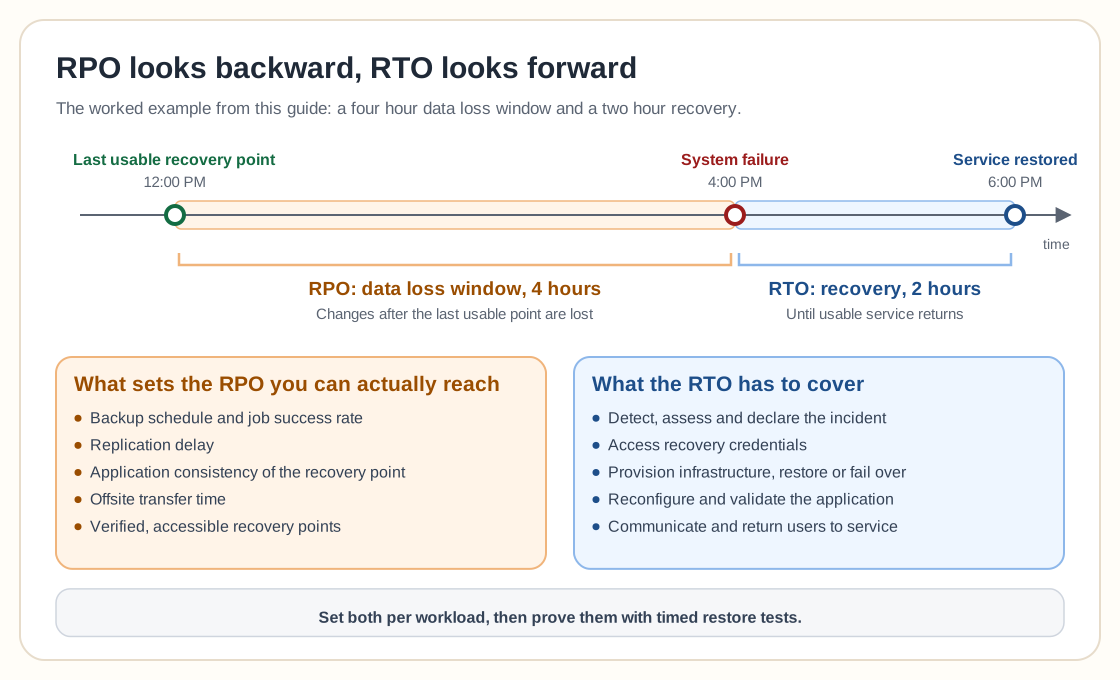
Looks backward from the disruption. The maximum acceptable gap between the latest usable recovery point and the incident.
Looks forward from the disruption. The maximum acceptable delay before usable service must return.
A worked example
The actual data-loss window is four hours; the actual recovery duration is two hours. If the target RPO was four hours and target RTO was two hours, both targets were met. If service had returned at 8:00 PM, the RTO would have been missed even though the RPO was still met.
These objectives should be defined per workload. A public website, accounting database, identity service and development server rarely deserve the same recovery target.
What RPO and RTO are not
RPO is not simply backup frequency
Backup frequency strongly influences RPO, but the two are not identical. An hourly backup does not guarantee a one-hour RPO if the job fails, the recovery point is corrupted, replication is delayed, the application was captured inconsistently, or the repository is unavailable. A one-hour schedule makes a one-hour RPO possible, and verified, accessible recovery points make the objective credible.
RTO is not simply restore speed
Restore speed is one part of RTO. The complete recovery time may include detecting the incident, escalating, deciding to recover, accessing backup systems, provisioning replacement infrastructure, restoring data, starting services, reconfiguring networks and DNS, validating applications, reconnecting users and communicating status. A VM may restore in 30 minutes while the full application takes six hours to become usable, so RTO should cover the complete process and the data copy is only one part of it.
RPO and RTO examples
A daily backup may be sufficient for personal files where losing one day of changes is tolerable. Meeting a 15-minute RPO for an online store, by contrast, may require database log protection, replication, automation, standby infrastructure and tested failover. Nightly backups alone would not meet that target.
RPO/RTO by workload tier
A simple classification model avoids designing every workload independently. These are planning examples, not universal standards.
NIST contingency planning guidance recommends evaluating systems and operations to determine recovery requirements and priorities rather than treating every system identically.
How to define an RPO
Measure the rate of change
Determine how much data the workload creates or changes during 15 minutes, one hour, four hours, one business day and one week. A four-hour RPO means very different things for a static file server and a transaction database.
Calculate the cost of reconstruction
Ask whether missing data can be recreated by reentering invoices, reprocessing transactions or resynchronizing source systems. If reconstruction is slow, expensive or impossible, the RPO should be shorter.
Consider consistency
The newest backup is not always the best recovery point. A database or multi-service application may require a coordinated, application-consistent recovery point that is older than the newest individual file or volume snapshot.
Account for detection delay
Corruption and ransomware may remain undiscovered for days or weeks. RPO describes acceptable recent data loss, while retention determines how far back recovery points remain available. You need both.
Validate the target
Compare the selected RPO with the actual backup schedule, job success rate, replication delay, verification delay, application consistency and offsite transfer time. Do not publish an RPO the current system has never demonstrated.
How to define an RTO
Identify the usable recovery state
Define what "restored" means: files accessible, VM booted, database accepting connections, application passing health checks, users able to sign in. Without an agreed recovery state, nobody can tell whether an RTO was met.
Map every recovery step
Document the complete sequence: detect, assess, declare, access recovery credentials, provision infrastructure, restore or fail over, reconfigure, validate, communicate, return to service.
Assign ownership
Record who performs each task and who can approve recovery. A technically fast process can miss its RTO because nobody has authority to begin.
Measure dependencies
The application may depend on DNS, identity, networking, certificates, databases, storage, secrets, external APIs and licensing. The effective application RTO cannot be shorter than the slowest required dependency.
Test the complete recovery
Run a timed recovery exercise and record time to detect, decide, access backups, restore data, configure infrastructure, start the application, validate and communicate. The measured result is more useful than the expected one.
Reference architectures
A practical Proxmox example
A nightly VM backup cannot meet a 15-minute database RPO on its own. Different protection methods may be required within the same virtual environment, such as application-aware database backup or transaction log protection layered on top of Proxmox Backup Server's frequent incremental VM backups.
A practical homelab and small business example
A homelab might define a one-hour RPO/four-hour RTO for a password manager service but no formal RPO for disposable test VMs. A small business might define a four-hour RPO/eight-hour RTO for its accounting database and a one-hour RPO/four-hour RTO for its customer portal. The targets should be reviewed with the people who understand the operational impact, because IT should not select every recovery objective alone.
Technology, retention and availability
No single technology automatically meets both objectives.
AWS groups disaster recovery approaches into strategies with increasing readiness and decreasing recovery time (backup and restore, pilot light, warm standby and multi-site) and recommends regular testing to determine whether the architecture can actually meet its targets.
RPO does not replace retention or availability
An RPO of one hour with 30 days of retention means the system aims for recoverable points no more than one hour apart, while keeping selected history for late-discovered problems. You need both; see the backup retention policy guide for the retention side.
High availability and disaster recovery are related but different: a highly available cluster can still suffer corruption, ransomware or administrator error, and a strong backup system can restore an application without providing continuous availability.
Common RPO and RTO mistakes
Systems have different business value and dependencies. Create workload tiers.
Technical teams may underestimate the cost of data loss or overestimate the need for immediate recovery. Include system owners.
Zero data loss may require synchronous replication and carefully designed failure handling. It is expensive and difficult.
A completed job does not prove the recovery point is usable. Test restoration.
RTO normally includes the broader disruption and recovery process. Include detection, decision and validation time.
An application cannot return before identity, networking, storage and databases are ready. Map the complete service.
Replication may copy corruption, ransomware and deletion. Keep independent historical recovery points.
A local backup may meet the target while the offsite copy falls many hours behind. Measure both.
A four-hour backup schedule cannot reliably support a 15-minute RPO. Change the architecture or the target.
Estimated recovery times are often optimistic. Run timed exercises.
RPO and RTO checklist
0 / 20Frequently asked questions
RPO measures how much recent data loss is acceptable. RTO measures how long the service can remain unavailable before it must be restored.
It means recovery may use a point up to four hours before the disruption. The organization accepts the possibility of losing up to four hours of recent changes.
It means the service should be returned to its agreed usable state within four hours of the disruption.
No. Backup frequency helps determine achievable RPO, but failed, corrupted, delayed or inaccessible recovery points can cause the actual RPO to be longer.
Not always. RTO may include detection, decision making, infrastructure provisioning, restoration, configuration, validation and returning users to service.
A zero RPO aims for no data loss. Achieving it may require synchronous replication, application-level transaction protection and carefully designed failover. Backups alone rarely guarantee zero data loss.
A true zero RTO would mean no interruption. High availability and active-active architectures may approach continuous service, but complex failures can still create disruption.
Both matter. A fast recovery using old data may be unacceptable, while a recent recovery point that takes days to restore may also fail the business requirement.
Replication can reduce RPO by copying changes frequently or continuously. It should be combined with retained recovery points because replication may copy corruption or deletion.
Backups provide recovery data, but RTO also depends on restore speed, infrastructure readiness, staffing, dependencies and testing.
Critical workloads should be tested regularly and after major infrastructure or application changes. The schedule should reflect business impact and the complexity of recovery.
No. Recovery targets should reflect workload importance, data change, dependencies, recovery cost and operational impact.
Set targets you can prove
RPO and RTO turn backup and disaster recovery from vague intentions into measurable expectations. RPO defines how much recent work may be lost; RTO defines how long the organization may wait for service to return.
A good recovery plan picks targets that reflect real business impact instead of the smallest possible numbers, builds an architecture capable of meeting them, and proves the result through testing. Start with the most important workload, define what usable recovery means, measure the complete recovery process, and fix the gap before writing a more ambitious number into the plan.