

Verification versus restore testing
Backup testing is the process of confirming that protected data can be retrieved, restored, validated and returned to a usable state. Testing ranges from a checksum verification to a complete disaster recovery exercise, and each level answers a different question.
CISA recommends maintaining offline, encrypted backups and regularly testing their availability and integrity in a disaster recovery scenario.
A checksum test cannot prove an application will start, and a successful file restore cannot prove a database is consistent. Even a booted virtual machine does not show that users can access the service. Each level provides stronger evidence than the one before it, so you need both automated verification and real restore testing.
Why successful backup jobs still fail during recovery
A backup can show a green status while recovery remains impossible or incomplete. Common causes include:
Testing finds these gaps before an incident exposes them under pressure.
The backup testing ladder
A useful program progresses from simple automated checks to complete recovery exercises.
Monitor backup jobs
Review whether jobs completed and what warnings they produced: status, timing, size changes, missed schedules, capacity and verification status. A clean job log shows the platform attempted the task without a known fatal error. It does not show that the data is complete, clean or restorable.
Verify backup integrity
Run automated integrity checks against stored recovery points. Proxmox Backup Server supports scheduled verification jobs and recommends reverifying all backups at least monthly, because data that was previously valid can degrade over time. Failed checksum verification may help reveal unexpected modification such as ransomware encryption. Verification is an additional control and is not sufficient ransomware protection by itself.
Restore sample files
Restore a representative selection of files (small and large, recently changed and older, encrypted and permission-sensitive) to a separate location. Confirm that each file opens, that content and version are correct, and that permissions and timestamps are reasonable.
Restore a complete system
Restore a complete VM, container, server or workstation into an isolated environment. Check that the OS boots, disks attach, network interfaces are detected, services start, and required accounts are present.
Validate the application
Test from a user and dependency perspective: start the database, run consistency checks, connect the application, authenticate a test user, and read and write test data. "Server booted successfully" is not a complete application validation result.
Test recovery from the offsite copy
Run a recovery without the primary backup repository. Confirm you can obtain credentials, encryption keys, media, backup software, network access and approval to begin recovery. An offsite backup nobody can access during an incident is not an effective recovery path.
Run a disaster recovery exercise
Assume a meaningful part of normal infrastructure is unavailable, such as loss of the cluster or the backup server, ransomware affecting production and local backups, or loss of the primary office. This tests technology, people, process, authority, communication and timing together.
AWS guidance recommends defining clear RPO and RTO targets, documenting issues and lessons, and updating the recovery strategy based on test results.
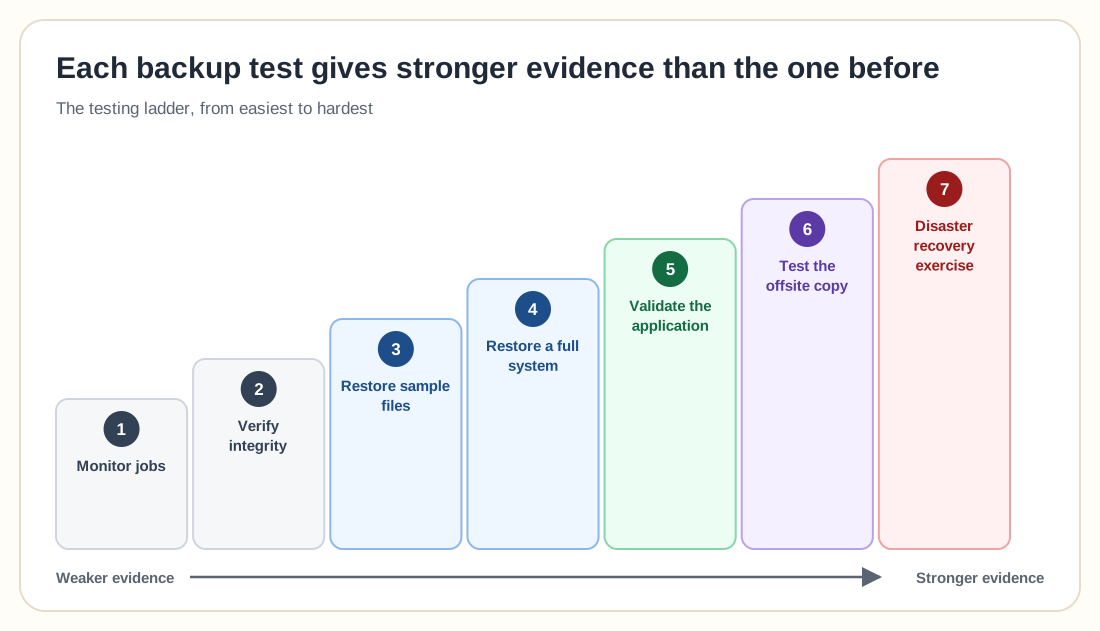
Types of backup and disaster recovery tests
Testing frequency
A practical starting schedule. Critical workloads may need more frequent testing.
Backup testing for Proxmox
A practical Proxmox program layers daily job review, weekly file restores and verification, monthly full VM restores with boot confirmation, quarterly multi-VM application tests, and an annual scenario covering loss of a node, the cluster, or the primary PBS server. Verification protects against some forms of stored data corruption, but only a real restore confirms that the VM, application, credentials and dependencies work together.
Testing by workload
Databases
Test full backup restoration, incremental or differential chains, transaction log restoration, point-in-time recovery, database consistency and application connectivity. Record the exact point in time recovered. A database test should prove both recoverability and data consistency.
File servers
Test more than a recent document. Include deep directory structures, permissions and ACLs, previous versions, deleted folders, and files from older retention periods. Ask a user or data owner to validate representative recovered content where practical.
Kubernetes
Test recovery of persistent volumes, cluster resource definitions, CRDs, Secrets, ConfigMaps, operators, ingress configuration and external dependencies. Confirm that the recovered application works in the target cluster; a volume snapshot that exists is not enough.
SaaS data
Confirm item-level restore, folder or mailbox restore, permissions, version history and metadata, and whether the platform restores in place, to an alternate location, or through export and reimport.
Ransomware recovery
Assume the newest recovery point may be unsafe. Test your ability to identify a likely clean point, access an offline or immutable copy, build a clean recovery environment, reset privileged credentials, and reconnect services gradually.
Measuring RPO and RTO, and defining pass criteria
To test RPO, record the incident simulation time, the time of the latest usable recovery point, and compare the actual recovery point gap with the target.
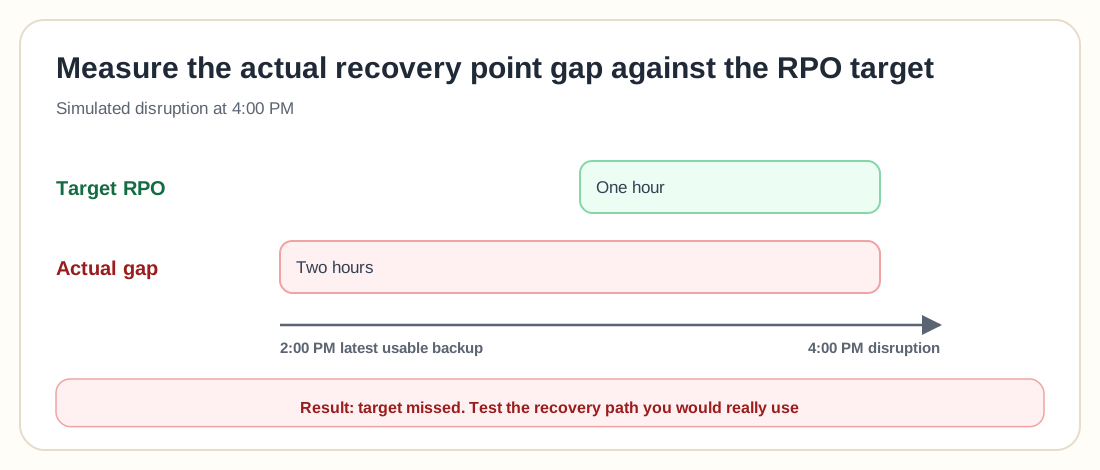
A backup may run hourly while the latest verified offsite recovery point is two hours old, so test the recovery path that would actually be used in the incident. For RTO, start the clock at one consistently used point (disruption, declaration or authorization) and record time spent on detection, escalation, decision, credential access, infrastructure preparation, restoration, validation and communication.
Define pass and fail criteria in advance
Do not decide whether a test succeeded after seeing the result. A VM restore test might pass only when the recovery point restores, the VM boots, required services start, network isolation is maintained, a test user can sign in, and recovery completes within the target RTO. Report a partial recovery as partial instead of rounding it up to success.
What evidence should be recorded
Evidence should be stored somewhere available during a real incident.
Common backup testing mistakes
A green dashboard does not prove recoverability. Add file, system and application restores.
The newest recovery point may contain corruption or ransomware. Test older retention points.
An unplanned test restore may overwrite current data or create identity and networking conflicts. Use an isolated destination.
Recovered content may be unusable when ownership and access controls are wrong. Validate metadata and permissions.
A booted operating system is not the same as a recovered business service. Test application functions.
Local testing does not prove recovery will work after site loss. Test the remote or protected copy.
A real attack may compromise ordinary production credentials. Test access using protected recovery credentials.
Without measurement, you cannot prove RTO. Record every recovery stage.
A failed test is useful when it leads to corrective action. Track the issue and retest it.
Do not leave every production system, password, expert and repository available when the scenario assumes they are lost.
Backup testing checklist
0 / 24Frequently asked questions
Backup testing confirms that protected data can be accessed, restored, validated and returned to a usable state.
No. Verification checks the integrity of stored backup data. Restore testing retrieves the data and proves that the recovery process works.
Review job failures continuously or daily, verify backups regularly, restore sample files monthly, test complete systems periodically, and run broader disaster recovery exercises according to workload importance.
No. A successful job does not prove that all required data was included, that the application is consistent, or that recovery can meet RPO and RTO.
It should identify the recovery point, restore destination, validation criteria, target RPO, target RTO, dependencies, responsible people, and pass or fail result.
Not every recovery point needs a complete system restore. Use automated verification broadly and select representative recovery points for file, system, application and offsite restore tests.
Restore it into an isolated network or alternate location. Change conflicting network identities and prevent recovered services from contacting production unexpectedly.
It is a scheduled process that restores or starts a protected workload in an isolated environment and checks predefined conditions such as boot status, service availability or application health.
No. It confirms that stored backup data matches recorded integrity information. A real VM restore and boot test is still required.
Use PBS verification jobs, restore files, restore complete VMs or containers into an isolated environment, validate guest applications, test remote copies, and compare measured recovery with RPO and RTO.
Use a controlled scenario in which production systems, ordinary credentials, or local backups are considered unavailable. Recover a clean point from protected storage without using real ransomware.
Document the cause, assign a corrective action, update the recovery process, and schedule a retest. A failure should remain open until the recovery path is demonstrated successfully.
A backup earns trust when it restores
Backups matter because they give you a way back to a usable system. Testing proves whether that path is complete. Start with automated integrity checks and simple file restores, then restore complete systems, validate applications, recover from the offsite copy, and run realistic disaster recovery exercises. Measure actual RPO and RTO, record failures without hiding them, fix the process and test again.
The strongest backup strategy is the one that has repeatedly restored the right data into a usable service within the required time, whatever its job reports say.