

How db-branch Uses ZFS Clones for Instant Database Branches
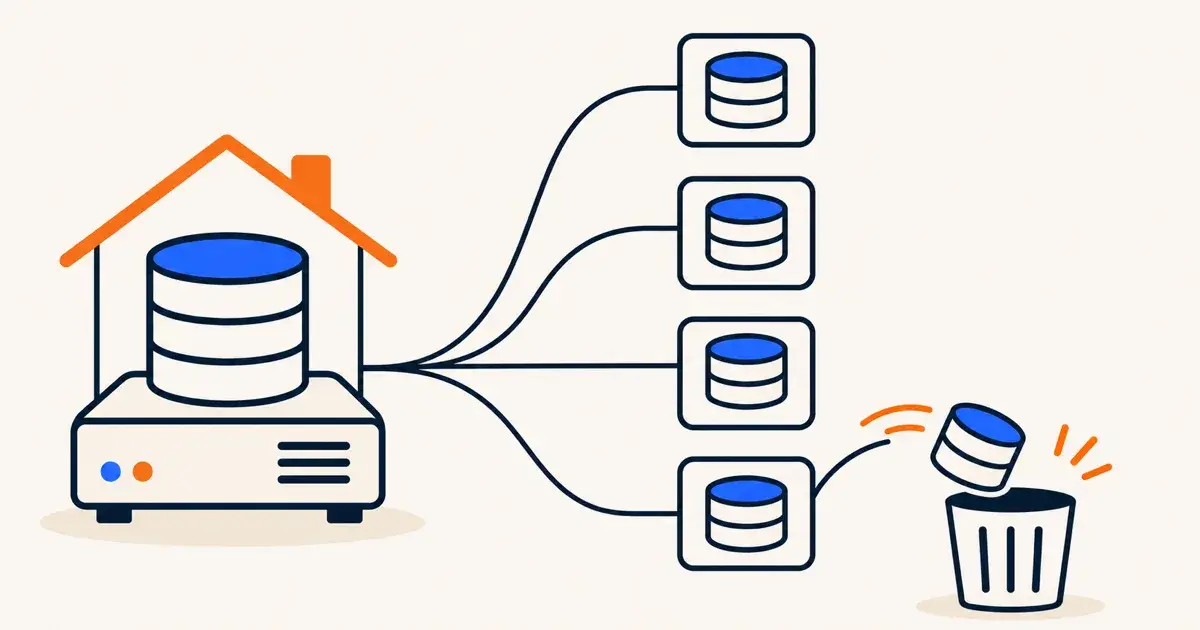
db-branch is an open-source tool written in Go that creates copy-on-write branches of MySQL and PostgreSQL databases using ZFS clones. Each base database lives on a ZFS dataset, and each branch is a ZFS clone of a base snapshot running its own database server on its own port. For a Proxmox homelab, it gives migrations, tests, and pull requests throwaway database copies in seconds.
The db-branch repository on GitHub was created on 13 November 2026 under the Apache-2.0 license, and the GitHub API showed 29 stars on 16 November 2026. A Show HN post on 15 November 2026 drew 41 points and practical questions from developers about how it compares to built-in database cloning.
According to the GitHub README, db-branch is currently in Beta, which means APIs and command-line details may still change before version 1.0. For homelabbers who run self-hosted apps, development stacks, or a CI pipeline on local hardware, it offers a self-hosted way to test risky database changes on a copy instead of the real thing.
How db-branch uses ZFS clones
The db-branch README describes a straightforward design built on ZFS snapshots and clones. You load your data once into a base, which is a ZFS dataset holding a loaded database. When you create a branch, db-branch creates a ZFS clone of a base snapshot. Because ZFS clones are copy-on-write, creating a branch copies nothing, and each branch runs its own database server on its own port.
On its own 3-node test cluster, the db-branch README reports that a PostgreSQL branch is ready in about 0.5 seconds and a MySQL branch is ready in about 3 seconds, with 0 bytes copied at creation. Those timings come from the project's own test cluster, so local homelab hardware will vary.
You can control db-branch through a CLI, a REST API, a web console, or an MCP server that lets LLM agents create and query their own branches. Branches support automatic expiry with --ttl, instant reset back to their creation state with branch reset, and point-in-time saves via branch checkpoint and branch restore. Existing checkpoints stay restorable even after you restore an earlier state.
The README also documents per-branch version upgrades with branch upgrade, which moves a single branch to a newer MySQL or PostgreSQL version while leaving the base and other branches untouched. A checkpoint is saved first so a failed upgrade rolls back automatically, and branch upgrade --check-only previews upgrade issues beforehand.
Here is the "First branch" workflow from the README (the project website has more), showing how runtimes, bases, branches, and checkpoints fit together:
db-branch runtime install postgres@18.6                                     # a database engine version
db-branch base create prod --runtime postgres@18.6 --dump prod.sql.gz       # a base: your data, loaded once
db-branch branch create feature-x --base prod --ttl 72h                     # a branch: instant, copy-on-write
db-branch branch dsn feature-x                                              # connection URL (includes the password)
db-branch branch checkpoint feature-x --name before-migration               # save the state (instant)
db-branch branch restore feature-x before-migration                         # go back to the saved state
db-branch branch reset feature-x                                            # discard every change
db-branch branch delete feature-x                                           # remove it
For larger setups, the README notes that multiple nodes can form a Raft cluster that shares bases, branches, settings, and users. An optional ProxySQL integration can route client connections to the right branch by user name or by a /*db_branch='name'*/ query comment so applications keep a single database address.
Running db-branch in a Proxmox homelab
The db-branch README lists Ubuntu 24.04 LTS or 26.04 LTS and a ZFS pool as its installation requirements, with zfsutils-linux installed as a package dependency. The README does not mention Proxmox anywhere. For quick testing on a Mac or Windows machine, the README suggests launching an Ubuntu 24.04 VM in Multipass with a file-backed ZFS pool, noting that a file-backed pool is slower and not meant for real data.
If you run Proxmox at home, the natural place to test or run db-branch is inside an Ubuntu 24.04 LTS virtual machine rather than directly on the Proxmox host. This is our suggestion rather than a documented setup from the project. Inside that Ubuntu VM, you can attach a dedicated virtual disk and create a ZFS pool inside the guest for db-branch to manage.
There is one storage detail to keep in mind before building this on a typical lab server. Many Proxmox hosts already run ZFS storage underneath their VM disks. Putting a ZFS pool inside an Ubuntu guest on top of a ZFS-backed Proxmox host creates two layers of copy-on-write, which is worth considering when you plan disk space, snapshots, and write performance for your lab.
Open-source core, paid modules, and limits
The core db-branch repository is licensed under Apache-2.0 and covers bases, branches, engine runtimes, Raft clustering, the CLI, REST API, web console, MCP server, monitoring, notifications, anonymous branches with limits, scheduled base refreshes, and cluster state backups. The apt repository also includes free modules (proxysql, greenmask, greenmask-mysql, and anon) for routing and data masking.
The db-branch README lists five paid modules (auth/SSO, audit, history, diff, and FSx storage) as separate, closed-source packages that remain self-hosted and require a monthly or yearly license key. In the Multipass evaluation setup described in the README, those paid modules run for 30 days without a key. There is no hosted or cloud version of db-branch.
Because db-branch is in Beta, you should expect breaking changes in its CLI flags and APIs before version 1.0. The README also says no support is promised and that GitHub issues are read when possible.
What the Hacker News thread raised
The Hacker News discussion on 15 November 2026 highlighted both where db-branch fits and what it leaves out. When a commenter asked whether changes on a branch can be merged back into the official database, the author (nu_nu11) replied that branches are meant to be disposable and merging changes back into the source is not supported, citing conflict resolution as the main hurdle.
The author also explained their motivation for building the project: most existing database branching tools focus on PostgreSQL, and they wanted a self-hosted option that handles MySQL too. In the same thread, a commenter pointed to Database Lab (postgres.ai) as another ZFS-based branching project, which the author agreed validates the filesystem-clone approach.
Another commenter noted that PostgreSQL 18 includes file_copy_method = clone for fast database copies from a template. If your lab only runs PostgreSQL 18 and you do not need MySQL support, a web console, checkpoints, or an MCP server, built-in PostgreSQL cloning may already cover what you need without adding another service.
Frequently Asked Questions
What is db-branch?
db-branch is an open-source, self-hosted tool written in Go that creates copy-on-write branches of MySQL and PostgreSQL databases using ZFS clones. Its core is licensed under Apache-2.0 and is currently in Beta.
Does db-branch support Proxmox?
The db-branch README does not mention Proxmox and lists Ubuntu 24.04 LTS or 26.04 LTS with a ZFS pool as its requirements. On Proxmox, you can run it inside an Ubuntu 24.04 VM with a ZFS pool created inside the guest.
Can db-branch merge branch changes back into the base database?
No. On Hacker News on 15 November 2026, the author confirmed that branches are meant to be disposable and merging changes back into the source database is not supported.
Is db-branch completely free?
The core software is Apache-2.0 and free to self-host, along with free routing and data masking modules. Closed-source paid modules for auth/SSO, audit, history, diff, and FSx storage require a monthly or yearly license key.
How fast does db-branch create a database branch?
According to the db-branch README, on its own 3-node test cluster a PostgreSQL branch is ready in about 0.5 seconds and a MySQL branch in about 3 seconds, with 0 bytes copied at creation.