

Proxmox VE 8 EOL: Upgrade to Proxmox VE 9 Now?
Proxmox VE 8 EOL is August 2026, with support ending on August 31, so most systems still on 8.x should now have an upgrade window booked for Proxmox VE 9. If the host is healthy, your backups are restorable, and your storage and third party integrations support Proxmox VE 9, I would upgrade instead of carrying an unsupported hypervisor into September.
I cross-checked the Proxmox support lifecycle, the Proxmox VE 9.0 and 9.2 announcements, the official upgrade path, and the support warning now appearing to Proxmox VE 8 users. The published lifecycle and Proxmox documentation are my authority here; forum guesses about how long old packages might remain downloadable are not.
When does Proxmox VE 8 support end?
Proxmox lists Proxmox VE 8 end of life as August 2026, and users are now seeing a web interface warning that support ends on August 31, 2026. Proxmox VE 8 first arrived in June 2023 on Debian 12 Bookworm, while Proxmox VE 9 moved the platform to Debian 13 Trixie.
End of life does not mean your server suddenly refuses to boot. Your VMs may keep running on September 1, but from then on they are running without support.
For a lab box that is isolated and easy to rebuild, you might accept a short period on an unsupported release. A production host, an internet reachable management plane, or a cluster running business workloads has a different risk profile. Once a hypervisor branch is out of support, it is on you to explain why a known security or reliability problem is being accepted.
If you are still deciding whether Proxmox is the right long term platform, the broader Proxmox section is a better place to evaluate it than letting an EOL deadline make the decision for you.
What happens if I keep running Proxmox VE 8 after EOL?
The immediate effect is that the Proxmox VE 8 branch stops getting supported security updates and critical bug fixes. Your cluster does not shut down, which is why EOL systems can look perfectly normal for weeks or months after the date has passed.
The risk builds without anything visibly breaking. A new QEMU, kernel, storage, networking, or management vulnerability can appear after your final supported update, and then you have fewer good options because the fix may exist only on the supported Proxmox VE 9 line.
There is also an operational cost. Backup vendors, monitoring tools, Terraform providers, hardware vendors, and support teams tend to test against supported releases. The longer you stay on Proxmox VE 8, the more likely you are to hit a problem where the first recommendation is simply to upgrade before anyone spends time debugging it.
I would not turn August 31 into a panic deadline, and I would not treat it as optional housekeeping either. If you need another week to finish a restore test and maintenance plan, take the week. If you need another six months because nobody owns the upgrade, you have a process problem.
Is Proxmox VE 9 mature enough to upgrade to now?
Yes. Proxmox VE 9 has had about a year of production exposure, and Proxmox VE 9.2 was released in May 2026, so you are no longer choosing between a mature 8.x branch and a brand new 9.0 release from yesterday.
The original Proxmox VE 9.0 announcement explicitly supported upgrades from the latest Proxmox VE 8 release. By May 2026, Proxmox VE 9.2 had become the current 9.x feature release, with updated guidance for Ceph users and the same reminder that Proxmox VE 8.4 support ends in August 2026.
Every environment still needs a check before it upgrades. A hypervisor can be stable while one dependency in your stack is not ready, and backup software is the obvious example. If your backup vendor only certifies Proxmox VE 9.0 or 9.1, moving directly to 9.2 may create a support gap even though Proxmox itself considers 9.2 ready.
Before touching production, inventory anything that talks to the Proxmox API, installs packages on the host, depends on a specific kernel, or reads storage directly. That includes backup agents, monitoring exporters, GPU passthrough setups, custom DKMS modules, automation scripts, UPS integrations, and external storage plugins.
What should I check before upgrading Proxmox VE 8 to 9?
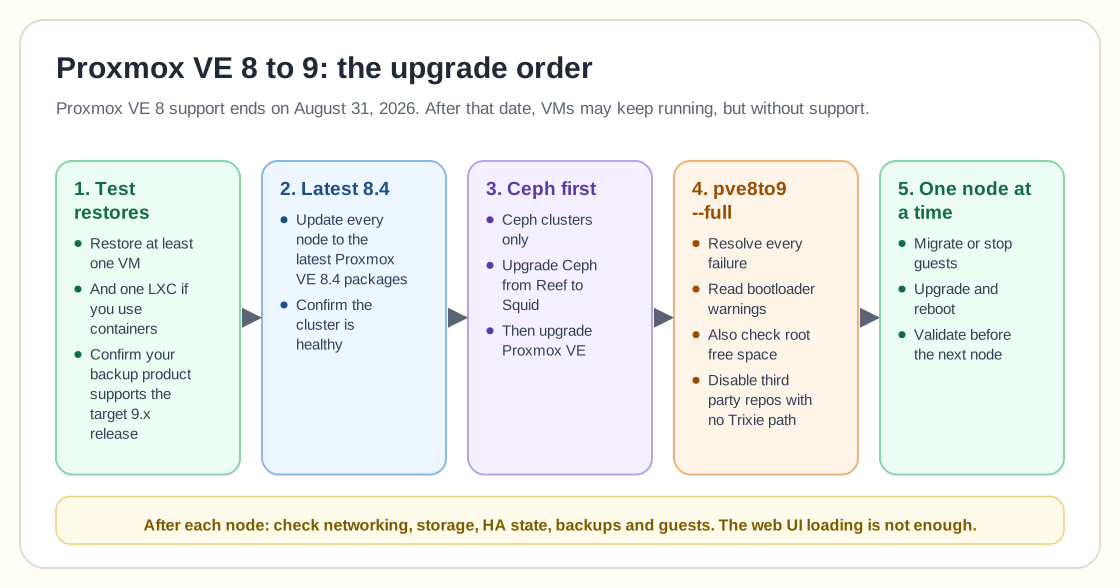
The safest Proxmox VE 8 to 9 upgrade starts with restore confidence, long before any apt command. A successful backup job is evidence that data was written somewhere. A successful restore test is evidence that you can get the workload back.
My preflight list would be:
- Update every node to the latest available Proxmox VE 8.4 packages before changing the major version.
- Confirm the cluster is healthy and that no storage recovery, replication, scrub, or migration operation is already in trouble.
- Run the Proxmox supplied
pve8to9 --fullchecker and resolve failures before continuing. - Verify you have enough free space on the root filesystem for the distribution upgrade.
- Check bootloader warnings carefully. Proxmox VE 8 to 9 upgrades have specific systemd boot and EFI considerations that the checker is designed to flag.
- Record your repositories and remove or disable third party repositories that do not have a Debian 13 Trixie path.
- Test at least one VM restore and, if you use containers, one LXC restore.
- Confirm that your backup product supports the exact Proxmox VE 9 release you intend to run.
If your upgrade problem is really a storage design problem, fix that separately. The storage section is a better place to work through ZFS, Ceph, and backup architecture than trying to change storage and hypervisor versions in the same maintenance window.
Should I upgrade one Proxmox node at a time?
Yes, a multi-node cluster should normally be upgraded in a controlled node sequence so workloads can be moved away from the node being changed. That limits the size of each failure domain and gives you a clean point to stop if the first upgraded node exposes an integration problem.
For each node, I would migrate or stop its guests, confirm the node is quiet, run the preflight check again, perform the upgrade according to the official guide, reboot, and then validate networking, storage, HA state, backup visibility, and guest operation before moving to the next node.
Do not make "the web UI loads" your success criterion. Check bridges, bonds, VLAN aware networking, storage mounts, replication jobs, scheduled backups, guest agents, passthrough devices, and monitoring, because the failure that matters is often outside the Proxmox dashboard.
A single standalone host has fewer moving parts but less room for error, since there is nowhere to live migrate workloads. In that case I care even more about tested backups, remote console access, and a bootable recovery path.
What changes if my Proxmox cluster uses Ceph?
A Proxmox cluster using Ceph needs a storage upgrade plan before the Proxmox major version change. Proxmox states that a Proxmox VE 8.4 cluster on Ceph Reef should first upgrade Ceph from Reef to Squid, then upgrade Proxmox VE from 8.4 to 9.x.
That order is easy to miss because "upgrade Proxmox" sounds like one task. On a hyperconverged cluster it is at least two linked platform changes, and Ceph health is what keeps VM disks available while hosts move through maintenance.
I would not combine a Ceph version change, a Proxmox major version change, new NIC firmware, and a network redesign into one heroic weekend. Separate changes give you better evidence when something fails.
Ceph operators should also pay attention to the current Ceph 19.2.6 security release and its upgrade notes. I cover that separately in Ceph 19.2.6 upgrade guidance, because the storage layer deserves its own preflight instead of a paragraph buried inside a Proxmox upgrade article.
Should I upgrade now or wait a little longer?
I would upgrade now if your environment is already on current Proxmox VE 8.4 packages, your restore tests pass, and your backup and hardware dependencies support Proxmox VE 9.2. The remaining Proxmox VE 8 support window is now too short to justify postponing a ready migration for convenience.
I would wait briefly if the upgrade checker reports unresolved failures, your Ceph cluster is not healthy, your only backup has never been restored, or a critical vendor integration does not yet support the target release. In those cases, remove the blocker quickly and keep the EOL date in view.
If this were my production cluster on August 21, 2026, I would want the first node upgraded before the final week of August, with enough calendar left to stop after node one if something unexpected appears. Pick a window that leaves you room to diagnose problems, and do not let it end five minutes before support does.
Frequently Asked Questions
When does Proxmox VE 8 reach end of life?
Proxmox lists Proxmox VE 8 end of life as August 2026, and current Proxmox VE 8 systems warn that support ends on August 31, 2026. After that date, stop treating the 8.x branch as a supported security baseline.
Can I upgrade Proxmox VE 8 directly to Proxmox VE 9?
Yes. Proxmox supports an in-place upgrade from the latest Proxmox VE 8.4 release to Proxmox VE 9, and provides the pve8to9 readiness checker to run before the distribution upgrade.
Should I upgrade a Proxmox Ceph cluster before Proxmox VE 8 EOL?
Yes, but follow the storage upgrade order. Proxmox says a Proxmox VE 8.4 cluster using Ceph Reef should move Ceph to Squid first and then upgrade Proxmox VE to 9.x.