

Proxmox Backup Strategy: A Practical 2026 Plan
A good Proxmox backup strategy in 2026 should assume that the cluster, the local backup target, and an administrator account can all fail. Proxmox Backup Server 4.2 gives you deduplicated incremental backups, verification, remote synchronization, tape and S3-compatible storage options, but the design is only complete when you can restore within a measured recovery target.
This post uses Proxmox's August 2026 documentation and the current PBS 4.2 release as the baseline instead of older forum recipes. Heise's 2026 Proxmox backup workshop makes the same practical point: deduplication and encryption are features, while disaster recovery depends on how the system is implemented and tested.
What should a Proxmox backup strategy protect against?
A Proxmox backup strategy should protect against guest failure, host failure, storage failure, site failure, operator mistakes, and compromised credentials. If every backup copy depends on the same cluster, room, storage controller, or administrator account, one incident can remove both production and recovery.
So the first design decision is the failure domain, and the schedule comes after it. A nightly backup to another disk inside the same server can help after a deleted file or broken VM. It does very little after theft, fire, controller failure, or a compromised root account that can reach the backup path.
For a broader view of how backup fits with ZFS, Ceph, NFS, and other storage choices, start with the Mr.PlanB storage guide. The backup system has to be designed around the storage failure you are trying to survive.
Should you use Proxmox Backup Server in 2026?
Yes, PBS 4.2 is the natural default for most Proxmox VE environments that need regular VM and container protection. It is built specifically for Proxmox workloads and supports incremental deduplicated backups, integrity verification, encryption, retention management, and remote synchronization.
Proxmox uses fixed-size chunking for virtual machine images and variable-size chunking for file archives. Deduplication means identical chunks are stored once, which can reduce storage and network use when many backups share unchanged data.
Deduplication is not redundancy, because saving less data does not create another copy, and a beautifully deduplicated datastore on one server is still one datastore on one server.
The current Mr.PlanB PBS guide is useful if you need the feature-level view. The rest of this article focuses on the architecture around PBS.
What does 3-2-1 mean for Proxmox?
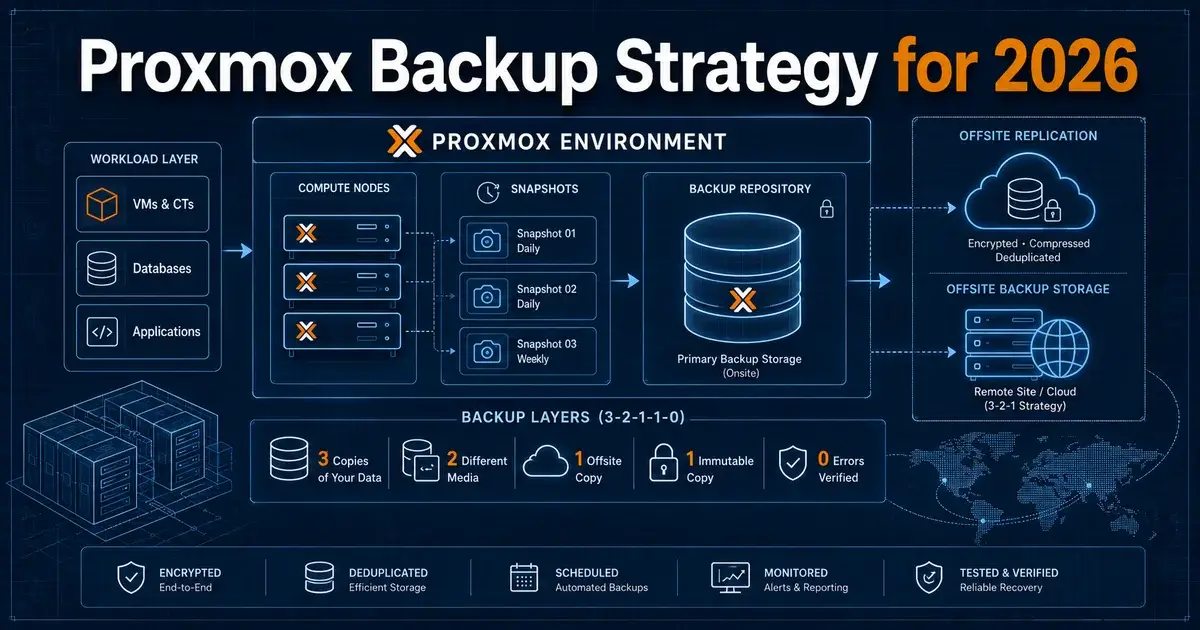
For Proxmox, 3-2-1 means keeping multiple copies of important data, using more than one storage approach, with at least one copy offsite. Proxmox's own documentation recommends the 3-2-1 rule and points to remote locations and different media as ways to implement it.
A practical small environment could keep production on the Proxmox cluster, a primary PBS datastore on separate hardware, and a second PBS or offline copy at another location. A larger environment may add tape, object storage, or another data center depending on recovery requirements.
What matters most is independence. If both PBS servers use the same credentials, same directory service, same management network, and same power room, the second server may look separate while remaining inside several shared failure domains.
I would rather have one slower offsite copy that is difficult for a compromised production administrator to damage than three fast copies controlled by the same account.
How often should Proxmox backups run?
Backup frequency should be set by the maximum amount of data the business can afford to lose. That is your recovery point objective, or RPO.
If a workload can lose 24 hours of changes, one daily backup may be enough. If losing four hours is unacceptable, a daily schedule is wrong no matter how reliable the backup server is. For busy databases, the application may also need its own transaction-aware protection, because a VM-level recovery point does not give you application-level point-in-time recovery.
Picking "nightly" because it sounds standard is a poor reason. Write the RPO beside each workload and make the schedule prove that target.
The same principle applies to retention. Seven daily points and no older history may recover yesterday's deletion but fail when corruption is discovered three weeks later. Retention should reflect how long problems can remain unnoticed.
How often should you verify and test restores?
Verification should run automatically, while restore tests should happen often enough that the team remembers the procedure and failures are found before an incident. PBS can verify backup data using stored checksums, but verification and restoration answer different questions.
Verification asks whether the stored chunks still match their expected data. A restore test asks whether you can turn the backup into a working VM, container, file set, or application under the conditions you will face during an outage.
For a small environment, I would automate verification and restore a representative workload every month. For a business-critical platform, I would test critical recovery paths more frequently and record the elapsed time.
"Restore succeeded" tells you little on its own. Record how long it took from declaring the recovery to having the service usable, which is the observed recovery time you can compare with the recovery time objective.
Should the PBS server be joined to the same trust domain?
Keep backup administration as independent as your environment allows. The goal is to reduce the chance that a compromised production credential can delete or damage every recovery point.
Proxmox documents that existing backup blocks are not rewritten by backup clients, which helps protect existing data from a compromised client system. That helps, but administrative access to the backup server is still powerful and should be treated separately.
Use narrow permissions, distinct service accounts, multifactor authentication where supported, and a management path that does not depend entirely on the production cluster. Protect the PBS configuration and credentials as carefully as the datastore itself.
For teams building new Proxmox environments, the 10 Proxmox mistakes guide is worth reading before backup becomes something you add after the cluster is already full.
Where does S3-compatible storage fit in PBS 4.2?
PBS 4.2 adds improved support for S3-compatible object storage as a backup storage backend. This creates another option for capacity and offsite design, especially where maintaining a second physical backup server is difficult.
Object storage does not remove the need to understand recovery performance. Large restores may be limited by network throughput, provider request behaviour, local cache design, and the amount of data that must be rehydrated.
Before making object storage your only offsite path, restore a real VM of meaningful size and measure the result. A low monthly storage bill can become irrelevant if the recovery path misses the business RTO by many hours.
Also check credential scope, since an offsite target is most useful when the credentials used by production cannot casually destroy it.
What would a simple Proxmox backup plan look like?
For a three-node Proxmox VE cluster, I would start with a dedicated PBS server on separate hardware and storage. Run backups at a frequency derived from workload RPOs, keep enough retention to cover delayed discovery, and verify the datastore automatically.
Then add an offsite copy through a second PBS server, offline media, tape, or an object-storage design that you have tested. Keep the offsite credentials separate. Restore one representative VM or container on a schedule and record the time.
Document the order of recovery. Identity, DNS, storage, databases, and management systems often have dependencies that make a random restore order slower than expected.
Finally, test recovery when the main cluster is unavailable. Restoring a VM into a healthy production cluster is useful, but it does not prove that you can rebuild after losing the cluster itself.
What would I choose for Proxmox in 2026?
I would use PBS 4.2 as the primary backup platform for a Proxmox VE environment, keep it off the production hosts, and maintain at least one recovery copy outside the primary site's failure domain. I would spend more effort on restore testing and access separation than on squeezing the last few percent out of deduplication.
For a homelab with replaceable workloads, a single PBS plus a rotated offline copy may be enough. For a business where downtime has a measurable cost, I would add a second site or other independent offsite target and test the full recovery sequence.
A plan that produces a green backup dashboard still fails if it cannot answer two questions: how much data will we lose, and how long until the service is back?
Frequently Asked Questions
What is the best Proxmox backup strategy in 2026?
A strong 2026 Proxmox strategy uses Proxmox Backup Server 4.2 for incremental deduplicated backups, keeps an independent offsite copy, runs verification, and tests restores. Start the design from the recovery time and recovery point your workloads actually require.
Does Proxmox Backup Server support the 3-2-1 backup rule?
Yes. Proxmox documents the 3-2-1 rule and provides remote synchronization, tape support, and other ways to keep extra copies away from the production cluster. Keep at least one recovery copy outside the failure domain of the Proxmox VE hosts.
Which Proxmox Backup Server version is current in August 2026?
Proxmox Backup Server 4.2 is the current major release documented by Proxmox in August 2026. Version 4.2 is based on Debian 13.4, uses Linux kernel 7.0 as its stable default, and includes ZFS 2.4 plus improved sync and S3-compatible storage support.