

Plex vs Jellyfin on Proxmox: Which Media Server Is Better?
Plex and Jellyfin can turn a Proxmox server into a centralized platform for streaming movies, television programs, music and other personal media. Both organize media libraries, retrieve metadata, support multiple users and deliver content to televisions, phones, tablets and web browsers.
Their operating models are different. Plex is a commercial platform with polished applications, account based access and paid premium features. Jellyfin is free and open source, with no paid server features and greater control over how users connect.
Plex is usually easier for households that want broad device support and simple remote sharing. Jellyfin is often better for Proxmox users who value self hosting, privacy, customization and free hardware transcoding.
What is the main difference?
Plex Media Server is proprietary software connected to the wider Plex platform. Users normally sign in with a Plex account, claim their server and use Plex applications to access its libraries. Plex combines personal media management with its own streaming, discovery and live television services.
Jellyfin describes itself as a free software media system. Its server and official clients are free to download, and the software is licensed under the GNU General Public License. The project states that it does not place features behind proprietary or paid tiers.
The difference goes beyond price. Plex provides a managed account and application ecosystem, while Jellyfin gives the server administrator more direct control over authentication, networking and updates.
Which is easier to use?
Plex is generally easier for new users. Its setup process guides administrators through creating an account, installing the server, adding media libraries and connecting client applications. Plex provides applications for smart televisions, mobile devices, streaming boxes, game consoles, computers and web browsers.
The interface automatically organizes media with posters, episode information, cast details and other metadata. Remote users sign in with their own Plex accounts, so they do not need separate local credentials for the server.
Jellyfin also provides a setup wizard and applications for common platforms, including Android, desktop systems and Kodi. Its client coverage is broad, although the quality and feature completeness can vary more between platforms because the project and many clients are community developed.
Jellyfin may require more technical work when configuring televisions, reverse proxies or remote access. Plex provides a more consistent consumer focused experience, especially when several family members use different devices.
Which is better for hardware transcoding?
Hardware transcoding converts media into a format, resolution or bitrate that the viewing device can handle. It can greatly reduce processor usage compared with software transcoding.
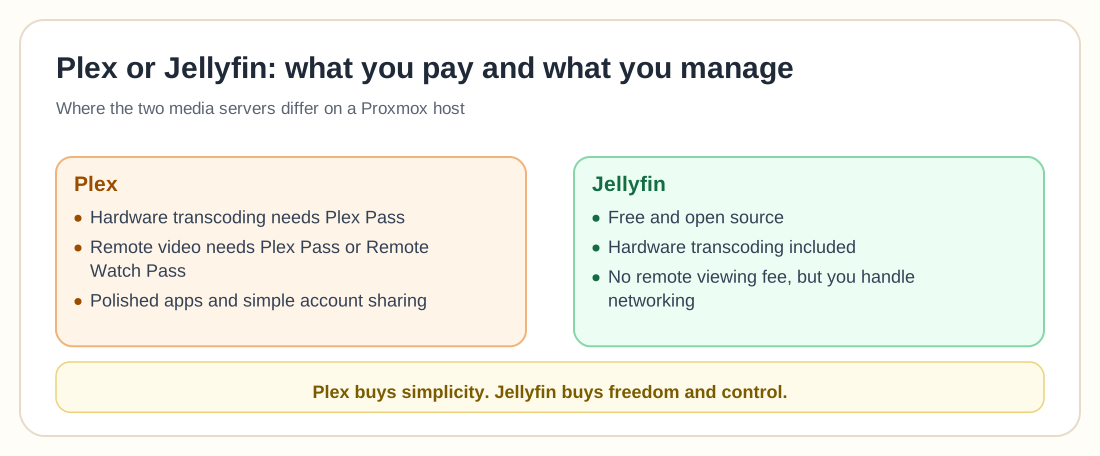
Plex supports hardware accelerated encoding and decoding on compatible hardware. Its official documentation gives particular attention to Intel Quick Sync and NVIDIA graphics hardware, while support for AMD graphics cards is described as less extensively tested. Hardware accelerated streaming requires a Plex Pass subscription.
Jellyfin provides hardware acceleration without a paid subscription. Its supported methods include Intel Quick Sync, NVIDIA NVENC and NVDEC, AMD VA API, Apple Video Toolbox and Rockchip acceleration. Jellyfin uses its own modified FFmpeg package to provide these capabilities.
Jellyfin is the better value when hardware transcoding is essential. Plex may provide a simpler configuration experience on commonly supported Intel and NVIDIA systems, but the server owner must pay for Plex Pass to use the feature.
On Proxmox, either platform needs access to the relevant graphics device. A virtual machine can receive a complete PCI device through passthrough. An LXC container can access selected device files, although permissions and user mappings require more manual configuration. Proxmox documents PCI passthrough for virtual machines and uses LXC as its system container technology.
Unlock the Power of Your iGPU! GPU Passthrough on Proxmox LXC with Jellyfin & Rootless Docker
Which handles Direct Play better?
Direct Play sends the original media file to the client without converting it. This provides the highest quality and uses the least server processing power.
Whether Direct Play works depends mainly on the client device, media format, audio codec, subtitles and network bandwidth. Plex distinguishes between Direct Play, Direct Stream and transcoding. Unsupported subtitles can force the server to burn text into the video, which requires transcoding.
Jellyfin follows the same basic principle. It uses direct playback when the client supports the source media and transcodes when compatibility or bandwidth requires it.
Plex generally has an advantage in client consistency because it controls a larger collection of first party applications. Jellyfin can perform very well when paired with capable clients such as Jellyfin Media Player or Kodi, but administrators may need to test different applications to find the best experience for each device.
Which is better for remote access?
Plex provides a guided remote access feature. The server signs in to Plex services and can attempt automatic router configuration through UPnP or NAT PMP. Manual configurations forward an external port to the server's internal port 32400.
Plex changed its remote video playback model in 2025. Remote streaming of personal video now requires an eligible Plex Pass or Remote Watch Pass arrangement. Local home network playback remains available without a subscription.
Jellyfin does not charge for remote access, but the administrator is responsible for making the server reachable securely. Options include port forwarding, a reverse proxy, a virtual private network or Tailscale. Jellyfin provides networking and reverse proxy documentation, but the server owner must manage certificates, domains and firewall rules. If you are weighing those options, we compare them side by side in 5 free ways to expose your home server, including why the Cloudflare Tunnel rule that supposedly bans Plex traffic no longer says what people think it says.
Plex is easier when the household accepts its account and subscription model. Jellyfin provides more control and no remote viewing fee, but it requires greater networking responsibility.
Which gives you more privacy and control?
Jellyfin offers greater control because authentication and media management can remain within infrastructure operated by the server owner. Its mission statement is explicit about free software and avoiding unreasonable centralization.
Plex servers can stream locally, but Plex account services handle authentication, server claiming and remote connectivity. A claimed server requires authentication by default, and Plex applications normally connect through a Plex account.
Some users prefer Plex because central accounts simplify invitations and client setup. Others prefer Jellyfin because they do not want access to their personal server to depend on an external platform.
Jellyfin also allows administrators to inspect, modify and build the software from source. That level of control is unavailable with Plex.
Which is easier to install on Proxmox?
Both can run inside a Linux virtual machine or a Docker environment hosted on Proxmox.
Jellyfin publishes packages for Debian and Ubuntu and provides an official container image for Docker and Podman. Its container documentation recommends persistent locations for configuration and cache data.
Plex publishes server downloads for Linux and several other operating systems. It can also be deployed through commonly used container images, although administrators should verify the maintenance source and update process before relying on any container image.
A small Linux virtual machine is the simplest general deployment because it provides a separate kernel and conventional Docker or package management. LXC uses fewer resources and can provide direct access to an Intel graphics device, but permissions, device mapping and storage mounts require more planning.
Media files should normally live on separate storage, outside the media server's system disk. The Plex or Jellyfin guest can mount an NFS, SMB or other storage share containing the libraries. This separates application recovery from media capacity.
Which is easier to back up?
Both servers store databases, metadata, artwork, user settings and playback history that should be protected.
A Proxmox backup can protect the complete virtual machine or LXC container. Application configuration should also be backed up separately so it can be restored into a fresh installation if the original guest becomes unusable.
Jellyfin warns administrators to copy its database before making manual database changes. Its migration documentation also explains how installation data can be moved between native and container deployments.
The media library itself may be too large for ordinary guest backups. Protect the application configuration and media storage through separate policies. Recreating a media server is relatively easy, but replacing a lost media collection may not be.
Which media server should you choose?
Choose Plex when ease of use, polished client applications and simple account based sharing are the leading priorities. It is particularly suitable when family members use many different consumer devices and do not want to manage server addresses or network settings.
Choose Jellyfin when you want a completely free server, open source software, free hardware transcoding and greater control over remote access and authentication.
For many Proxmox homelabs, Jellyfin is the stronger technical and financial choice. It fits naturally with self hosted infrastructure and does not require a subscription to unlock server hardware.
Plex is still the stronger choice when client polish and household simplicity matter more than software freedom or avoiding recurring fees.
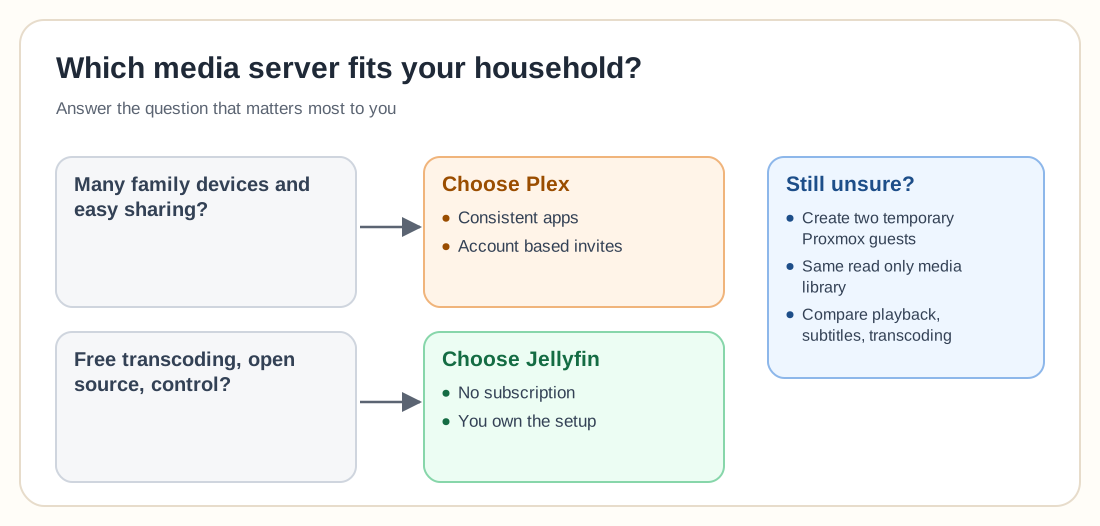
The safest way to decide is to test both against your actual media formats and viewing devices. Create two temporary Proxmox guests, connect them to the same read only media library and compare direct playback, subtitles, transcoding and remote access before committing to either platform.