

Should You Run Portainer in LXC or a VM on Proxmox?
Portainer provides a graphical interface for managing Docker containers, images, volumes, networks and application stacks. On Proxmox, the main deployment decision is LXC vs VM: whether Docker and Portainer should run inside an LXC container or a virtual machine.
Both approaches can work. An LXC deployment generally uses fewer resources and starts quickly, while a virtual machine provides stronger isolation, a separate kernel and a more conventional environment for Docker.
For most businesses and production focused homelabs, a small Linux virtual machine is the safer default. LXC can be a good choice when resource efficiency matters and the administrator understands nested containers, permissions and storage behaviour.
What are you actually installing?
Portainer Server normally runs as a Docker container. The official installation process requires a working Docker environment, creates persistent storage for Portainer data and starts the Portainer Server container. Portainer exposes its interface over HTTPS on port 9443 by default.
So the real comparison is usually between Portainer and Docker inside a Proxmox virtual machine, and Portainer and Docker inside a Proxmox LXC container. You are normally choosing where the Docker engine that hosts Portainer should run, rather than picking between Portainer as a native LXC application and Portainer as a virtual machine appliance.
That matters because Docker expects control over kernel features, networking, storage and process isolation. A virtual machine provides its own kernel, while an LXC container shares the Proxmox host kernel.
How does a Proxmox LXC container work?
Proxmox uses LXC for operating system level containers. LXC creates isolated Linux systems that share the kernel of the Proxmox host. Because the guest does not need a separate kernel, it normally requires less memory and storage than a complete virtual machine.
An LXC container can have its own IP address, filesystem, users, services and resource limits. From the application's perspective, it behaves much like a small Linux server.
Running Docker inside LXC adds another container layer. Proxmox manages the outer system container, while Docker manages application containers inside it. This arrangement is sometimes described as nested containerization. It can be efficient, but it introduces more interaction between the Proxmox host, LXC configuration and Docker runtime.
Proxmox provides container settings such as keyctl, which is required for using Docker inside an unprivileged container. Other configurations may also require nesting features, device permissions or storage adjustments.
What are the advantages of running Portainer in LXC?
The main advantage is efficiency. An LXC container does not need to reserve resources for a separate guest kernel, so a small Portainer and Docker environment can run with limited memory, processor capacity and storage.
LXC containers also start quickly. This can be useful in a compact homelab where the Proxmox host has limited memory and several infrastructure services must share the same hardware. Proxmox can manage the outer container through its normal interface, so you can assign resources, configure networking, schedule backups and move the container between compatible cluster nodes.
An LXC deployment may be appropriate when Portainer manages a small number of low risk applications and the administrator is comfortable troubleshooting Linux permissions. It can also work well when the Proxmox server is primarily a lab environment and a short interruption would not create a serious business problem.
What are the disadvantages of Docker inside LXC?
The biggest disadvantage is additional complexity. When a Docker application fails inside an LXC guest, the problem may come from the application, Docker, the guest operating system, LXC permissions or the Proxmox host kernel.
Storage can become especially confusing. Docker supports several storage drivers, while Proxmox LXC has its own mount point, user mapping and backup behaviour. A configuration that appears correct inside the container may behave differently because of restrictions applied outside it.
Hardware access can also require extra work. Passing a GPU, USB device or other hardware into Docker may require permissions at both the Proxmox LXC layer and the Docker layer.
Unprivileged LXC containers improve security by mapping root inside the container to an unprivileged identity on the host. However, this mapping can complicate access to mounted directories and device files. Some administrators solve these problems by using privileged containers, which may simplify permissions but weakens the isolation between the container and the Proxmox host.
LXC can save resources, although the time spent diagnosing nested permissions may exceed the value of the memory saved.
How does a Proxmox virtual machine work?
Proxmox uses KVM for full virtual machines. Each virtual machine receives virtualized hardware and runs its own guest operating system and kernel.
A Portainer virtual machine usually runs a standard Linux distribution such as Debian or Ubuntu. Docker is installed using the same process that would be used on a physical Linux server or cloud instance, and Portainer then runs as a Docker container inside that guest.
This architecture creates a clear separation. Proxmox manages the virtual machine, the guest operating system manages Docker, and Portainer manages Docker applications. Each layer has a defined responsibility, which generally makes the environment easier to understand and support.
What are the advantages of running Portainer in a VM?
The strongest advantage is isolation. Because the virtual machine has its own kernel, Docker is separated from the Proxmox host kernel. A container escape or Docker configuration error must cross the virtual machine boundary before affecting the hypervisor.
A virtual machine also gives Docker a conventional environment. Standard installation guides, troubleshooting instructions and security recommendations generally assume Docker is running on a complete Linux system. Docker networking, filesystem drivers and kernel features are less likely to be affected by LXC restrictions. Passing through hardware can still require planning, but there are fewer nested permission layers.
A VM is also easier to move to another platform. If you later leave Proxmox, the Docker host can be migrated as a conventional virtual machine or rebuilt from its operating system and Compose configuration. That portability matters when Portainer manages important application services rather than temporary homelab containers.
Does a VM require much more hardware?
A virtual machine requires more resources than LXC, but Portainer itself is lightweight. Portainer describes its Server and Agent components as lightweight Docker containers.
A small Linux VM can often run Portainer and several modest Docker applications without needing large allocations. The real requirements depend more on the managed applications than on Portainer. A database, media server or artificial intelligence application may need substantial memory and storage, and Portainer's own resource requirements are usually a small part of the total.
For most modern Proxmox hosts, the extra memory used by a small Linux guest is a reasonable cost for stronger isolation and simpler support.
Which option is easier to back up?
Proxmox can create complete backups of both virtual machines and LXC containers. Its integrated backup system includes guest configuration and data, and scheduled jobs can protect selected workloads automatically. A full Proxmox backup of the Docker host can therefore protect the operating system, Docker installation, Portainer database and locally stored application volumes.
Portainer also has its own backup feature, which serves a different purpose. A Portainer backup includes the Portainer database and stack files deployed through Portainer, and leaves out the containers and application data in the managed environment. Restoring Portainer configuration will not bring back a database volume, uploaded files or a media library.
The best protection combines several layers. Back up Portainer configuration, store Compose files in version control and use Proxmox Backup Server or another backup platform to protect the full Docker guest and its application data.
Which option is easier to upgrade?
Portainer upgrades are similar in both environments because Portainer runs as a Docker container. The documented Docker process stops and removes the existing Portainer container, downloads the newer image and recreates the container while retaining persistent data.
The difference appears when Docker or the operating system needs an update. Inside a VM, administrators follow standard Linux and Docker procedures, and kernel updates affect only the guest. Inside LXC, the guest shares the Proxmox kernel, so some Docker behaviour may change after a Proxmox kernel or LXC update, even when the guest packages remain unchanged.
A virtual machine provides a more independent upgrade lifecycle. You can test a guest operating system update without changing the Proxmox host and test a Proxmox update without immediately replacing the Docker guest kernel.
Which option supports Proxmox clustering better?
Proxmox can manage both virtual machines and LXC containers as cluster resources. Its high availability manager can monitor protected VMs and containers and restart them when a node fails, provided the cluster and storage design support recovery. Both Portainer deployment types can therefore participate in Proxmox backup, migration and high availability workflows.
A VM may be easier to migrate when its storage and networking are self contained. LXC migration can also work well, but bind mounts, device mappings and host specific configuration may reduce portability.
If Portainer depends on access to a local Docker socket, application storage or hardware attached to one node, high availability requires more than marking the guest as protected. Every dependency must be available on the recovery node.
Should you use LXC or a VM?
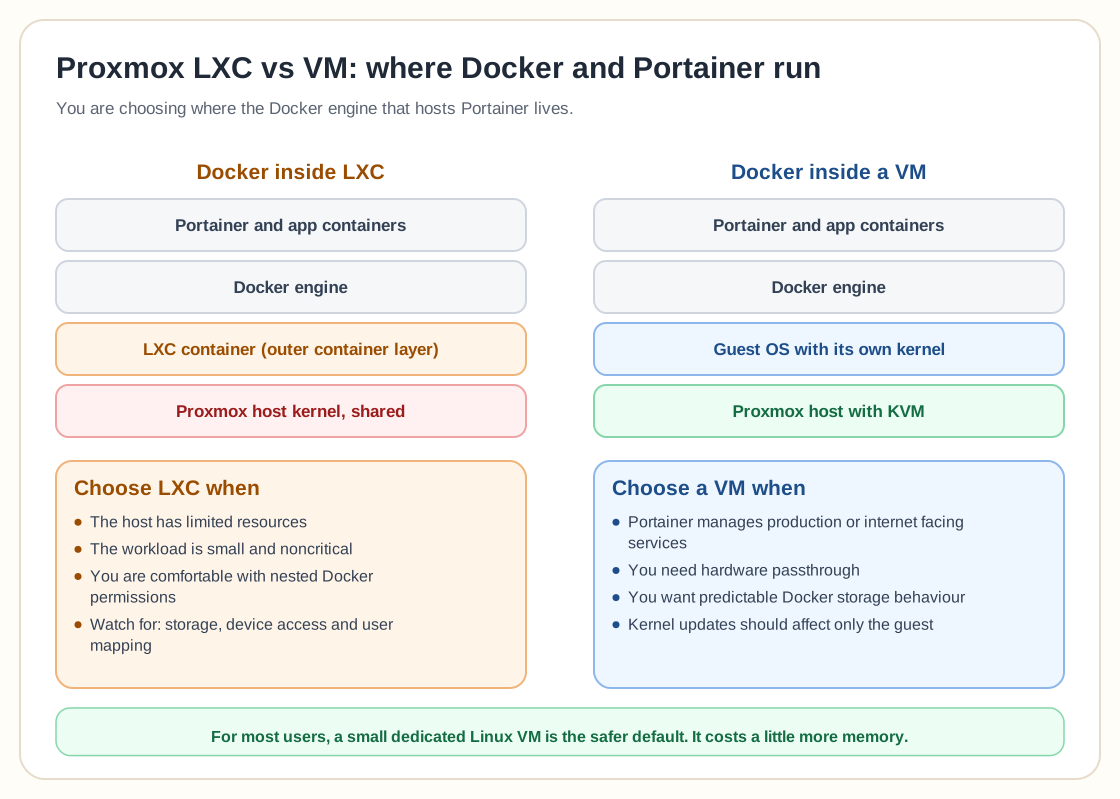
Choose LXC when the Proxmox host has limited resources, the workload is small and you are comfortable managing nested Docker permissions. It is a reasonable option for experimentation, personal homelabs and noncritical services.
Choose a virtual machine when Portainer manages production applications, internet facing services or workloads that must be easy to support and recover. A VM is also preferable when you need hardware passthrough, predictable Docker storage behaviour or stronger separation from the Proxmox host.
For most users, a dedicated Linux VM is the better long term choice. It consumes slightly more memory and disk space, but the architecture is easier to secure, document, migrate and troubleshoot. LXC is more efficient, while a virtual machine gives clearer isolation and fewer hidden dependencies, and when Portainer controls important Docker workloads, those operational advantages usually matter more than saving a small amount of memory.