

Broadcom VDDK Access Now Complicates VMware Exits
VMware migration teams have a new dependency problem. Public access to the VMware Virtual Disk Development Kit, or VDDK, changed in August 2026, and several documented VDDK download paths stopped working or became restricted. Backup and migration tools use VDDK to read VMware virtual disks efficiently, so if your exit plan assumes VDDK will simply be downloadable when the project starts, verify that assumption now.
I checked reports from migration vendors and Broadcom community threads before writing this. The evidence supports a concrete claim that public access changed and users encountered broken or restricted download paths. It does not support a stronger claim about Broadcom's motive, so I would not describe the change as deliberate sabotage without a direct statement proving that intent.
What is VMware VDDK and why does it matter?
VMware Virtual Disk Development Kit is a set of libraries and APIs used to work with VMware virtual disk files. Backup, replication, conversion, disaster recovery, and migration products can use it to access VM disks without treating each virtual machine like an ordinary physical server.
That makes VDDK plumbing, and most infrastructure teams don't think about plumbing every day. They notice it when it disappears.
A migration tool may advertise a simple VMware to KVM workflow, but under the hood it still needs a supported way to read the source disks. If that method expects VDDK and the required version cannot be obtained, the migration workflow can fail before the first VM moves. That is a dependency risk, and a bigger one than a download inconvenience.
What changed with VDDK access in August 2026?
Migration vendors reported that Broadcom's public VDDK download pages stopped behaving as expected around August 25, 2026. ShapeBlue documented errors on pages used for VMware to KVM migration work, while Platform9 described public access as restricted and warned customers to plan alternate paths.
Broadcom community discussions show the same practical symptom from the customer side: users followed official links and could not obtain the kit they expected to download.
VDDK also remains an active dependency in current migration products. Oracle, for example, announced support for VDDK 8.0.3 in Oracle Cloud Migrations in August 2026, which shows why access matters. A current migration workflow can depend on a specific toolkit version even when the end goal is to leave VMware.
Put simply, availability changed, documented links broke or became restricted for some users, and migration teams should not assume that obtaining VDDK is a zero effort step.
Did Broadcom remove VDDK to stop VMware migrations?
There is not enough public evidence to state Broadcom's motive as fact. Some vendors and users interpret the access change as increasing lock in, and that interpretation is understandable because VDDK is useful precisely when data has to move out of VMware. Still, technical writing should keep the effect and the motive apart.
The effect is observable: some migration workflows became harder because a dependency that had been publicly obtainable was no longer available through the same path. Establishing the motive would take a direct Broadcom explanation, internal evidence, or another authoritative source.
For a migration planner, the motive also matters less than the operational response. If a tool needs VDDK, you need to know whether you can legally and reliably obtain the required build under your account and entitlement before the migration window starts. Run that test during planning, because cutover weekend is a bad time to find out.
Which VMware exit projects are most exposed?
Projects that rely on agentless disk conversion or target tools built around VDDK are most exposed. The exact impact depends on the destination platform and the migration product.
A VMware to KVM conversion tool may use VDDK for efficient source disk access. A backup platform may use it for image level protection. A disaster recovery product may use it for replication. A cloud migration service may package VDDK as a prerequisite that the customer must supply.
If any step in your runbook says "download VDDK," treat that as a named project dependency with an owner, version, checksum, entitlement, and fallback.
Apply the same discipline to firmware, drivers, conversion appliances, licenses, certificates, and API credentials. A migration is a chain, and it usually breaks at the dependency nobody tested.
The Mr.PlanB comparisons hub is useful when evaluating target platforms, but the destination decision should include migration mechanics. A platform can be attractive in steady state and still be a poor target if the path from your current environment is fragile.
Can you migrate away from VMware without VDDK?
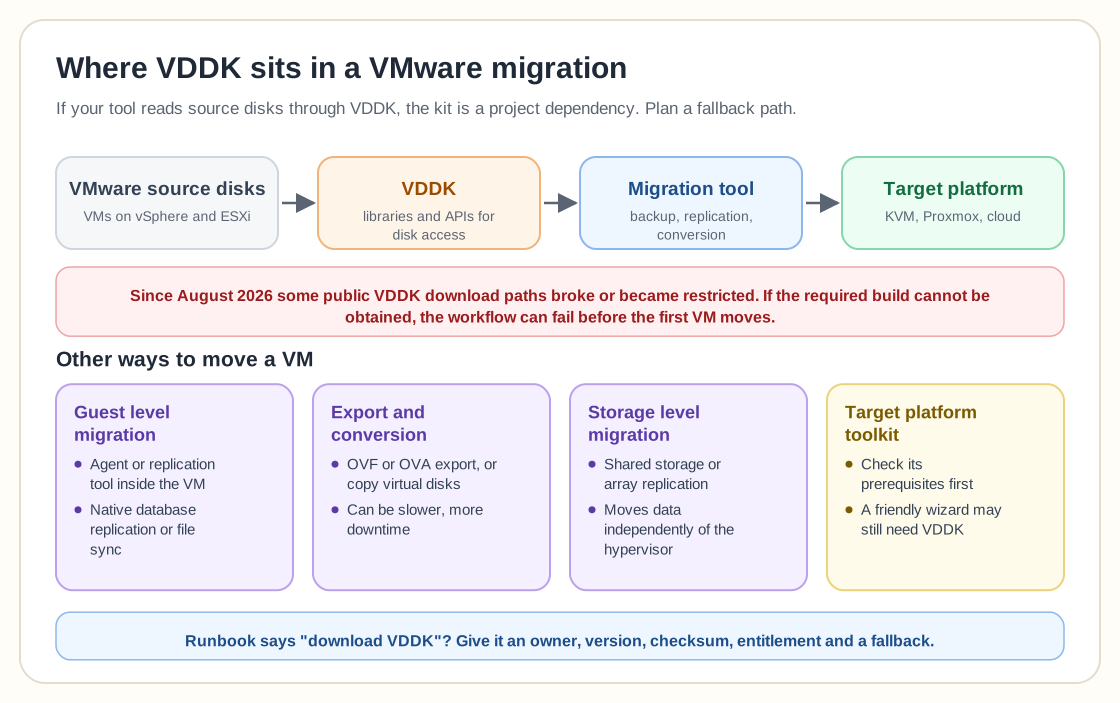
Yes. VDDK is useful, but it is one of several ways to move a virtual machine. The alternatives depend on downtime tolerance, guest operating system, storage layout, target hypervisor, and available tooling.
One option is guest level migration. Install an agent or replication tool inside the VM, copy the application or block data to a new guest, then cut over. This works well when the application already has a native replication method, such as database replication or file synchronization.
Another option is export and conversion. Depending on the environment, you may export OVF or OVA packages, copy virtual disks, or use a converter that supports a different source access method. This can be slower and may require more downtime.
Storage level migration can work when the source and target share access to the same storage technology or when array replication can move data independently of the hypervisor.
Some target platforms provide their own migration toolkit. Inspect the prerequisites before assuming it solves the problem, since a friendly wizard may still depend on VDDK behind the scenes.
If Proxmox is your target, start with the current Proxmox platform overview and build a representative migration test. Do not base the plan on a video that converted one small VM under conditions that do not match your storage and network design.
What should you archive before a VMware migration?
Archive the installation media, VDDK build, checksums, licenses, documentation, conversion tools, and scripts your migration plan depends on, subject to the vendor's license terms. Record where each file came from and which version of the source environment it supports. This is basic reproducibility; a six month migration program should not depend on a webpage remaining unchanged.
Also record the exact VMware versions in the source estate. VDDK compatibility can depend on vSphere and ESXi versions, and a tool validated against one build may not behave identically against another.
Keep the artifacts under change control instead of on one engineer's laptop. If the project pauses and restarts, the next person should be able to reconstruct the tested toolchain.
The same practice applies beyond VMware. Infrastructure vendors change portals, product names, login systems, and download policies, and a migration project is safer when critical dependencies are kept as project artifacts instead of bookmarks.
Does this make Proxmox or KubeVirt more attractive?
It can make open migration paths more attractive, though an open destination does not make it easier to get out of the source. Proxmox and KubeVirt both use open virtualization foundations, yet the first migration still has to cross the VMware boundary.
The vMotion learning curve article makes the same broader point: leaving VMware involves more than converting files. Teams need new operational concepts, backup procedures, monitoring, networking, and failure runbooks.
VDDK access is one more reason to start early. The longer you wait, the more likely a contract, entitlement, download portal, or tool dependency becomes part of the critical path.
What would I do before approving a VMware exit plan?
I would require the team to prove the migration path with the exact tools and versions it plans to use. Download every prerequisite now, verify entitlement, document checksums, and convert representative workloads before the business commits to a cutover date.
I would also design at least one fallback path that does not depend on the same source access method. It may be slower or require more downtime, but a slower known path is better than discovering during cutover that the primary tool cannot obtain a required component.
The opposite choice is reasonable when the migration tool is fully vendor managed and contractually includes all required VMware components. In that case, make the vendor prove it in a pilot and put the responsibility in writing.
The VDDK story is a reminder that you only find out how much infrastructure optionality you have when you try to use it. A migration option that depends on a file you cannot obtain is not yet a working option.
Frequently Asked Questions
What happened to VMware VDDK downloads in 2026?
Multiple migration vendors and users reported that public VMware Virtual Disk Development Kit download pages stopped working or became restricted around August 25, 2026. Broadcom community threads also show customers struggling to obtain the kit.
Why does VDDK matter for VMware migration?
VDDK provides APIs and libraries used by backup, replication, conversion, and migration tools to access VMware virtual disks. Some VMware-to-KVM and cloud migration workflows depend on a supported VDDK build.
Can you migrate away from VMware without VDDK?
Yes, but the method depends on the target platform. Alternatives can include guest-level migration, OVF or disk export, storage-level copy, target-specific migration tools, or staged conversion workflows.