

The objective is reliable output first
Kubernetes can provide a common platform for AI inference, training, data preparation and batch scoring. It does not automatically make accelerator workloads efficient, portable, fairly scheduled, cost effective, or recoverable.
The objective is reliable business output from a controlled amount of accelerator capacity. Measure it as cost per valid outcome instead of cost per device-hour.
Common AI workload patterns
CPU or GPU? Device plugins and Dynamic Resource Allocation
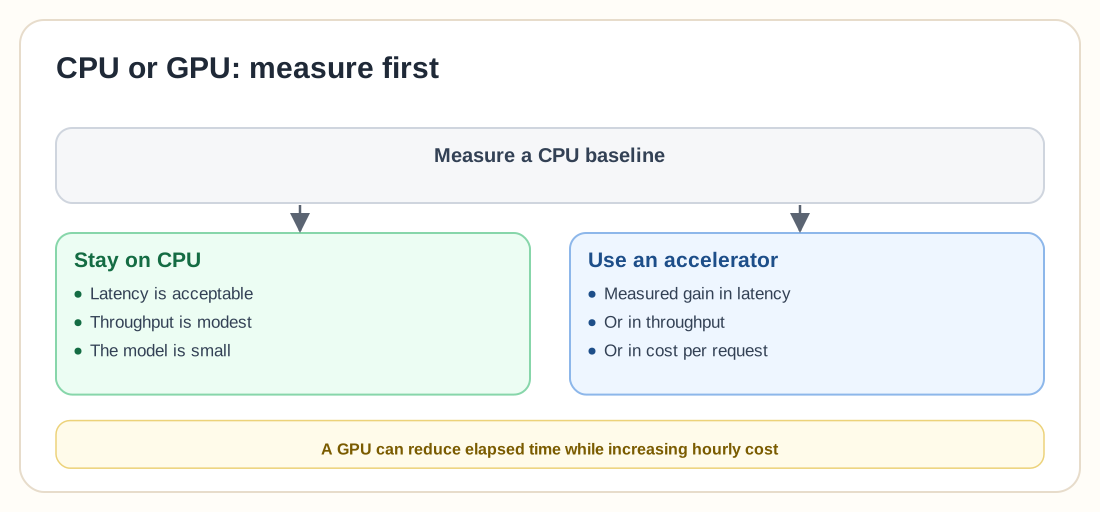
Use CPUs when latency is acceptable, throughput is modest, or the model is small. Use accelerators only when measurement shows a material improvement in latency, throughput, or cost per request. A GPU can reduce elapsed time while increasing hourly cost.
Device plugins advertise specialized resources such as GPUs to the kubelet so the scheduler can place Pods that request them. Kubernetes includes stable support for scheduling AMD and NVIDIA GPUs through compatible device plugins.
DRA is a newer framework for requesting and allocating accelerator devices by attribute rather than resource name alone. The core DRA functionality became generally available in Kubernetes 1.34, with later releases adding further stable capabilities. Exact behaviour depends on the installed version and driver.
Sharing models
Choose dedicated devices when performance and isolation matter more than utilization. Do not describe a time-shared GPU as equivalent to an exclusive one.
Model serving
Models may load from a container image (reproducible, but slow pulls for large models), object storage (independent lifecycle, but download time and credentials to manage), or a PersistentVolume (fast local access, but storage attachment and backup dependencies).
Large models may require substantial time to download, deserialize, allocate GPU memory and compile kernels. Use a startup probe so traffic doesn't reach the Pod before initialization completes, and measure warm-up time for a cold node, cold image and cold model cache separately.
Readiness should confirm the model is loaded and a sample inference succeeds. A started HTTP process is not enough on its own. Liveness should never depend on a temporarily unavailable model registry or optional telemetry, or a shared outage can trigger a fleet-wide restart loop.
KServe provides Kubernetes custom resources and controllers for serving predictive and generative AI models, with deployment modes that integrate with serverless or high-density serving components. It can simplify serving, but it also introduces controllers and CRDs that must be backed up and recovered like any other platform dependency.
Autoscaling inference
The HorizontalPodAutoscaler can scale supported workloads from resource, custom or external metrics. Useful inference signals include queue depth, concurrent requests, tokens per second and accelerator saturation.
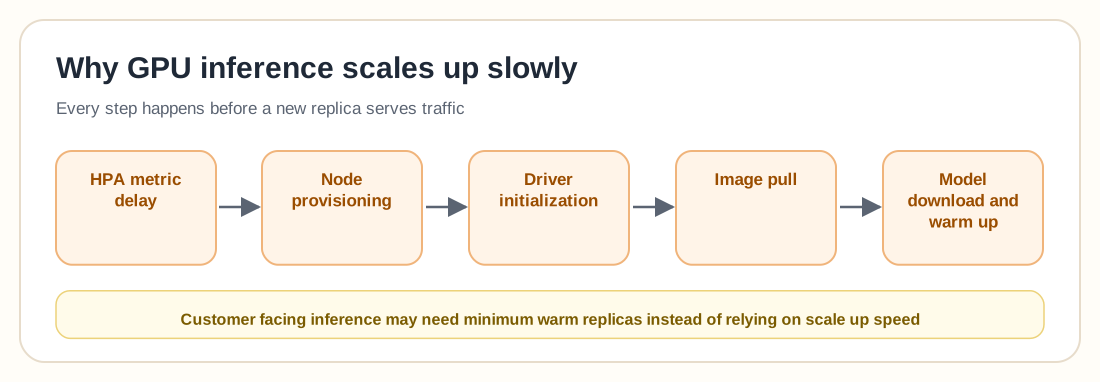
Scale-to-zero can cut cost for infrequently used models but introduces cold-start latency. Evaluate model size, download time and customer timeout before using it for anything with a strict first-response deadline.
Distributed training and checkpoints
Kubeflow Trainer is a Kubernetes-native platform for distributed training and fine-tuning across frameworks including PyTorch, JAX and XGBoost. It doesn't remove the need to define checkpoint frequency, dataset access, retry behaviour, or accelerator topology.
Store checkpoints (model weights, optimizer state, training step, random state) outside the Pod filesystem, in object storage, a shared filesystem or a managed training repository. Test restarting from a checkpoint after Pod, node and cluster loss as well as after a clean shutdown.
Security, privacy and model theft
AI workloads may expose business data, customer prompts, training datasets, model weights and API credentials. A user who can create an arbitrary Pod with access to the model PVC or object-store identity may be able to copy the model, so review effective privilege as well as resource names.
Observability and cost
Monitor four layers: cluster (Pending Pods, scheduler latency), accelerator (GPU utilization, memory, temperature, errors), model server (queue depth, latency, token rate), and business (valid prediction rate, conversion, cost per request).
A model can be fast but inaccurate, available but biased, or correctly deployed but using the wrong version. Monitor accuracy, drift, rejection rate and unsafe-output rate according to the application, in addition to Pod and GPU status.
Useful unit costs include cost per 1,000 inferences, cost per million tokens, and cost per training run. Idle GPU capacity may be justified by latency objectives or failure reserve. Label justified reserve separately from accidental waste, since usage-only chargeback can undervalue capacity reserved for availability.
Backup and disaster recovery
Protect Kubernetes resources, serving/training CRDs, model registry metadata, model weights, training checkpoints, evaluation results, container images and Secrets. Model artefacts should normally exist outside the source cluster, because a PersistentVolume containing the only model copy creates unnecessary recovery risk.
Some models can provide degraded CPU inference during accelerator failure. Evaluate and load-test this fallback before assuming it works. See the disaster recovery plan guide for the broader recovery framework.
Common mistakes
The workload may not need an accelerator. Compare cost per valid outcome.
Memory, architecture, driver and interconnect requirements may differ. Define compatible device classes.
Utilization may not reflect queue delay, memory, or customer latency. Use demand and service metrics.
Pod replacement removes the only model copy. Use an external model store.
Traffic reaches a process that cannot yet perform inference. Validate that the model is loaded; a running process is not enough.
Logs may expose confidential or personal data. Redact and control retention.
Training can consume the capacity needed by customers. Separate priorities or node pools.
One interruption loses the complete run. Store durable checkpoints.
Accelerator quota and supply may differ by region. Verify capacity and test recovery.
AI and GPU workload checklist
0 / 25Frequently asked questions
Yes. Kubernetes supports GPU scheduling through compatible vendor device plugins.
It is a plugin framework that advertises specialized hardware resources, such as GPUs, to the kubelet for workload allocation.
DRA is a Kubernetes framework for requesting and allocating devices and other specialized resources using driver-defined device classes and claims. The core framework became generally available in Kubernetes 1.34, with later releases adding further stable capabilities.
Possibly, through hardware partitioning, vendor time sharing, DRA-supported sharing, or model-server multiplexing. Exact isolation and behaviour depend on the hardware and integration.
They can, but separate pools often provide better priority, performance, cost and failure isolation.
Yes. HPA can scale supported workloads using resource, custom or external metrics, provided the metric system and accelerator capacity are available.
KServe is a Kubernetes-native model-serving platform that uses custom resources and controllers to manage predictive and generative inference workloads.
Small, stable models may be packaged with the image. Large or frequently updated models often fit better in a versioned model registry or object store.
Create durable checkpoints containing enough training state to resume after Pod, node or cluster loss.
Yes, when the workload is checkpointed, interruption tolerant and not bound to a strict immediate deadline.
No. Validate the model version, model loading, inference output, latency, queueing and business outcome.
It must schedule onto compatible hardware, meet latency and quality objectives, control cost and tenant access, survive expected failures, and recover its model and business function in the approved environment.
Operate the AI service as well as the GPU
Kubernetes can provide a strong control plane for AI inference and training, with repeatable deployment, hardware scheduling, workload isolation and shared operations. Its risks appear when expensive accelerators are treated as ordinary interchangeable compute.
Measure the CPU baseline, choose whole-device allocation, partitioning or sharing deliberately, store models and checkpoints outside the source cluster, scale from queueing and service demand instead of GPU utilization alone, and monitor model quality alongside infrastructure health. Test Pod loss, GPU-node loss, cold model loading and replacement-cluster recovery. Then calculate cost per useful business outcome instead of GPU utilization percentage.