

Newsletter
Subscribe our newsletter
Get new infrastructure guides, comparison reports, and migration notes in your inbox.
Docker vs Kubernetes: When to Use Each (2026 Verdict)
Docker packages your applications into containers; Kubernetes orchestrates those containers across a cluster. This Docker vs Kubernetes guide helps you decide whether Docker Compose is enough or when Kubernetes complexity is warranted.
Executive summary
Docker and Kubernetes have distinct but complementary roles in container infrastructure. Docker is a containerization platform that packages applications into portable containers, while Kubernetes is an orchestration platform that manages and scales containerized applications across clusters.
What is Docker?
Docker is an open-source containerization platform that packages applications with all their dependencies into lightweight, portable containers. It changed application deployment by solving the "it works on my machine" problem.
Key features:
- Lightweight containers sharing host OS kernel
- Portability across development, testing, and production
- Isolation using Linux namespaces and cgroups
- Rapid deployment with near-instant container startup
What is Kubernetes?
Kubernetes (K8s) is an open-source container orchestration platform originally developed by Google. It automates deployment, scaling, and management of containerized applications across clusters of machines.
Key features:
- Automatic scaling based on demand and resource usage
- Self-healing with automatic restarts and rescheduling
- Built-in load balancing and service discovery
- Rolling updates with zero-downtime deployments
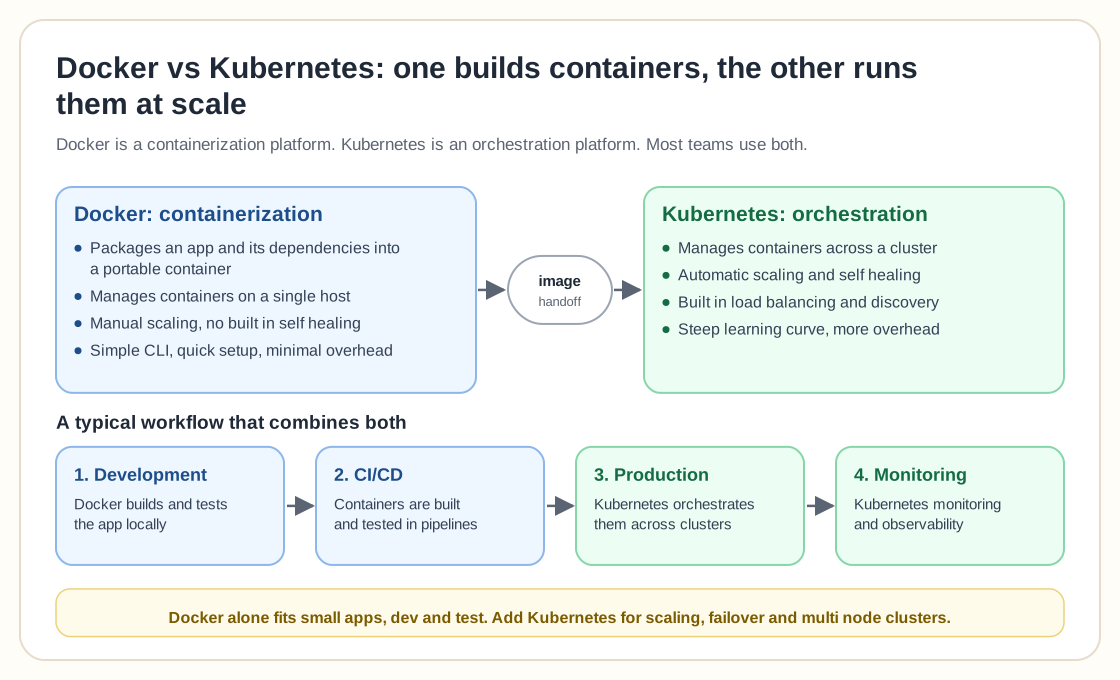
Docker vs Kubernetes: side-by-side comparison
Key differences in capabilities and use cases
| Category | Docker | Kubernetes |
|---|---|---|
| Primary Purpose | Containerization platform that builds and runs containers | Container orchestration that manages containers at scale |
| Scope | Single host container management | Multi-node cluster management |
| Learning Curve | Simple, intuitive CLI and quick setup | Steep learning curve, complex concepts |
| Auto-Scaling | Manual scaling, basic replica management | Automatic horizontal and vertical scaling |
| Self-Healing | No built-in self-healing capabilities | Automatic restart and rescheduling of failed containers |
| Load Balancing | Manual configuration required | Built-in service discovery and load balancing |
| Best For | Development, testing, small-scale deployments | Enterprise production, microservices, large-scale |
| Resource Overhead | Lightweight, minimal overhead | Higher overhead due to control plane |
Docker use cases
Development & testing
Docker gives teams consistent development environments, removes "works on my machine" issues, and packages applications for reliable local testing.
CI/CD pipelines
Docker provides consistent build environments and faster automated testing, and supports immutable deployments with version-controlled containers.
Application packaging
Docker simplifies application distribution, keeps dependencies consistent, and supports Infrastructure as Code (IaC) practices.
Kubernetes use cases
Enterprise production
Kubernetes manages complex microservices architectures, supports high-availability applications with zero-downtime requirements, and enables multi-cloud strategies.
Industry applications
Financial services (fraud detection), healthcare (patient data platforms), e-commerce (traffic spikes), media (massive datasets), and telecommunications (5G infrastructure).
AI & machine learning
Kubernetes orchestrates GPU clusters for training large language models, supports dynamic resource allocation, and enables scalable inference services.
When to choose Docker vs Kubernetes
Choose Docker when:
- Working with small to medium-scale applications
- Team prioritizes simplicity over advanced features
- Quick setup and deployment are critical
- Limited orchestration requirements
- Development and testing environments
Choose Kubernetes when:
- Managing large-scale, complex applications
- Requiring enterprise-grade auto-scaling and self-healing
- Multi-cloud or hybrid cloud deployments needed
- Advanced networking and security requirements
- Long-term scalability is essential
Docker and Kubernetes work together
The two tools complement each other
In practice, Docker and Kubernetes often work together. A typical enterprise workflow combines both technologies:
1. Development
Developers use Docker to build and test applications locally
2. CI/CD
Docker containers are built and tested in continuous integration pipelines
3. Production
Kubernetes orchestrates these Docker containers across production clusters
4. Monitoring
Kubernetes provides built-in monitoring and observability features
Docker builds the containers and Kubernetes runs them at scale, which is why most organizations use both technologies instead of choosing one.
Market trends & future considerations
Kubernetes dominance
Kubernetes has 79% vs 5% popularity in web searches compared to Docker Swarm. All major cloud providers offer managed Kubernetes services (EKS, AKS, GKE), and large organizations are increasingly standardizing on Kubernetes for production workloads.
Emerging technologies
Both platforms are adding serverless container integration, better support for edge computing and distributed deployments, and improved capabilities for AI/ML workloads, including GPU orchestration and machine learning operations.
Related guides
Frequently asked questions
Do I need Kubernetes if I'm already using Docker?
Not necessarily. If you're running a small number of containers on a single host, Docker (or Docker Compose) is often enough. Kubernetes adds value once you need multi-node scheduling, automatic failover, or scaling across a cluster. Many teams run Docker in production for years before Kubernetes becomes necessary.
Can Kubernetes run without Docker?
Yes. Kubernetes doesn't require Docker specifically. It runs containers through a container runtime interface (CRI), and most clusters today use containerd or CRI-O rather than the Docker Engine directly. You still typically build images with Docker or Docker-compatible tooling, but the Docker daemon itself isn't part of the runtime.
Is Kubernetes overkill for a homelab?
For most homelabs, yes. A single Docker host (or Docker in an LXC/VM) covers the vast majority of self-hosted service needs with far less operational overhead. K3s or k0s are lighter starting points if you specifically want to learn Kubernetes without a full multi-node cluster.