

From Essentials to Expensive: What VMware Licensing Costs in 2026
For over a decade, small IT shops could comfortably get by with VMware's Essentials Plus bundle. You got high availability, vMotion, and the peace of mind that your VMs would stay alive if a host decided to die. For a long time, that package made sense. But here we are, closing in on 2026, and what used to be a relatively affordable setup is starting to look like a budgetary nightmare.
Escaping VMware for Proxmox? Watch Out for the RHEL Licensing Trap!
The transition from socket-based licensing to a per-core model has thrown a wrench into how small-to-mid-sized businesses manage their virtualization budgets. The math changed, and so did every expectation built on it.
The core cost curve
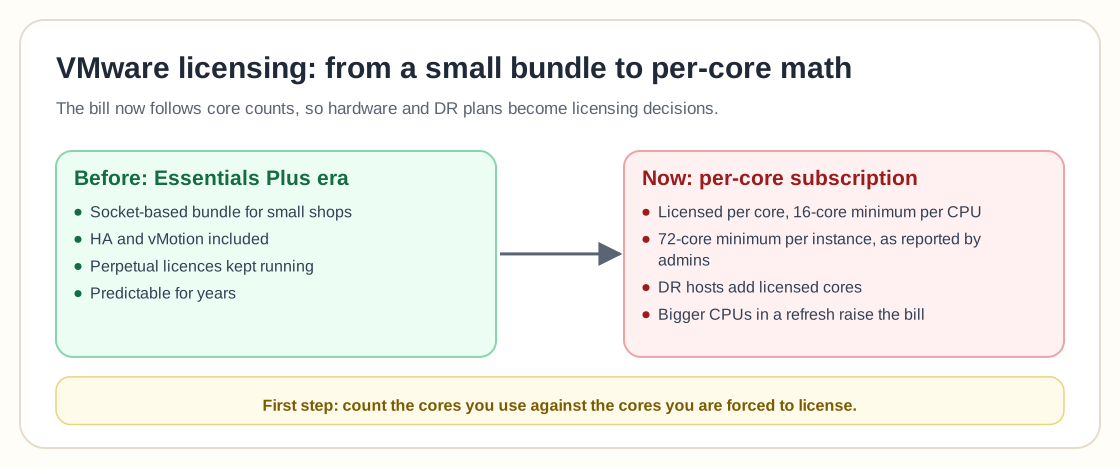
Start with the basics: Broadcom now owns VMware, and licensing is no longer what it was. If you've got a host with 2 sockets and 8 cores each (that's 16 cores total), under the new model you'll be licensing based on 16 cores per socket minimum. That means you pay for 32 cores on that box, even if you don't use them all. Multiply that by three hosts, and you're suddenly staring down a licensing requirement for 96 cores.
One IT admin recently shared that he was quoted around $50 per core annually for a standard VMware license. That's $4,800 per year. If you go with a higher-end edition, that number could balloon to over $20,000. For small teams running a couple dozen VMs, that kind of pricing used to be reserved for large-scale enterprise environments.
The sticker shock is real, and it hits teams just trying to renew what they've already had for years as well as those trying to expand.
When DR costs start to undermine DR itself
The frustration gets worse when you realize these higher costs directly undercut the reasons you stuck with VMware in the first place. Take disaster recovery. Many teams, like the one in this case, rely on VMware because of how tightly it integrates with solutions like Veeam DRaaS. For companies in sectors like financial services, where RTOs and RPOs matter, that real-time VM replication and fast failover can make or break business continuity.
Now the cost of keeping that setup running is soaring. Sure, alternative hypervisors like Proxmox or Nutanix AHV exist, and Veeam even supports some of them, at least partially. The problem is that the integration isn't as smooth. In a real-world failover, every minute counts, and having to rebuild VMs manually from backups because your hypervisor doesn't support replication might not cut it.
You end up boxed in: either you keep VMware and pay the rising costs, or you take the leap to a different hypervisor and risk slowing down your recovery process.
Hardware upgrades come with licensing strings attached
As if the licensing changes weren't enough, many users are also looking at hardware upgrades in 2026. Newer, faster hardware might help you consolidate and reduce the number of hosts, but it can also complicate your licensing situation even further.
Some users pointed out that with a 72-core minimum per license instance, it might actually be more cost-effective to run fewer, denser hosts. That only works if your workload and risk tolerance allow it. Running critical workloads on two beefy hosts instead of three smaller ones might help with cost, but it also increases your exposure, since losing one host leaves you at half capacity.
One admin said they planned to move to a two-host VxRail setup with a witness appliance. That might check some boxes, but it also assumes you're ready to fully commit to VCF, which comes with its own cost and complexity layers. VMware's ecosystem increasingly demands that you go all in, and for smaller IT departments, that can feel like overkill.
Perpetual licenses aren't a lifeline anymore
Some folks have tried to work around these changes by sticking with their old perpetual licenses. It's a tempting option, since you already paid for it. Without an active support contract, though, patching becomes a problem. Security updates for serious vulnerabilities (CVSS 9+) may still be offered after a delay, but you lose tools like vLCM and centralized management via vCenter if you're not renewing support.
One participant said they only patch their ESXi hosts twice a year and wondered if renewing was really worth it. Another pointed out that with shared storage and vMotion, there's no excuse not to patch more frequently, and that falling behind could even put your cyber insurance at risk. Some policies reportedly penalize you for every month you're behind on patching a known CVE.
VMware has made its position plain: without a subscription, you fall behind the curve, and eventually you'll be unsupported and out of options. Upgrading from vSphere 8 to 9 is subscription-only, and once 8 goes out of support in a couple years, perpetual license holders may find themselves stranded.
What can you do about it?
The first step is to run the numbers early. Understand how many cores you actually use versus how many you're being forced to license. Many are finding that 50% of their licensed cores are essentially dead weight under the new model.
Second, reconsider your hardware refresh in light of licensing. If you're being penalized for running more hosts with fewer cores, it may be time to consolidate, though that's a trade-off between performance, risk tolerance, and cost.
Third, start asking hard questions about your hypervisor. If you're locked into VMware because of Veeam, dig into the Veeam support matrix. Proxmox support is improving, and other vendors are starting to catch up. The more platforms your backup solution can handle, the more leverage you have when negotiating licensing.
Lastly, don't ignore the human side of this. Get your finance and management teams involved early and show them what's changed. Calling this "just a renewal" undersells it, because it changes how virtualization is priced and managed. If you don't prepare, your 2026 budget is going to take a hit you weren't expecting.
Final thoughts
VMware used to be a no-brainer for small and midsize IT operations. It gave you enterprise-grade stability at a price that didn't break the bank, and that era is ending. What used to be an affordable setup under Essentials Plus now feels like you're being asked to pay enterprise prices for a modest deployment.
The problem reaches beyond VMware, too, as a ripple effect of consolidation in the tech industry. Like many changes driven by corporate mergers, the biggest impacts land on the smallest teams. If you start now, you've got time to adapt, but the window is closing fast.