

'Veeam Failover Cluster Backup Copies Duplicating Shared Storage'
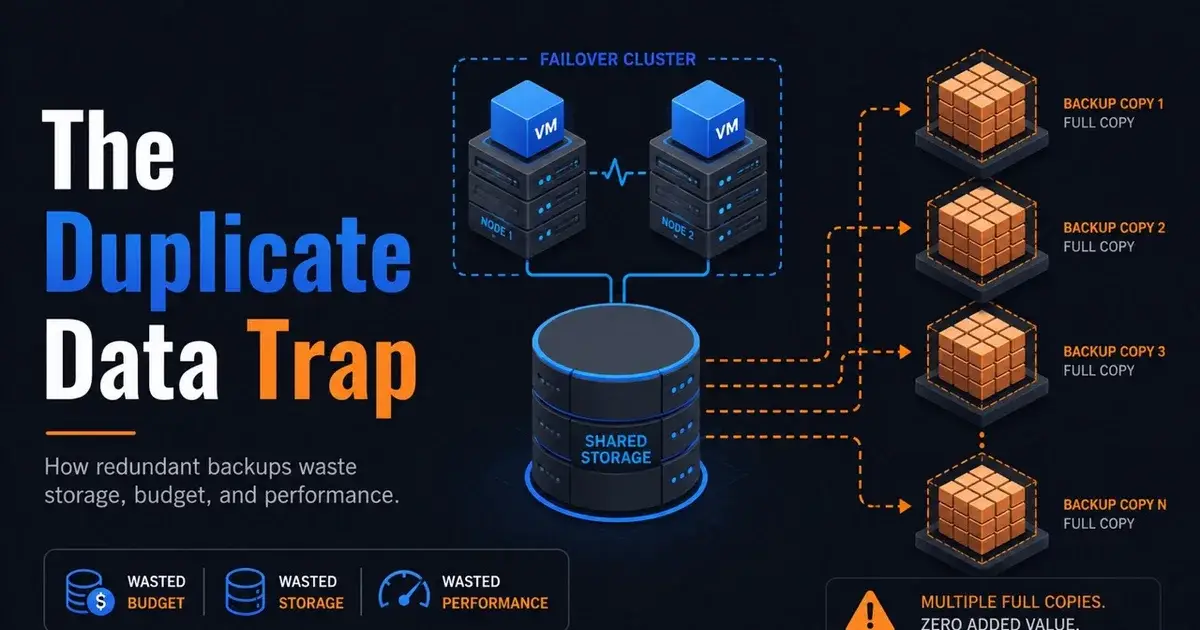
Cluster backup problems become expensive quickly when shared storage is copied as though every node owns a separate copy. One Veeam 12 administrator reported exactly that behavior in 2026: Windows Failover Cluster backup copies were described as not cluster-aware, with shared storage duplicated for each node.
That report should be read carefully, since it describes one production environment and one Veeam 12 workflow. Current Veeam 13 documentation, updated in July 2026, states that backup copy for Veeam Agent failover-cluster backups creates a single backup copy file for each failover cluster. The gap between those two statements is why version and protection method matter.
What did the Veeam 12 administrator actually report?
The environment used Windows Failover Clusters, local-disk backups, S3 copy workflows, and tape. In the middle of a broader complaint about S3 and support, the administrator added a specific cluster limitation: with Veeam 12, their Windows Failover Cluster jobs did not support backup copies properly because the copy process was not cluster-aware and duplicated shared storage for every node.
The source does not provide the cluster size, shared-volume capacity, exact Veeam 12 build, agent version, job configuration, or a storage screenshot. Without those details, the case cannot be generalized into "Veeam 12 always duplicates cluster data."
What the case does support is a practical warning. If a protection product sees node membership differently from shared-data ownership, backup-copy capacity can diverge sharply from what the administrator expects. You want to catch that during design testing, before months of retention have accumulated.
Why is shared storage duplication such a big problem?
The multiplication factor can be brutal. A large clustered dataset copied once may be acceptable, but the same dataset represented again for each cluster node can consume much more secondary storage and extend copy windows.
Raw capacity is only part of the cost. Extra data can create more repository I/O, more object-storage operations, more WAN traffic, longer retention processing, and longer health checks. If the copy target is metered cloud storage, it may also change the bill.
Even on premises, duplicate logical data can force earlier storage purchases and make disaster-recovery synchronization harder to finish inside the required window.
The Mr.PlanB storage hub is relevant because backup capacity has to be modeled around the data movement pattern as well as the size of the source volume. A shared 20 TB dataset does not behave economically like 20 TB if the protection workflow writes it several times.
What does Veeam 13 say about failover-cluster backup copies?
Current Veeam Backup & Replication 13 documentation describes a dedicated failover-cluster protection workflow with Veeam Agent for Microsoft Windows. It also states that when those failover-cluster backups are copied, the backup-copy job creates a single backup copy file for each failover cluster.
The same documentation notes that failover-cluster jobs do not create per-machine backup files because of cluster limitations. For this backup method, the cluster is treated as one scope.
That is materially different from the behavior the administrator described in Veeam 12. That suggests anybody evaluating the problem in 2026 should first check whether the exact version and protection method still behave the same way before designing around the old limitation.
"Veeam 12 did this in one environment" does not prove "Veeam 13 does this now." Equally, do not assume an upgrade will fix an environment without testing, because the exact job type matters.
How should you test cluster-awareness before rollout?
Create a representative cluster with shared data and run a complete protection cycle into a test repository. Record the logical source size, first full backup size, incremental behavior, and backup-copy size.
Then add a node or move the clustered role between nodes, and run the backup and copy again. The secondary repository should make it clear whether shared data is being treated once or repeated by node.
Do the same test after a Veeam upgrade. A product can change how clustered assets are discovered, grouped, or copied between major releases, so capacity planning that was correct for one version may become too conservative or too optimistic later.
For virtualization teams evaluating broader platform changes, the Mr.PlanB Proxmox backup guide makes a similar point: backup behavior has to be tested against the actual platform objects being protected instead of inferred from a generic feature label.
What should be measured besides repository size?
Measure copy duration, WAN use, restore granularity, and what happens when a node is unavailable. A smaller backup is not automatically better if the restore workflow becomes harder.
For a failover cluster, test recovery of shared data and individual nodes according to the supported method. Confirm whether restored data maps back to the cluster correctly, and how witness disks and shared disks are presented during restore.
Current Veeam documentation notes specific behavior for shared disks and disk witnesses, which is another reason the restore test matters. Cluster backup behaves differently from ordinary server backup repeated several times.
Also test retention. If a backup-copy job uses long-term GFS points, a duplication issue can compound over many weekly, monthly, or yearly restore points, and one clean full backup is not enough evidence for a year-long capacity model.
Should a team upgrade Veeam only to fix this problem?
Only after confirming that the current supported version changes the exact behavior causing the problem. The Veeam 13 documentation is encouraging for the specific failover-cluster backup-copy model, but an upgrade changes more than one feature.
Inventory repositories, proxies, agents, tape, object storage, encryption, scripts, and application-aware processing before moving the control plane. Then reproduce the cluster copy test in the target version before declaring the issue solved.
If the environment is already planning a V13 migration, this test should be part of acceptance. If V12 is stable and supported for the required period, a smaller architecture change may be possible depending on the workload.
The deciding question is whether the supported V13 workflow removes the measured duplication without breaking another recovery requirement.
What would I do with a cluster that is already duplicating data?
I would first quantify the waste. Compare the cluster's real protected shared capacity with the logical capacity written into the secondary repository. Identify which restore points contain repeated data and how much retention is amplifying the effect.
Then I would build the same cluster protection job in a current Veeam 13 test environment using the documented failover-cluster workflow, and run primary backup, backup copy, retention, and restore tests.
If the current version produces one cluster-level copy as documented and the restore works, the upgrade has a measurable business case. If duplication remains because the production environment uses a different protection method, the next step is to change the job design or open a targeted support case with that evidence.
Cluster-awareness has to be proven by watching how the product stores and restores shared data.
Frequently Asked Questions
Did Veeam 12 duplicate shared cluster storage in backup copies?
One 2026 administrator reported that their Veeam 12 Windows Failover Cluster backup-copy workflow was not cluster-aware and duplicated shared storage for every node. That is a user report from one environment, not a universal statement about every Veeam 12 cluster.
How does current Veeam 13 document failover-cluster backup copies?
Veeam 13 documentation updated in July 2026 says a backup copy of Veeam Agent failover-cluster backups creates a single backup copy file for each failover cluster. That current behavior should be checked against the exact protection method and build in use.
Why can cluster backup duplication become expensive?
Shared storage can be large, so treating the same clustered data as separate per-node content can increase repository consumption, copy duration, object-storage operations, retention cost, and replication traffic.