

The Automation Gap Teams Hit When Replacing VMware With Proxmox
The part of VMware migrations that gets overlooked
When companies start planning their exit from VMware, the conversation usually revolves around hypervisors, storage clusters, and networking. Teams compare ESXi to KVM, debate Ceph versus SAN arrays, and analyze whether live migration works the same way. Somewhere in the middle of all those infrastructure discussions, one major piece of the VMware ecosystem drops out of sight: automation.
One engineer recently ran into this exact problem while preparing to move most of their virtualization layer to Proxmox. Their organization had been relying heavily on VMware Aria Automation. Internal teams could log into a portal, choose a template for a Windows or Linux machine, deploy it themselves, and immediately see the hostname, IP address, and remote console.
The Proxmox Migration TRAP Nobody Warned You About
Developers loved it, and infrastructure teams loved it even more. Then the migration planning started, and suddenly that self-service system had no obvious replacement. That realization is becoming one of the most common surprises for organizations leaving VMware.
VMware's automation layer did more than people realized
VMware Aria Automation is more than a convenience tool. In many organizations it acts as the front door for infrastructure.
Developers and internal teams don't open support tickets to request servers anymore. They log into a portal, select a template, and launch new machines on demand. The system handles provisioning, assigns networking, and provides console access if something goes wrong.
From the infrastructure team's perspective, it solves several problems at once. It standardizes VM builds, enforces templates, and eliminates manual provisioning. Most importantly, it keeps engineers from becoming the bottleneck every time someone needs a new environment.
When organizations begin migrating away from VMware, they often discover that Proxmox itself doesn't include a full equivalent to that portal experience, and that's where things get interesting.
The first answer: build your own automation
One experienced engineer responded with the solution many infrastructure teams rely on without making much noise about it: they built their own system.
Their environment uses Ansible to provision both VMware and Proxmox virtual machines. When someone needs a server, they enter a hostname and select the machine type from a dropdown menu. A build script launches the deployment, retrieves the DHCP-assigned IP address, and stores it in a local database. Within about five minutes, the new server is ready.
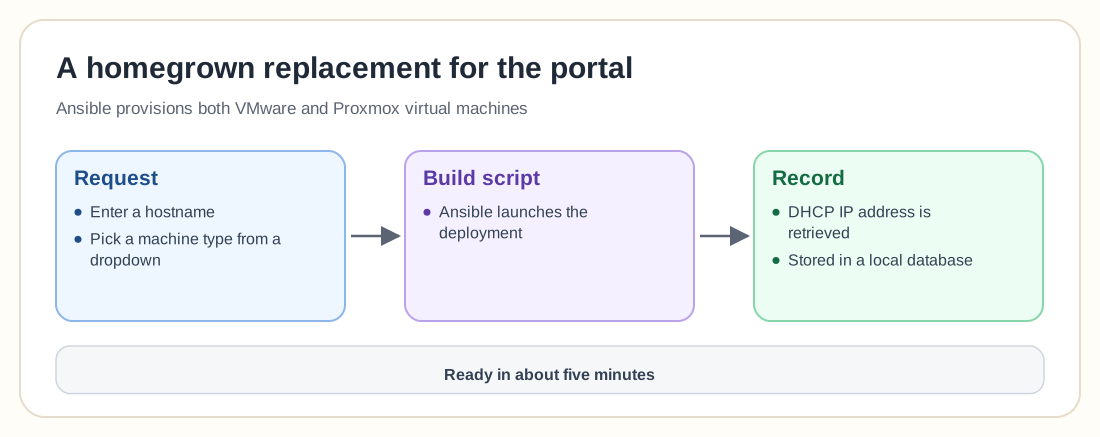
The web interface in front of the system was written internally, but the underlying automation tools are standard infrastructure components.
That approach says a lot. Proxmox is extremely scriptable through its API, and many teams build their own provisioning layers instead of relying on a single large automation product. It also means automation becomes part of the infrastructure team's responsibility.
The toolchain approach many teams adopt
Instead of one centralized platform like VMware Aria, Proxmox environments often rely on combinations of tools.
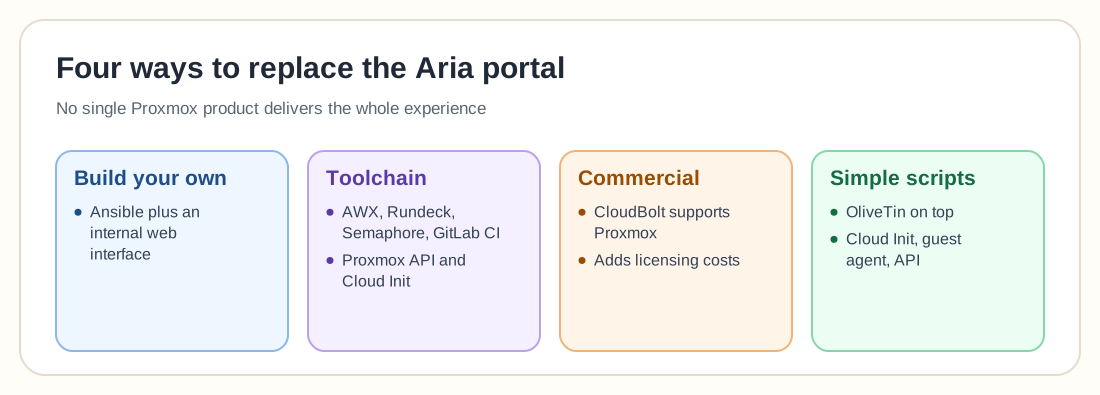
Some engineers suggested orchestration platforms such as AWX, Rundeck, Semaphore, Jenkins, GitLab CI, Airflow, or TeamCity. These systems can trigger automation workflows that interact with the Proxmox API to create and configure virtual machines. Templates are typically built with Cloud-Init or configuration management tools like Ansible.
From the user's perspective, the experience can still look like a self-service portal, while behind the scenes multiple systems work together to deliver that workflow.
This modular approach offers flexibility, but it also requires more architectural planning. VMware packaged many of those capabilities into a single platform, and open infrastructure stacks tend to spread them across several tools.
Commercial platforms still exist
Not every organization wants to build its own automation layer. One engineer mentioned that their company uses CloudBolt for self-service provisioning. In their environment, users can deploy infrastructure through a portal, view the VM's IP address and hostname, and access the console directly from the interface.
CloudBolt can also trigger orchestration workflows and configuration management actions during server builds, and it supports Proxmox as a resource provider. For organizations that want a VMware-like experience without building everything internally, tools like this can fill the gap.
They also bring licensing costs and another platform to manage, which leads the conversation right back to the trade-offs that started the migration discussion in the first place.
Some engineers suggest simpler approaches
Not everyone believes a large automation platform is necessary. One response suggested using simple scripts combined with VM templates and letting users trigger them through lightweight interfaces like OliveTin. In that model, the automation is essentially just scripts wrapped in a web interface.
Another comment pointed out that sometimes the simplest solution is to rely directly on Proxmox features like Cloud-Init, the QEMU guest agent, and the Proxmox API. With those pieces in place, automated VM provisioning becomes relatively straightforward. The catch is that administrators must assemble the workflow themselves, because no single product delivers the entire experience.
Why this problem exists
Proxmox isn't really short on features here. The challenge comes from a different philosophy.
VMware built an ecosystem where the hypervisor, automation platform, networking stack, and management tools all belong to the same vendor. That tight integration makes large environments easier to standardize.
Proxmox sits in a very different world. It's part of the broader open infrastructure ecosystem, where tools are modular and interchangeable and you assemble components that fit your workflow instead of buying one giant platform.
For engineers who enjoy building systems, this flexibility is powerful. For teams used to VMware's all-in-one approach, it can feel like something important is missing.
The moment migration planning gets real
That's why the automation question often becomes a turning point in VMware migrations. Replacing the hypervisor is relatively easy, replacing storage architecture is manageable, and networking differences can be learned. Replacing the workflows people rely on every day, meaning the portals, automation pipelines, and provisioning systems, is a harder job.
Many organizations discover that the migration involves rebuilding the operational layer that sits on top of the virtual machines as well as moving the machines themselves. At that point the VMware exit plan stops being a technical exercise and turns into an infrastructure redesign.