

Should You Choose XCP ng or Proxmox for a VMware Migration?
Leaving VMware involves more than selecting another hypervisor. Every virtual machine must be transferred, tested and protected without creating unacceptable downtime or breaking critical applications.
Proxmox VE and XCP ng are two of the strongest open source destinations for VMware workloads. Both provide migration tools, centralized management, clustering, high availability and integrated backup options. However, their migration processes and long term operating models are different.
Proxmox vs XCP-ng: Which Open-Source Hypervisor is Right for You?
Proxmox is generally the more flexible choice for organizations that want an integrated virtualization platform with broad storage and container support. XCP ng can be more attractive when reducing migration downtime is the leading priority or when the team prefers a virtual machine focused Xen environment.
How does Proxmox migrate VMware virtual machines?
Proxmox VE includes an integrated importer that connects to a VMware ESXi host. Administrators add the ESXi system as an import source in the Proxmox storage configuration, select a virtual machine and map its disks, network interfaces and target storage through the web interface.
The Proxmox documentation states that the importer was tested with ESXi versions 6.5 through 8.0. The importer can map much of the VMware configuration into the Proxmox virtual machine model, reducing the amount of manual reconstruction required.
Proxmox recommends powering down the VMware virtual machine before beginning the main import. This protects consistency and prevents changes from being made to the original disks while they are transferred.
Proxmox also offers a live import option. In this mode, the source VMware virtual machine is still powered off, but the new Proxmox virtual machine can start before the entire disk has finished transferring. Frequently accessed disk data is imported first, while the remaining information continues copying in the background.
This can shorten service downtime substantially, especially when migrating a large virtual machine. However, the destination may initially have lower input and output performance, and Proxmox warns that data written after the live import starts could be lost if the import process fails.
How does XCP ng migrate VMware virtual machines?
XCP ng uses Xen Orchestra for VMware migration. Its V2V feature connects to VMware through the ESXi application programming interface and transfers the virtual machine into the XCP ng environment.
Xen Orchestra supports warm migration. It first creates a VMware snapshot and copies the main virtual disk while the source virtual machine continues operating. When the initial copy is complete, Xen Orchestra shuts down the VMware virtual machine, captures the remaining changed blocks and transfers only that final difference.
The virtual machine is then started on XCP ng. Because most of the data is copied while the original system remains online, the final service interruption can be much shorter than a traditional cold migration.
Warm migration requires the VMware virtual machine to have at least one snapshot. The VMware account used by Xen Orchestra must also have permission to stop the source virtual machine during the final cutover.
Xen Orchestra only needs network access to the ESXi application programming interface, without direct access to the underlying VMware storage. This can simplify migrations where the storage network is difficult to connect to the replacement environment.
Which platform provides less downtime?
XCP ng has the clearer advantage when comparing the official VMware migration workflows. Xen Orchestra performs its initial data transfer while the source virtual machine remains online, so only the final changes need to be copied during the shutdown window.
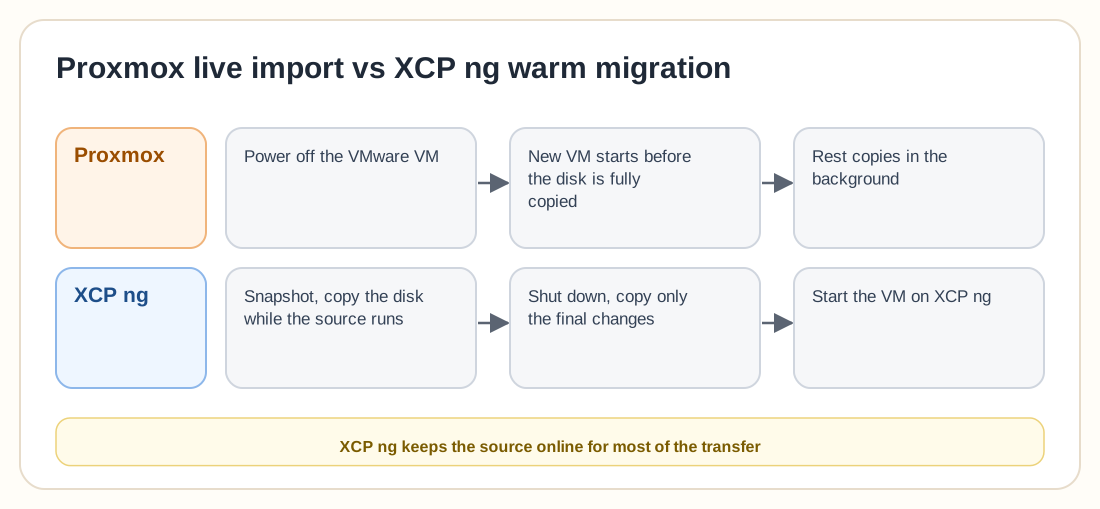
Proxmox live import also reduces downtime, but the VMware virtual machine must already be turned off. Proxmox starts the destination before the full disk transfer is finished, while XCP ng keeps the source online during most of the transfer.
The actual difference will depend on virtual machine size, storage speed, network bandwidth and write activity. A small infrastructure with short maintenance windows may find the Proxmox process completely acceptable. A business migrating multi terabyte application servers may benefit more from the XCP ng warm migration model.
Neither workflow should be trusted without testing. Databases, directory services and transaction heavy applications require application level validation even when the hypervisor reports a successful migration.
What migration limitations should you check?
Proxmox lists several important limitations. Virtual machines stored directly on VMware vSAN cannot be imported through the standard workflow, and the disks may need to be moved to another VMware datastore first. Encrypted virtual disks cannot be imported until the encryption policy is removed. Proxmox also cannot currently transfer VMware virtual trusted platform module state, which can affect Windows systems that store disk encryption keys in the virtual trusted platform module.
VMware snapshots can make Proxmox imports significantly slower. Proxmox recommends serializing large migration jobs because the ESXi application programming interface has a relatively low connection limit. Running too many imports simultaneously can cause delays and stalled operations.
XCP ng has its own limitations. Its automatic VMware migration process cannot handle a single virtual disk larger than 2 terabytes minus 8 megabytes. Administrators must create multiple destination disks and transfer the content through another method when a virtual machine exceeds that limit.
XCP ng also advises administrators to remove VMware guest drivers before migration. When importing an OVA, administrators must manually confirm whether the original system used BIOS or UEFI because that information may not be detected correctly.
These limitations can decide the platform before feature comparisons begin. An organization with many large virtual disks may find Proxmox easier. An organization with large but supported disks and strict downtime requirements may prefer XCP ng.
What happens after the migration?
The destination platform must support the environment for years after VMware has been removed.
Proxmox manages KVM virtual machines and LXC containers from its integrated web interface. It supports local ZFS, NFS, iSCSI, Ceph and other storage technologies available through Debian. It also includes cluster management, high availability, software defined networking and a distributed firewall.
Proxmox Backup Server provides incremental backups, deduplication, verification, remote synchronization, single file recovery and live restore. It is deployed as a separate backup system and added directly to Proxmox VE as a storage destination.
XCP ng focuses on virtual machines and uses Xen Orchestra as its central management layer. Xen Orchestra provides access controls, reports, load balancing, backup, delta backup, disaster recovery, continuous replication and warm migration.
That gives you two different operating models. Proxmox places most cluster management directly on the hypervisor nodes and uses a separate product for advanced backup, while XCP ng relies more heavily on Xen Orchestra as the central control, backup and automation system.
Which platform is better for a large VMware migration?
XCP ng deserves serious consideration when the migration contains many large virtual machines and downtime must remain minimal. Its warm migration process is built specifically around copying most data before the VMware shutdown, and Xen Orchestra gives administrators one central place to monitor migration jobs and manage the resulting XCP ng environment.
Proxmox may be the better long term choice when the organization wants more than a direct VMware replacement. It supports virtual machines, system containers, integrated Ceph management, ZFS and a broad range of Linux based infrastructure options. Teams with strong Debian, KVM or Linux administration experience may also find Proxmox easier to troubleshoot and customize.
Should you choose XCP ng or Proxmox?
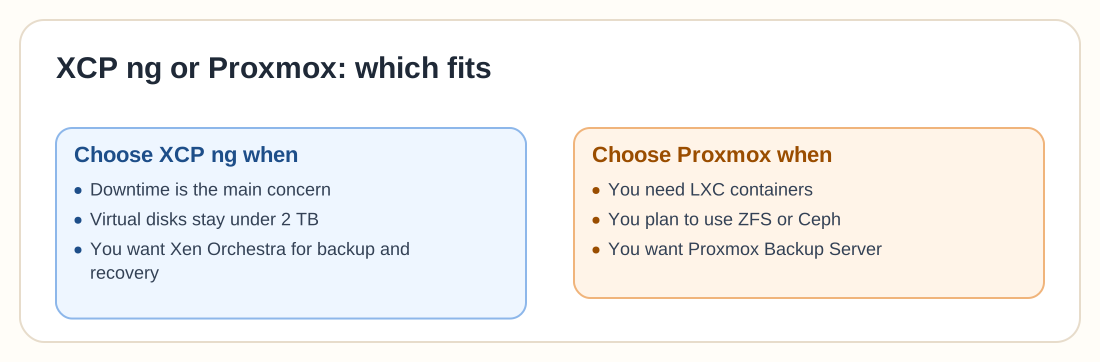
Choose XCP ng when migration downtime is the dominant concern, your virtual disks remain within its automatic migration limit and you want Xen Orchestra to manage virtualization, backup and disaster recovery.
Choose Proxmox when you want a wider infrastructure platform, need LXC containers, plan to use ZFS or Ceph, or prefer Proxmox Backup Server as a separate backup layer.
Before committing, migrate several representative virtual machines to both platforms. Include a Windows server, a Linux application, a database system and one of the largest workloads in the environment. Measure transfer time, outage duration, driver changes, network behavior, backup performance and recovery speed.
The migration tool gets you off VMware, but the daily management model decides whether the replacement still works well after the migration project is finished.