

Proxmox vs XCP-ng: Which Open Source Hypervisor Is Better?
Proxmox VE vs XCP-ng is a close call between two open source hypervisors, because both platforms solve the same central problem: running and managing virtual machines without tying the business to an expensive proprietary hypervisor. Both are open source, both support clustering and high availability, and both can become credible VMware replacements. The better choice depends on whether you value an integrated infrastructure platform or a focused Xen based virtualization stack.
As of July 2026, Proxmox VE 9.2 is the current Proxmox release. It is based on Debian 13 and combines KVM virtual machines, LXC containers, software defined networking, storage management and clustering in one interface. On the other side, XCP ng 8.3 is the current long term support release, supported until November 30, 2028. It is built around the Xen hypervisor and is normally managed through Xen Orchestra.
What is the main difference?
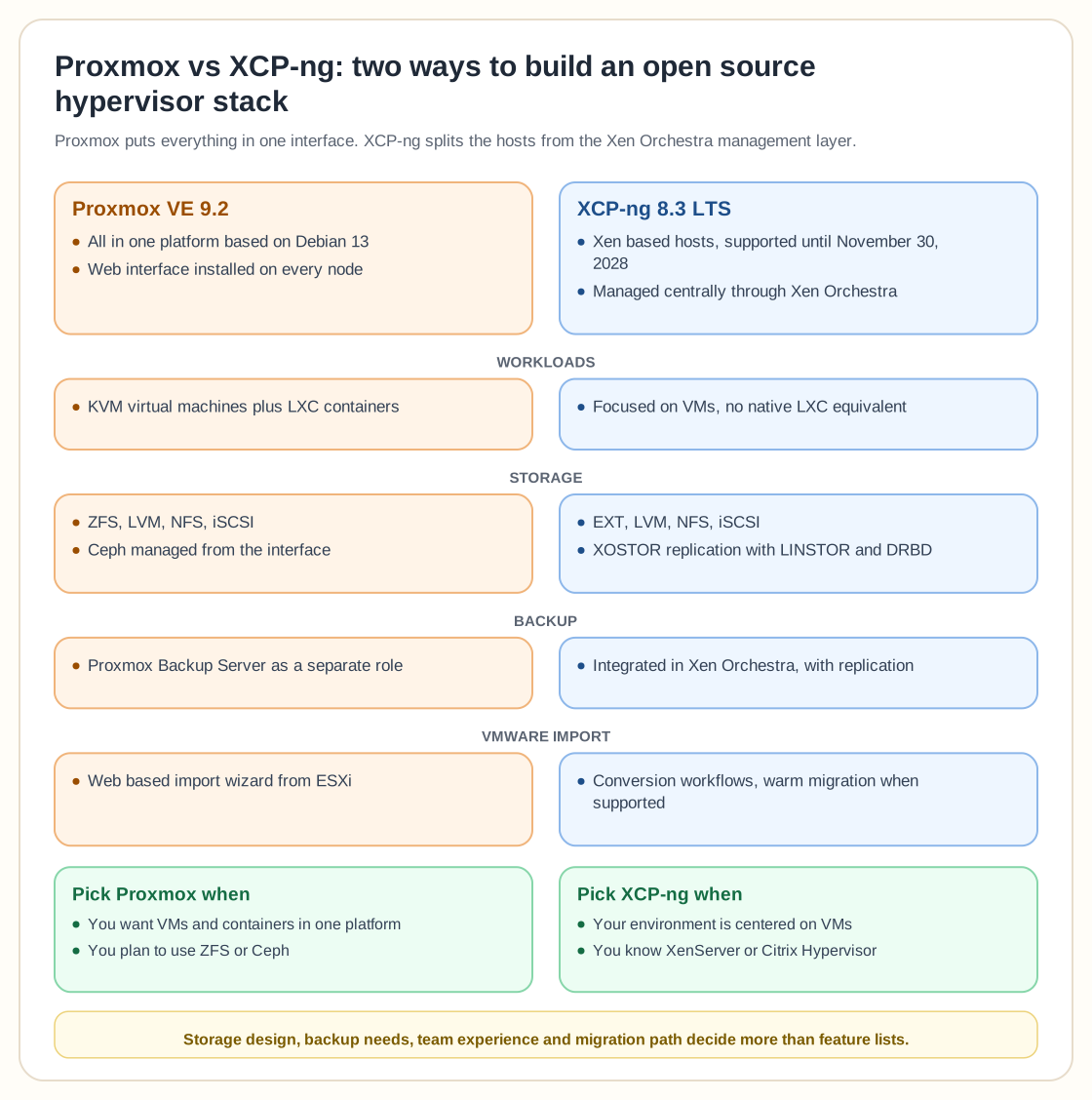
Proxmox is designed as an all in one virtualization platform. Its web interface is installed directly on every node and manages virtual machines, containers, networking, storage, backups and cluster functions. This makes Proxmox attractive to smaller IT teams, managed service providers and homelab users who want one product covering most infrastructure tasks.
XCP ng takes a more specialized approach. The hosts run the Xen based virtualization platform, while Xen Orchestra provides centralized management, reporting, backup, replication, load balancing and disaster recovery. Xen Orchestra is developed by the same team as XCP ng and is the officially supported management client. This separation can feel structured in larger VM focused environments, although administrators must deploy and protect another component.
Virtual machines and containers
Proxmox supports KVM virtual machines and LXC system containers. Administrators can use full virtual machines for Windows, strong isolation and appliance workloads, then use lightweight LXC containers for Linux services that do not need a complete guest operating system.
XCP ng focuses primarily on virtual machines. It offers Xen virtualization, live migration, resource pools and guest tools for Windows, Linux and several BSD based systems. It does not provide an LXC equivalent as a native platform feature.
Teams that want every workload isolated inside a conventional VM may see this focus as a benefit. Teams that rely heavily on lightweight Linux containers will probably find Proxmox more flexible.
Management experience
Proxmox offers a direct interface. An administrator can open the web console, create a VM, configure storage, join nodes to a cluster and schedule backups without installing a separate management server. The interface is dense, but most infrastructure settings are visible in one place. This design also reduces the number of components needed to get started, and even a single Proxmox node includes the same general management interface used for a larger cluster.
Xen Orchestra provides a centralized view across XCP ng hosts and pools. It includes access controls, self service, reports, backup jobs, disaster recovery, continuous replication and VM load balancing.
The supported Xen Orchestra appliance is commercially packaged, while a community version can be built from the open source code. Organizations should decide whether they want the supported appliance or are comfortable maintaining the community build.
Storage and high availability
Proxmox supports local storage such as ZFS and LVM, plus shared options including NFS, iSCSI and Ceph. Ceph is deeply integrated and can be managed from the Proxmox interface, making Proxmox a strong option for hyperconverged clusters built from standard servers.
That flexibility helps, but Ceph requires sufficient nodes, disks and network capacity to operate properly. A small business running one or two servers may find ZFS or external shared storage simpler than building a full Ceph cluster.
XCP ng supports local EXT and LVM storage as well as shared NFS and iSCSI repositories. Its XOSTOR option uses LINSTOR and DRBD to replicate storage across hosts. High availability can restart protected VMs after a host failure, while live migration moves running VMs between hosts in a pool. XCP ng often feels most natural with reliable shared storage, although XOSTOR supports a hyperconverged design.
Backup and disaster recovery
Proxmox includes backup capabilities and integrates directly with Proxmox Backup Server. Proxmox Backup Server adds incremental backups, deduplication, encryption, verification, live restore and single file recovery. It can protect Proxmox virtual machines and containers through the same management workflow. Separating the backup server from the virtualization cluster also makes it easier to isolate backup storage from production infrastructure.
XCP ng uses Xen Orchestra as its integrated backup platform. It supports full and incremental backup, replication, rolling snapshots, metadata backup, continuous replication and disaster recovery workflows.
Xen Orchestra combines management and backup in one system, while Proxmox separates hypervisor management and the dedicated backup server role more clearly. Neither approach wins by default, and the right choice depends on how the organization wants to manage permissions, storage and recovery responsibilities.
VMware migration
Both platforms target organizations leaving VMware. Proxmox includes a web based import wizard that can migrate guests directly from VMware ESXi.
XCP ng provides Xen Orchestra based conversion workflows for VMware, KVM and other platforms, including warm migration under supported conditions. Its VMware migration process can copy most of a VM while it is still running, then shut it down to transfer the final changes.
Whichever platform you pick, test Windows drivers, firmware mode, networking, snapshots, backup recovery and application performance before moving production systems.
XCP ng may feel familiar to teams with XenServer or Citrix Hypervisor experience. Proxmox may feel more familiar to teams comfortable with Debian, KVM, Linux bridges and ZFS.
Licensing and support
Both products can be downloaded and used as open source software. Proxmox VE is licensed under the GNU AGPL version 3 and is available without a subscription. Proxmox subscriptions provide access to the enterprise repository and optional support services.
XCP ng also offers optional commercial support. Its support model is priced per physical host and does not impose CPU, memory or hypervisor feature restrictions.
Businesses should still budget for support. Without a traditional license fee you still need tested updates, reliable backups, documentation, monitoring and experienced engineers when a cluster fails.
Which one should you choose?
Choose Proxmox when you want virtual machines and LXC containers in the same platform, prefer an integrated interface, plan to use ZFS or Ceph, or want Proxmox Backup Server as a separate backup system. It is especially compelling for mixed workloads, smaller teams and organizations that want broad infrastructure features without assembling several management products.
Choose XCP ng when your environment is centered on virtual machines, you prefer Xen architecture, or you want Xen Orchestra to provide centralized management, backup, replication and disaster recovery. It is also a logical destination for organizations already familiar with XenServer or Citrix Hypervisor.
For most small businesses, homelabs and mixed Linux environments, Proxmox is the more versatile choice. For VM focused organizations that value Xen Orchestra and a structured Xen based stack, XCP ng can be the better operational fit.
In the end, your storage design, backup requirements, team experience and migration path will decide this more than headline feature lists.