

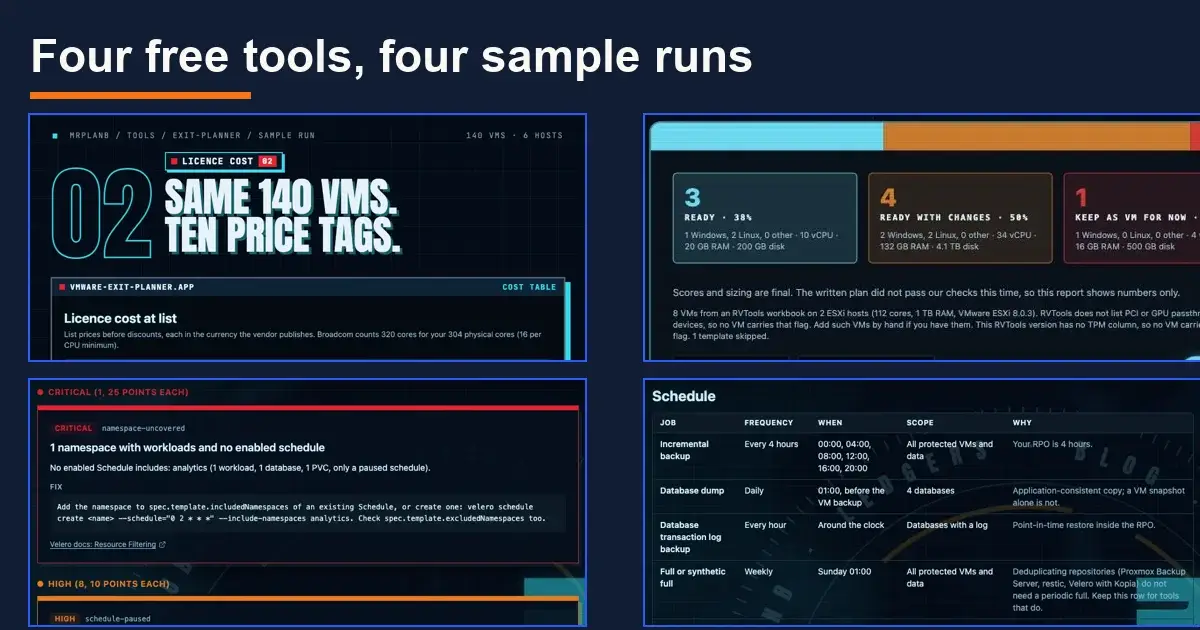
Four free planning tools, four sample runs: what the numbers say
Four free planning tools on mrplanb.com answer the questions I see most from small IT teams: what the VMware renewal will cost and what to move to, which VMs could run on Kubernetes, whether Velero protects anything, and what a written backup policy should say. Each section below shows a real sample run you can open, with the numbers it produced.
All four are free, run three times a day per visitor without a sign-up, and keep your files in the browser. They recommend no product, and no vendor pays for a place on any page. The scores behind the comparisons come from the public Ledgers on this site.
The renewal quote: VMware Exit Planner
You drop in an RVTools export, or type a few numbers, and the VMware Exit Planner gives you the cores Broadcom will count, list prices for eight alternatives from the VM Platform Ledger, four migration waves, and the VMs that will block a move: vTPM, shared disks, raw device mappings, USB dongles, GPU passthrough, old hardware versions and missing VMware Tools.
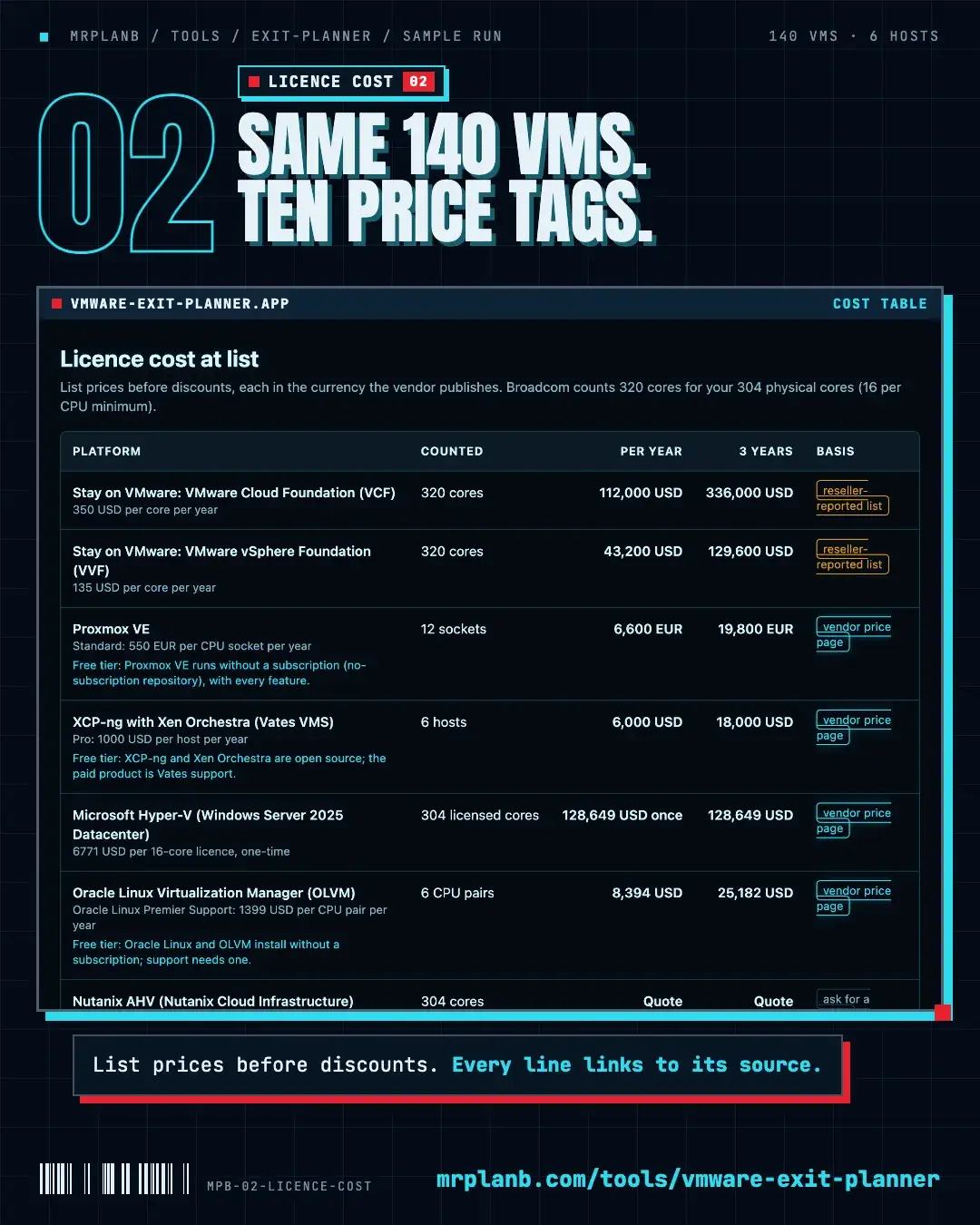
The sample estate has 140 VMs on 6 hosts. Those hosts have 304 physical cores, and Broadcom counts 320, because it bills at least 16 cores per CPU and two edge hosts run 12-core chips. At list price that is 112,000 USD a year for VMware Cloud Foundation against 6,600 EUR a year for Proxmox VE Standard support on the same 12 sockets. Ten VMs landed in the last wave because of blockers.
Open the sample run: vmware-exit-planner?r=b22aa098e97e
Who it is for: the one admin who has to answer "what are our options" before the renewal meeting.
Could Kubernetes run this: KubeVirt Readiness Report
The KubeVirt Readiness Report takes the same RVTools export and scores every VM from 0 to 100 for a move to OpenShift Virtualization, Harvester, Kubermatic and the other KubeVirt platforms. Every deduction links to the documentation page that explains the limit. It then shortlists platforms from the On-Prem Kubernetes Ledger and sizes the nodes with the assumptions shown.
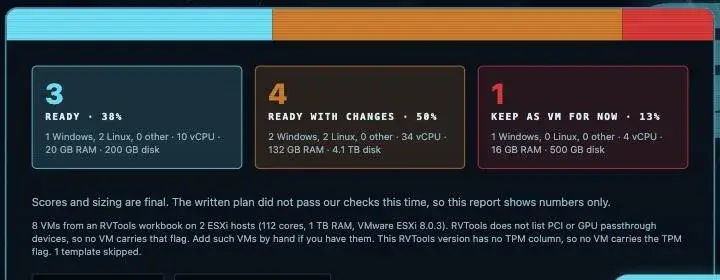
The built-in sample has 8 VMs on 2 hosts: 3 are ready now, 4 are ready with changes and 1 stays a VM for now. The deductions that decided it were a guest OS past vendor support (45 points), a raw device mapping (35), a shared multi-writer disk (30) and a USB licence key (20). This run shows numbers only, because the written plan did not pass the tool's own checks, which is the behaviour I want when the text and the numbers disagree.
Open the sample report: kubevirt-readiness?r=1e8ccac75a8b
For the bigger question of whether to go Proxmox or KubeVirt at all, see KubeVirt vs Proxmox for a VMware migration.
The Velero nobody tested: Kubernetes Backup Audit
Paste the output of kubectl get schedules,backups,restores,backupstoragelocations into the Kubernetes Backup Audit, plus PVCs and workloads if you have them. It runs fourteen checks, scores the setup from 0 to 100, and gives every finding the Velero flag or field that fixes it with the documentation page behind it. It ends with a restore test plan built from your own objects.
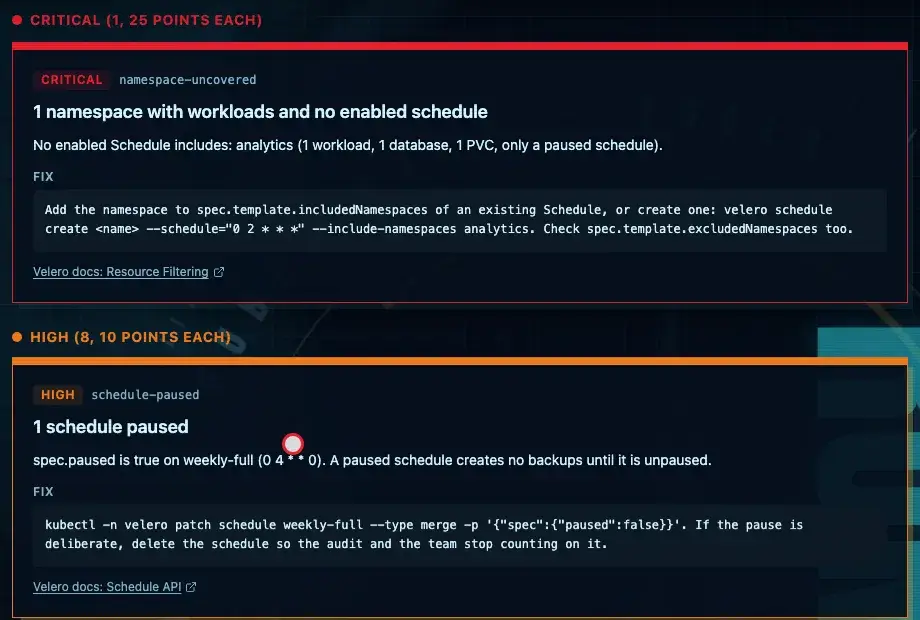
The sample cluster scored 30 of 100: 1 critical, 8 high and 3 medium findings. The critical one is a namespace with a Postgres database and nothing but a paused schedule. Among the high ones: a 500 Gi PVC on EFS with no snapshot path and no file system backup, the database with no pre or post hooks, a 36 hour TTL on a daily schedule (one failed night and nothing is left), the last backup PartiallyFailed, and the EnableCSI feature switched off.
Most of these are invisible in velero backup get, which lists backups as Completed while the data you care about was never in them.
Open the sample audit: kubernetes-backup-audit?r=a7dbffde1e75
The policy nobody wrote: Backup Runbook Generator
The Backup Runbook Generator asks ten questions: platforms, data size, RPO, RTO, retention, compliance, sites, budget and who restores. It writes an eight-section policy, checks your answers against 3-2-1-1-0, builds the schedule table and the retention maths, and gives config snippets for the tools you already run: vzdump and Proxmox Backup Server, Velero, restic, Windows Server Backup and rclone.
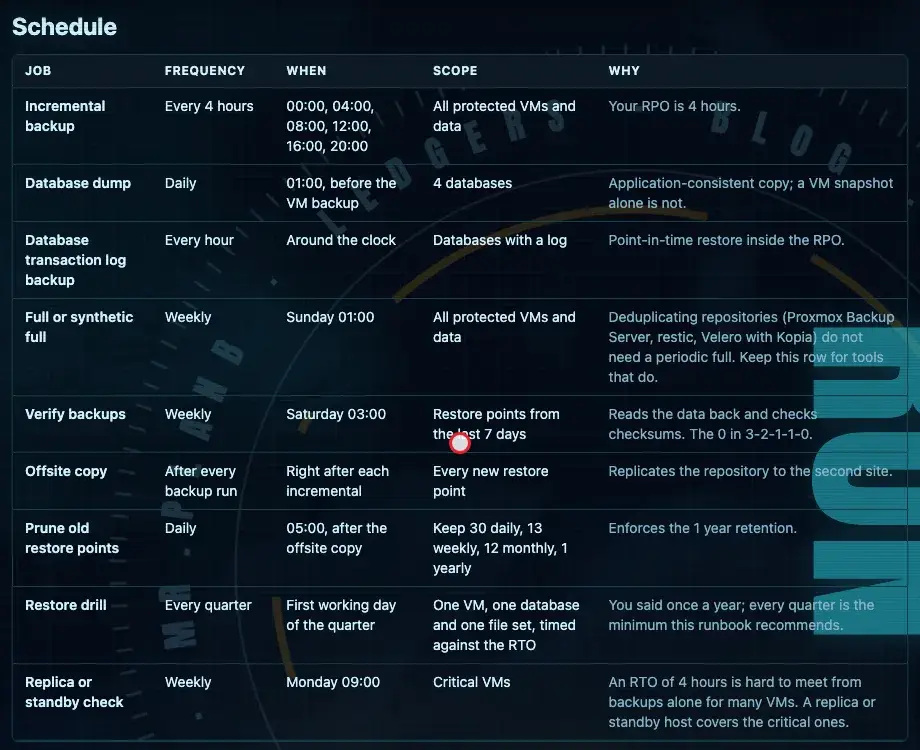
The sample is a small business on VMware and Windows with 40 VMs, 4 databases and 20 TB of data, an RPO and RTO of 4 hours and one year of retention. The 3-2-1-1-0 check came back 2 of 5. Disk at both sites counts as one medium, and no copy is offline or immutable, so one admin account reaches every copy.
The number that surprises people is storage. Keeping 30 daily, 13 weekly, 12 monthly and 1 yearly restore point of 20 TB comes to about 116 TB in the primary repository and the same again offsite, and about 139 TB in 12 months at 20% growth. Every line of that estimate shows its assumption (50% after compression and deduplication, 2% daily change), so you can replace them with your own.
Open the sample document: backup-runbook-generator?r=af1fd32147d7
If you are choosing the backup software itself, the Open-Source Backup Ledger scores the free options.
How the tools are built
The numbers come from fixed rules in code, with the assumptions printed next to them. The written parts only explain those numbers: a section is accepted when every number in it already appears in the computed plan, and otherwise the tool falls back to template text or shows numbers only, as the KubeVirt sample does.
What is sent to the server is limited. The RVTools export is parsed in your browser and only counts and flags leave it. The backup audit hashes namespace and object names before sending. The runbook sends your ten answers and nothing else.
If a result looks wrong for your setup, tell me on X or LinkedIn and I will check the rule behind it.
Frequently Asked Questions
How many cores will Broadcom bill for my VMware hosts?
VMware Cloud Foundation and vSphere Foundation are licensed per core with a minimum of 16 cores per CPU. In the Exit Planner sample, 6 hosts with 304 physical cores are counted as 320, because two hosts run 12-core CPUs.
Can all my VMware VMs move to KubeVirt?
Usually not all of them. In the KubeVirt Readiness sample, 3 of 8 VMs were ready, 4 were ready with changes and 1 stayed a VM. Old guest operating systems, raw device mappings, shared disks and USB licence keys cost the most points.
How do I know if my Velero backups actually protect anything?
Check that every namespace with data has an enabled schedule, that every PVC has a snapshot or file system backup path, that TTL is longer than the schedule interval and that the last backups completed. The Kubernetes Backup Audit runs fourteen such checks on the YAML you paste.
How much backup storage do I need for 20 TB of data?
With one year of retention (30 daily, 13 weekly, 12 monthly and 1 yearly restore point) the Runbook Generator sample needs about 116 TB in the primary repository and the same again offsite, growing to about 139 TB in 12 months at 20% data growth.
Do these tools upload my RVTools file or kubectl output?
No. The RVTools export is read in your browser and only counts and flags are sent. The backup audit hashes names in the browser before anything is sent. All four tools are free with three runs a day and no sign-up.