

Containerization is not modernization
A legacy workload may still depend on one server, local files, a fixed hostname, a static IP, manual installation, in-memory sessions, a shared writable directory, an unsupported operating system, or a hardware-bound licence. Packaging it into a container does not remove any of that.
Modernization may additionally require externalizing configuration, moving files to persistent or object storage, removing machine-specific dependencies, adding meaningful health checks, supporting graceful shutdown, and separating application and database lifecycles.
A containerized monolith may still be a monolith, and that is not automatically a failure. A well-operated monolith in Kubernetes can beat a poorly operated monolith on an unmanaged server. The improvement must be measured honestly.
Why migrate, and why not
A sound Kubernetes programme rejects unsuitable migrations. Success isn't measured by the percentage of applications moved.
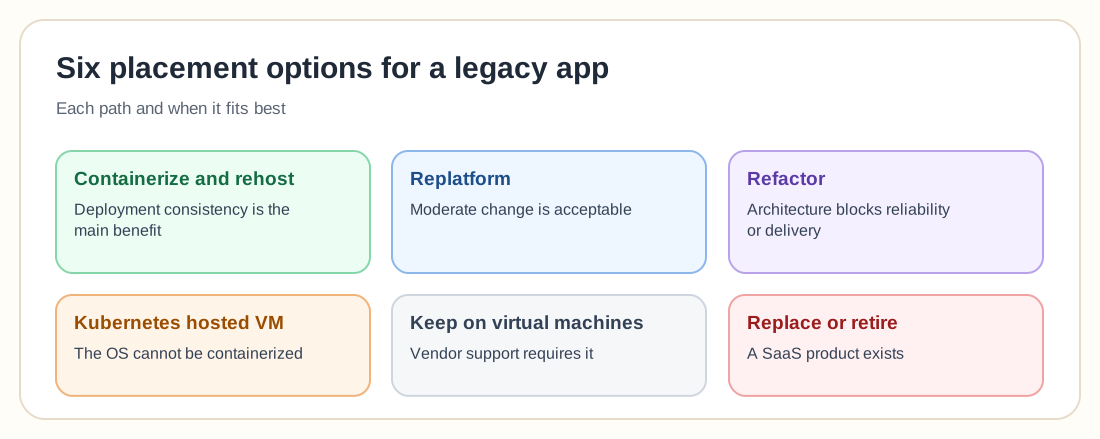
Six placement options
Choosing the controller, and Windows applications
A Deployment is generally appropriate when any replica can serve traffic and state is external, as with web front ends, stateless APIs and document-processing workers. A StatefulSet is for genuinely stateful legacy candidates that need stable identity or ordered scaling; don't use it merely because an app writes files.
Kubernetes supports Windows worker nodes alongside Linux nodes. The control plane remains Linux-based, while workloads can be scheduled to Windows or Linux nodes as appropriate. Current documentation lists Windows Server 2022 and 2025 as supported node operating systems.
Migrating state, filesystem and configuration
A container filesystem is not a durable data location, because writable container-layer data may disappear when a Pod is replaced. Classify every path as read-only content, temporary data, cache, log, configuration, or persistent business data, then map it deliberately:
Test a legacy shared directory's real behaviour before trusting it on new storage, because file locking, case sensitivity, symbolic links, atomic rename and maximum path length can all differ.
Health checks, graceful shutdown and session state
A startup probe protects a slow-initializing legacy app from being killed by ordinary liveness checks before it's ready. A readiness probe should confirm the app can safely receive traffic. Avoid making it depend on every optional external service, or one minor outage removes every replica from service. A liveness probe should detect conditions that require restart. If it reacts to a remote database outage, it could trigger a restart loop across every replica.
During shutdown the application should stop receiving new work, finish or checkpoint current work, close connections, and exit within the termination window. Test real termination instead of assuming it works.
Session state
A web app storing sessions in memory may fail across replicas. Options include session affinity as a bridge, Redis- or database-backed sessions, or stateless tokens. Affinity can support the transition but should not hide a resilience requirement indefinitely.
Database and scheduled-task migration
Separating application migration from database migration reduces risk. A practical first phase often containerizes the application while retaining the established database, and database modernization follows in a later phase.
Inventory operating-system scheduler jobs, database scheduler jobs, and application-internal schedules, then map each to a CronJob, Job, queue worker, or external workflow platform, and prevent duplicate execution during cutover.
Use an expand-and-contract database migration pattern where possible: add backward-compatible schema, deploy the compatible application, migrate data, then remove obsolete schema later. Do not combine an irreversible database migration with an untested application rollout.
Migration approaches
Cutover and rollback planning
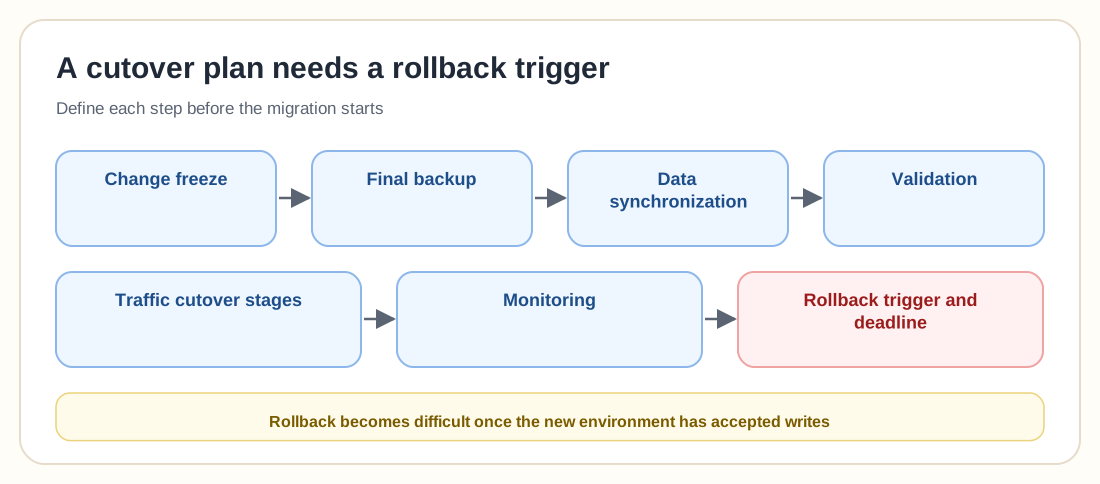
A cutover plan should define the change freeze, final backup, data synchronization, validation, traffic cutover stages, monitoring and, most importantly, a rollback trigger and deadline.
Common legacy Kubernetes migration mistakes
This may reproduce the old server without improving architecture. Classify and separate files deliberately.
The application may fail during restart, upgrade, scaling or recovery. Test lifecycle events.
Users may lose sessions or receive inconsistent behaviour. Fix or explicitly manage session state first.
A database outage may restart every application instance repeatedly. Design probes carefully.
This combines multiple high-risk changes. Separate them where practical.
Every environment change requires a rebuild and may expose secrets. Externalize configuration.
Reports, cleanup or integration jobs may silently stop after migration. Inventory host-level schedules.
Real workloads may expose issues that testing missed. Keep rollback until acceptance criteria are satisfied.
Legacy application migration checklist
0 / 24Frequently asked questions
Yes. Many older applications can run after containerization, but suitability depends on operating-system support, state, networking, configuration, licensing and recovery requirements.
No. Containerization packages the application. Modernization may also require externalized state, automated deployment, health checks, security changes and operational redesign.
It can when Kubernetes improves deployment or operations. The application does not need to be split into microservices merely to use Kubernetes.
Use a Deployment when instances are interchangeable. Use a StatefulSet when stable identity, ordered operation, or replica-specific persistent storage is required.
Yes. Kubernetes supports Windows worker nodes, subject to supported Windows Server versions, networking, container-runtime and application compatibility.
No. Windows workers can join a cluster, but the Kubernetes control plane runs on Linux.
Current Kubernetes documentation states that Kubernetes does not support Windows containers using Hyper-V isolation.
Writable container-layer data is not a dependable persistent location. Use a PersistentVolume, object storage, database, or another approved external store for required data.
Yes. Kubernetes can still improve packaging and deployment, but one replica does not provide application high availability.
Not necessarily. Keeping the database on its existing platform or moving it to a managed service can reduce migration risk.
Keep it on a VM when it depends on unsupported operating systems, hardware, interactive desktop use, vendor certification, or machine-specific behaviour that Kubernetes does not improve.
There is no universal method. Phased replatforming, blue-green migration and parallel validation often reduce risk, but the choice depends on state synchronization and business constraints.
Modernize deliberately
Kubernetes can standardize images, configuration, deployment, monitoring, security controls, backup and recovery for a legacy application. It cannot remove architectural limitations that remain inside the application itself.
Inventory the workload, find every state location, document operating-system and licensing dependencies, and choose whether to rehost, replatform, refactor, retain, replace or retire. Build a proof of concept around the hardest failure and recovery scenarios, then migrate only when Kubernetes creates a measurable improvement. Disguising an old server as a Pod is not a reason to migrate.