

How to Install Proxmox VE: Step-by-Step Guide
Install Proxmox VE step by step, from the ISO download to your first VM, at your own pace.
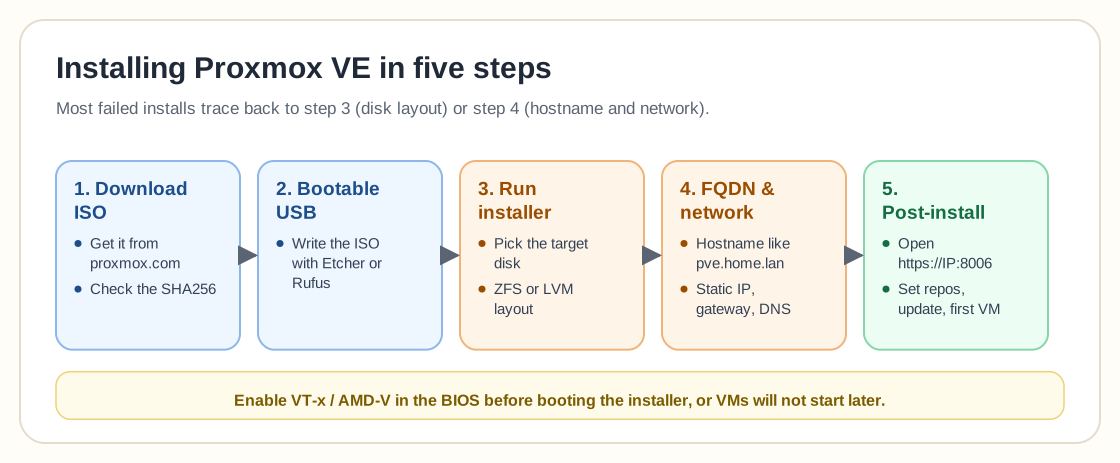
Step 1: Download the Proxmox VE ISO
Get the latest ISO from the official Proxmox downloads page. After downloading, verify the SHA256 checksum to confirm the file is intact.
Step 2: Create bootable USB media
Use Balena Etcher, Rufus (Windows), or `dd` on Linux to flash the ISO to a USB drive (8GB+). Make sure to select GPT partitioning and DD mode in Rufus if applicable.
Step 3: Run the Proxmox installer
Boot from the USB and follow the guided installer. Select your target disk, choose a filesystem (ZFS recommended for redundancy, LVM-thin for low-RAM setups), and set a strong root password.
Step 4: Configure the FQDN hostname & network
Set your hostname as a proper FQDN like `pve.home.arpa` or `node1.lab.internal`. Avoid `.local` (conflicts with mDNS). Configure a static IP, gateway, and DNS servers.
Step 5: Post-Installation Setup
Access the web UI at `https://your-ip:8006`. Update package repositories, disable the enterprise repo if you don't have a subscription, and run `apt update && apt dist-upgrade`. Create a non-root user and set up SSH keys.
Frequently asked questions
What are the minimum system requirements to install Proxmox VE?
Officially, Proxmox VE needs a 64-bit CPU with virtualization support (Intel VT-x or AMD-V), at least 2GB of RAM, and 32GB of storage. In practice, 8GB+ of RAM is the realistic minimum if you plan to use ZFS, since ZFS's caching wants headroom beyond what your VMs and containers consume.
Why does the Proxmox installer show a black screen?
This is almost always a graphics compatibility issue with the installer's default framebuffer mode, common on newer GPUs or certain server hardware. Add `nomodeset` to the boot kernel parameters at the GRUB menu, or select the Terminal UI installer option instead of the graphical one. Either way you bypass the problematic display mode.
Should I set the Proxmox hostname as a FQDN?
Yes. Proxmox expects a fully qualified domain name (like pve.home.arpa or node1.lab.internal) rather than a short hostname. Avoid the .local suffix specifically, since it conflicts with mDNS/Bonjour service discovery and can cause intermittent web UI or cluster issues.
Should I choose ZFS or LVM during installation?
ZFS is the better default if you have at least two disks and 8GB+ of RAM, since it gives you built-in redundancy, snapshots and data integrity checks. LVM-thin is a reasonable choice for single-disk, lower-RAM systems where ZFS's memory overhead isn't worth it.