

Newsletter
Subscribe our newsletter
Get new infrastructure guides, comparison reports, and migration notes in your inbox.
Proxmox vs Raw KVM
A formal comparison between Proxmox Virtual Environment and raw KVM, covering the benefits, trade-offs, and practical implications of each for system administrators and home lab enthusiasts.
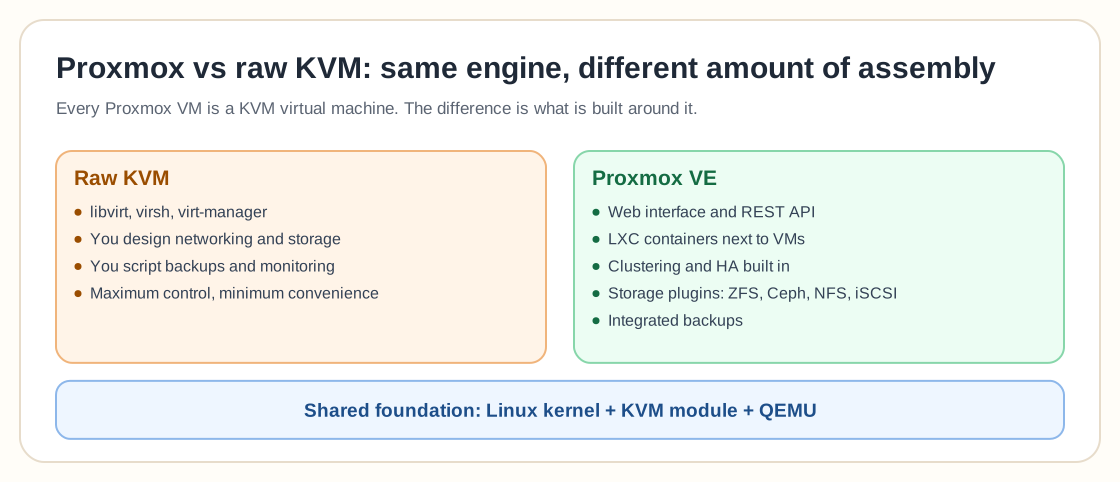
This isn't really an "either/or" choice. Proxmox VE is built on KVM, so every VM you create in Proxmox is a KVM virtual machine underneath. What you are deciding is whether you want to manage KVM through Proxmox's web UI and tooling, or work with it directly via QEMU, libvirt, and the command line.
Proxmox VE
Proxmox Virtual Environment (VE) is an integrated hypervisor platform combining KVM and LXC with a web interface, backup features, and ZFS support. It is aimed at home labs and production environments that want simple management.
Raw KVM
KVM (Kernel-based Virtual Machine) is a Linux kernel module that turns Linux into a type-1 hypervisor. Managing KVM directly involves command-line tools such as QEMU, libvirt, and virt-manager, which gives deep configurability but adds complexity.
Detailed Comparison
Learn more about Proxmox VE and KVM official documentation.
Web-based management console, simplified setup, and integrated VM/container lifecycle management.
Requires familiarity with qemu, virsh, and XML configuration files. Suitable for advanced Linux administrators.
Combines KVM and LXC in a unified interface with built-in ZFS, clustering, and replication.
Offers modular control. Users can integrate desired tools (libvirt, virt-manager, Cockpit, etc.) manually.
Uses a customized Ubuntu kernel and patched QEMU packages for better compatibility and performance.
Relies on distribution-maintained kernels and QEMU versions; patch management handled by the administrator.
Provides REST API, CLI (qm/pct), Terraform modules, and cloud-init support.
Uses libvirt-based automation; compatible with a broader range of orchestration tools but requires setup.
Primarily x86_64; ARM and RISC-V not enabled by default in packaged QEMU builds.
Full architecture support depending on QEMU compilation and kernel configuration.
Suits home labs, small businesses, and users who prefer GUI-driven administration.
Preferred by developers, researchers, and automation engineers requiring granular control.
Decision Guidance
Choose Proxmox if:
- You value convenience and rapid deployment.
- You prefer graphical management and ZFS integration.
- You require clustering and backup without additional configuration.
Choose Raw KVM if:
- You want full control over QEMU parameters and architectures.
- Your workflow depends on libvirt and command-line tooling.
- You intend to build a custom automation or orchestration pipeline.
Frequently Asked Questions
Is Proxmox the same as KVM?
No, but it's built on top of it. KVM is the underlying Linux kernel virtualization technology; Proxmox VE is a management platform that packages KVM (plus LXC containers) with a web UI, clustering, backup, and REST API. Every Proxmox VM is a KVM VM under the hood; Proxmox manages KVM and does not replace it.
Why would I use Proxmox instead of KVM directly?
Managing raw KVM means working directly with QEMU command lines, libvirt XML definitions, and manual tooling for clustering or backup. Proxmox wraps all of that in a web interface with built-in ZFS/Ceph storage integration, live migration, and scheduled backups, trading some low-level flexibility for much faster day-to-day operations.
Does Proxmox limit what KVM can do?
For the vast majority of use cases, no. Proxmox exposes the KVM/QEMU features admins actually use (CPU pinning, PCI passthrough, custom machine types) through its UI and API. Very advanced or bleeding-edge QEMU flags not yet surfaced in Proxmox's interface can still be set via its configuration files, so you rarely lose capability, just some of the raw command-line immediacy.