

Zabbix vs LibreNMS in 2026: Which Monitoring Tool Wins? [Tested]
School IT closets are split into two camps.
On one side is the Zabbix crowd: automation junkies and "monitor everything" purists who deploy it in Docker and call it a day. On the other are the LibreNMS loyalists, SNMP pragmatists who just want to know when a switch dies without burning a weekend tuning triggers.
If you're running a K-12 network with 900-plus Cisco APs, thousands of phones, cameras and speakers, and dozens of MDF stacks, this is a question of survival more than a hobby debate. Depending on who you ask, one of these tools is either your future-proof monitoring backbone or an overengineered nightmare.
If you're trying to tie the decision to something more concrete than forum vibes, the framing from CISA's Cybersecurity Performance Goals and the NIST CSF Detect function is useful. They both push the same basic idea: keep an accurate inventory, collect meaningful logs, and monitor systems consistently enough to spot trouble before users become your monitoring platform.
The case for Zabbix: "one tool to rule them all"
Scroll through enough admin discussions and it's obvious that people love recommending Zabbix, and they do it with real passion.
"+1 Zabbix." "Deploy it with Docker, you'll thank me later." "K-12 here, started with LibreNMS, switched to Zabbix. Incredibly flexible."
The word that keeps coming up is flexible.
Zabbix is a full-stack monitoring platform as well as a network monitor. You can track switches, sure, but also servers, services, Windows disk space, custom scripts, APIs, and even the weird one-off app someone built ten years ago and forgot about.
If you want a single pane of glass for your entire district, covering networking, infrastructure and maybe even application monitoring, Zabbix starts to look like the grown-up choice.
That appeal is real. Zabbix's own current documentation and network device templates show why teams gravitate to it: chassis health, interface telemetry, inventory details, and template-driven monitoring that reaches well beyond switches and routers.
What people tend not to lead with is that flexibility costs time. Zabbix doesn't magically understand your environment. It needs templates, triggers, tuning and some thoughtful design. If you want clean alerts instead of a 3AM SMS storm because a classroom AP rebooted, you have to engineer it properly.
One admin more or less admitted this without saying it outright: if they weren't already invested in another paid tool, they'd use Zabbix. That tells you something. Zabbix is aspirational and powerful, and it feels like you're building something serious. You are building it, though, and in K-12 time is usually the scarcest resource in the room.
The LibreNMS counterpunch: "you just want monitoring? Cool."
LibreNMS has a different vibe, with less swagger and more "it just works." Admins who favor it tend to talk about speed and simplicity:
- "Beyond easy to set up."
- "Great SNMP monitoring and autodiscovery."
- "You can get useful alerts up pretty quickly."
- "Resource efficient."
In a school district with ~3,500 devices, that matters.
LibreNMS is unapologetically network-focused. It's built around SNMP, it autodiscovers gear, and it maps out your switches and APs without asking you to design a monitoring philosophy first. The official LibreNMS auto-discovery docs show why admins like it: you seed the environment, discovery runs on a schedule, and the platform gets useful fast.
If your core need is to hear when something breaks, see bandwidth graphs, and get warned when a hard drive is filling up, LibreNMS does that with minimal drama.
One admin put it bluntly: the people recommending Zabbix aren't telling you how much resource investment it takes to really leverage it. That's the subtext of the whole thread. LibreNMS is efficient in CPU cycles and in human effort, and in public education IT, human effort is the budget line that actually hurts.
The dirty secret: it's about more than features
This is where it gets controversial. Most of the time, when someone asks "Zabbix or LibreNMS?", what they're really deciding is whether they want a monitoring tool or a monitoring project.
Zabbix appeals to builders, the admins who want to fine-tune triggers, integrate with logging stacks, and maybe pair it with Graylog, Prometheus, or something else down the line. It scales into ambition.
LibreNMS appeals to operators, the admins juggling tickets, Chromebook rollouts, E-Rate paperwork, and board meetings. They want signal and have no appetite for architecture.
That difference in mindset changes everything. One K-12 admin said they started with LibreNMS and found it limiting. Another said LibreNMS "blows Zabbix out of the water" on resource efficiency. From where each of them sits, both are right, because the tool ends up reflecting your philosophy.
Where Checkmk and others sneak in
It wouldn't be a real debate without wildcards.
Checkmk pops up as the "actually, have you looked at this?" option. Some swear by it, others call Zabbix a pain and claim Checkmk is smoother, and it gets praise for topology visualization and flexibility.
Icinga gets mentioned by someone who clearly has a personal stake. Prometheus integrations get thrown around, along with ntopng for flow monitoring and Grafana stacks with Loki and Promtail layered on top of LibreNMS.
This is where things spiral. Once you start stacking tools (LibreNMS plus Grafana plus NetBox as your source of truth plus InfluxDB for custom logs), you've stopped simplifying and started assembling a monitoring ecosystem.
It's also the point where some teams start questioning the stack itself. Instead of layering tools, platforms like Sensaka DCOS treat the environment as one operating layer, combining assets, monitoring, and access in a single view. It's not the typical path, but it avoids a lot of the integration overhead.
Ironically, the stacked approach ends up looking a lot like the Zabbix path, just modular.
The 3,500-device reality check
Here's the actual environment in question:
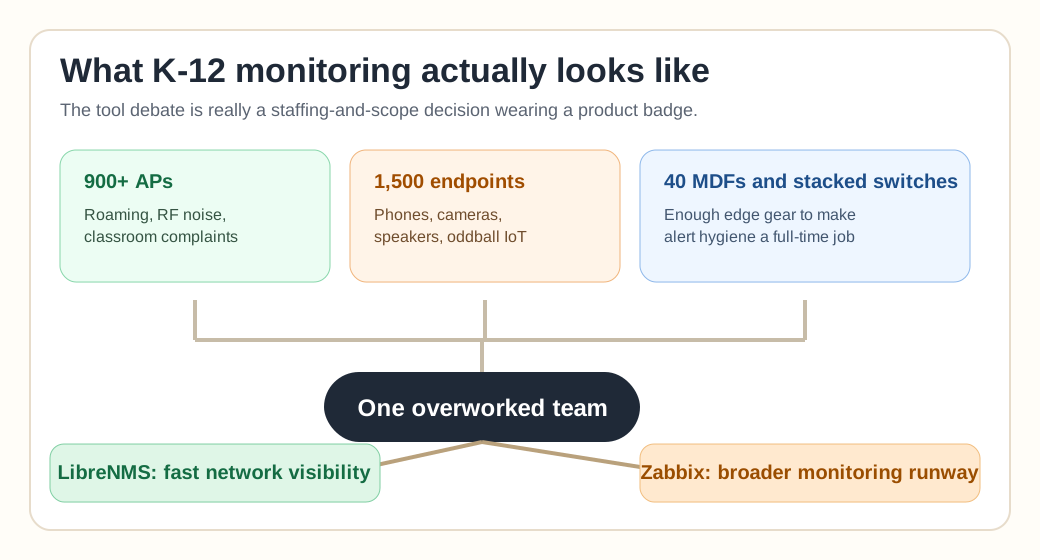
- 900+ Cisco APs
- 1,500 speakers, cameras, phones
- 40 MDFs
- Stacked Cisco switches
- Roughly 3,500 devices total
That's real infrastructure and nowhere near a home lab with extra steps. At that scale, alert noise becomes a serious problem, and discovery accuracy, performance overhead and database tuning all start to matter. Maintenance burden matters most of all.
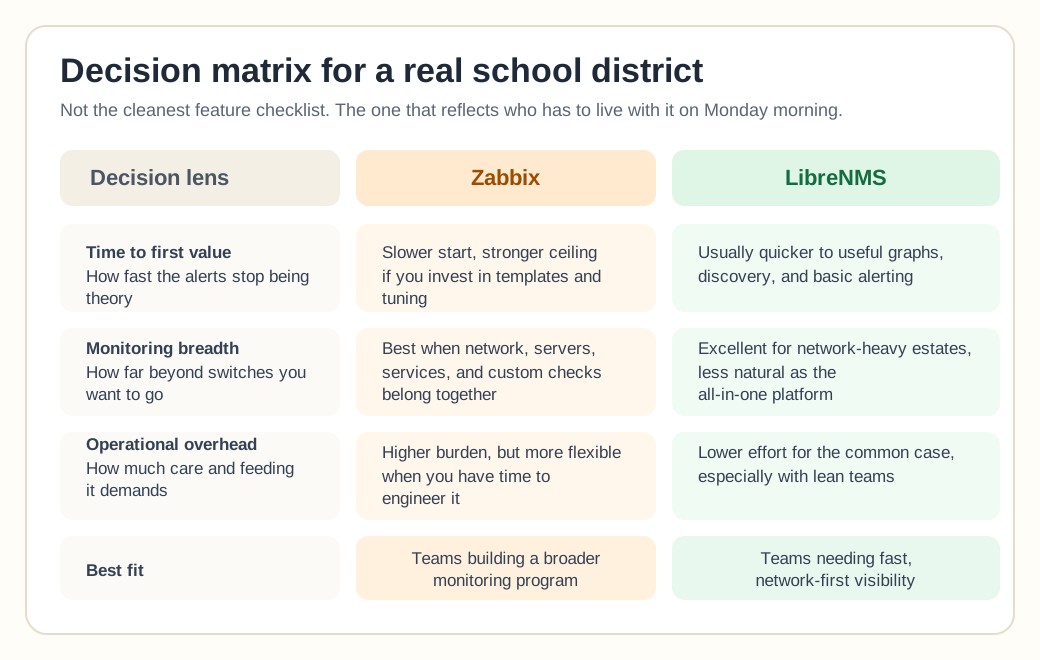
Zabbix can handle this scale, and so can LibreNMS. What you need to ask is whether your team can handle the platform you choose.
If you're a solo network admin in a district, LibreNMS might be what keeps you sane. If you have a small team and long-term plans to unify monitoring across networking, servers, virtualization, and apps, Zabbix might save you from bolting five tools together later.
The uncomfortable part is that a poorly configured Zabbix install is worse than no monitoring, because it'll drown you in alerts. A neglected LibreNMS box will miss edge-case failures without telling you. Neither tool saves you from design.
The controversial take
If your only requirement is "monitor network gear and send alerts," and you're not planning to grow beyond that anytime soon, Zabbix is probably overkill. It's powerful and flexible and everyone loves it, but power you don't use is just complexity.
On the flip side, if you treat LibreNMS as a forever solution while planning to expand into deep service monitoring, synthetic checks, custom scripts, distributed proxies, and complex alert logic, you might outgrow it and wish you'd started with Zabbix.
So the mistake to avoid is picking a tool that doesn't match your future workload or your available time.
So which one wins?
There isn't a clean winner, but there is a pattern. Admins who value speed, simplicity, and network-first visibility lean toward LibreNMS. Admins who value flexibility, extensibility, and unified monitoring lean toward Zabbix.
The ones happiest long-term picked the tool that fit their staffing reality over the one that sounded more powerful on paper. In K-12, the hardest thing to monitor is your own time, and no open-source platform fixes that.
Frequently Asked Questions
Is LibreNMS easier to set up than Zabbix?
Yes, for pure network monitoring. LibreNMS auto-discovers SNMP devices and ships with sensible defaults, so a small IT team can have switches and routers monitored in an afternoon. Zabbix is more powerful but requires manually building templates, triggers, and dashboards before it becomes useful.
Can Zabbix fully replace LibreNMS?
Yes — Zabbix can monitor network devices via SNMP just like LibreNMS, plus servers, applications, and custom metrics through one platform. The tradeoff is setup and maintenance time: LibreNMS is purpose-built for network monitoring and gets you there faster if that's your only need.
Which is better for a small IT team with limited time?
LibreNMS, in most cases. Its auto-discovery and network-first design mean less ongoing tuning. Zabbix pays off when you also need to monitor servers, applications, or custom business metrics — but it demands more staff time to configure and maintain well.
Does Zabbix or LibreNMS scale better for a growing district?
Both scale to thousands of devices, but differently. LibreNMS scales cleanly for network-only monitoring. Zabbix scales further in scope — servers, apps, and infrastructure in one pane of glass — but that broader scope means more configuration work as you grow.