

Your Local DNS Filter Is Probably Being Bypassed Right Now
Spinning up your own DNS filter is satisfying. You install AdGuard Home, load up carefully curated blocklists, point DHCP at your resolver, and watch queries scroll by thinking: I control my network now.
Except you don’t, not even close. Your local DNS filter is probably being bypassed right now.
That’s the punchline that hit hard. Devices ignore DHCP without telling you. A Google Home sends DNS straight to 8.8.8.8. Browsers tunnel DNS over HTTPS so your resolver never even sees the query, and Android apps skip hostname resolution entirely and connect directly to hardcoded IPs.
That blocked domain you were proud of catching might never have touched your DNS server. Once you realize that, the whole “I’ve locked down my network” story starts to wobble.
The illusion of control
The setup seemed airtight at first, with AdGuard Home running locally, blocklists active, and everything pointing at your DNS server. It feels centralized, clean, and deterministic.
Then reality creeps in: hardcoded DNS servers, DoH on port 443, DoT on port 853, and DoQ over UDP 853. Encrypted queries slide through the same port your normal HTTPS traffic uses. Apps embed their own resolvers, and devices treat your DHCP settings as more of a suggestion than a rule.
Suddenly your resolver is just sitting there, unused. “Nobody asked me anything.”
That’s the unsettling part. DNS filtering only works if clients actually use your DNS server, and once they don’t, your control collapses into theater.
The five-layer defense
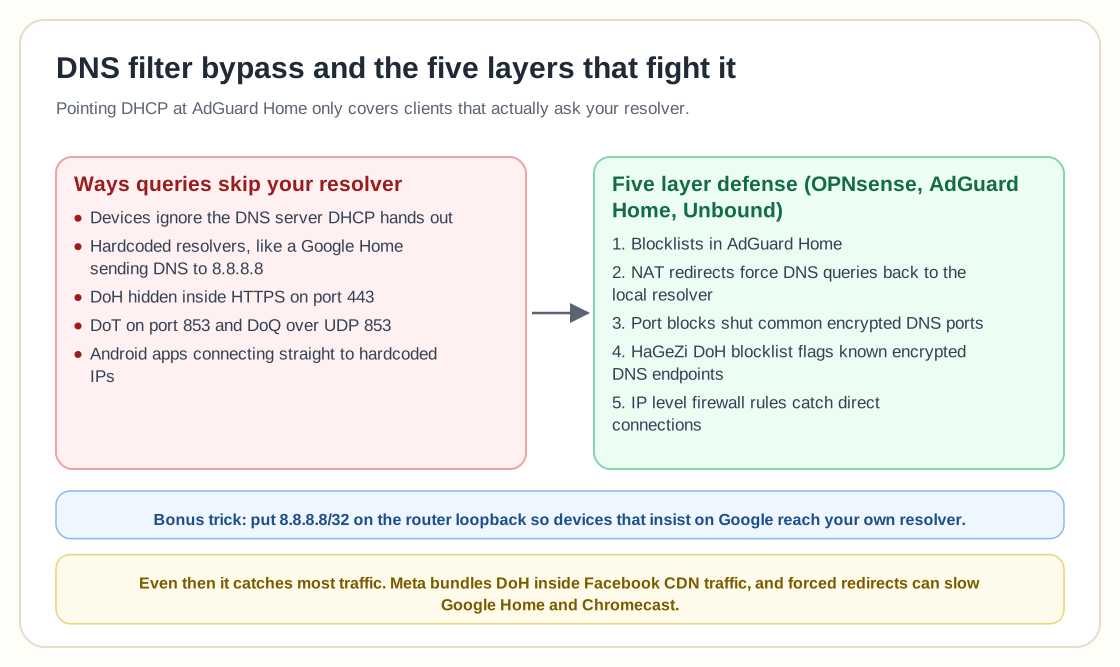
Instead of accepting defeat, the response was escalation: a five-layer defense built on OPNsense, AdGuard Home, and Unbound.
Blocklists were now one layer among several. NAT redirects forced DNS queries back to the local resolver. Port blocks shut down common encrypted DNS ports. HaGeZi’s DoH blocklist identified known encrypted DNS endpoints, and IP-level firewall rules caught traffic trying to slip out directly.
This had moved well past casual homelab tinkering into active containment. Even then, the word “all” had to be crossed out and replaced with “most,” because nothing is ever fully locked down.
“We’ve got 8.8.8.8 at home”
The comments took on a life of their own. One of the most upvoted replies turned the whole situation into a meme: “We’ve got 8.8.8.8 at home.” Another chimed in: “You want 8.8.8.8? Sure, there is one right here just a couple of hops away.”
This is where things get clever. If devices insist on talking to 8.8.8.8, fine, give them 8.8.8.8. Just make sure that IP actually lives inside your network.
Some users described assigning 8.8.8.8/32 and 8.8.4.4/32 directly to the loopback interface of their router. Others suggested creating a VLAN with 8.8.8.8/30 and static routing it so the router sees it as a local next hop.
It’s elegant, a little mischievous, and deeply satisfying. The device thinks it’s talking to Google when it’s actually talking to your resolver. Internet superhero energy, as one commenter put it.
The pushback: this can break stuff
Here the tone shifts, because not everyone treats DNS redirection like a harmless trick.
One user warned that using random public IPv4 addresses internally can sometimes break things. Another said redirecting traffic caused noticeable delays and interruptions for Google devices like Google Home and Chromecast.
That’s the tradeoff. Forceful interception can create latency, smart devices may retry aggressively, and some services expect to hit specific infrastructure and behave oddly when they don’t.
Then there’s the nuclear option: blocking outgoing WAN traffic to 8.8.8.8 entirely. Denying it at the firewall sounds clean, but encrypted DNS providers aren’t limited to a single IP, and once DoH hides inside regular HTTPS traffic, IP blocking becomes blunt and risky.
Meta, CDNs, and the limits of blocking
The original write-up didn’t pretend this was a perfect solution and explicitly called out what it doesn’t catch.
Meta bundles their DoH inside regular Facebook CDN infrastructure, so blocking it cleanly without breaking Facebook and related apps is nearly impossible.
That fits a broader pattern. Encrypted DNS is becoming standard. Browsers default to DoH, operating systems experiment with encrypted resolvers, and large platforms integrate DNS resolution tightly into their own traffic flows.
The more encrypted and multiplexed everything becomes, the harder it is to filter surgically. Blocking DNS now means potentially interfering with core app behavior too.
The bigger argument: privacy vs parental control vs autonomy
Underneath the technical back-and-forth is a philosophical debate.
Some people see encrypted DNS as an attack on local control. If you run a DNS filter for ad blocking, malware protection, or parental control, DoH feels like sabotage.
Others see encrypted DNS as a privacy win, since it prevents ISPs and local network operators from snooping on queries. From that angle, bypassing a local resolver is protective rather than malicious.
And then there’s the practical crowd, who don’t care about ideology and just want ads gone and devices stable.
One commenter joked that by colocating DNS locally, we’re basically Internet superheroes, like Netflix placing caching servers at ISPs. Another quipped that we’re helping Google cut down peering data charges.
The humor masks a real tension over who should control DNS resolution: the device vendor, the browser, the ISP, or the user? In a home lab, most of us answer the user. The modern internet doesn’t always agree.
The fragility of “default secure”
There’s something almost poetic about the idea that the more secure and private protocols become, the harder it is for you to enforce local policy.
DoH hides DNS inside HTTPS. That’s great for preventing ISP-level surveillance and terrible for local filtering, unless you start inspecting TLS, which opens an entirely different ethical and technical can of worms.
So you escalate with NAT rules, firewall blocks, redirects, IP tricks, and blocklists of known DoH endpoints, and you still admit it only catches “most.”
That honesty matters, because the illusion of total control is more dangerous than the reality of partial control.
What this teaches
If this whole saga exposes one thing, it’s that DNS filtering is no longer a single-layer problem.
Pointing DHCP at your resolver is table stakes. Modern devices treat that as optional, browsers treat it as advisory, and apps sometimes ignore it entirely.
Meaningful enforcement needs network-level interception, port control, IP awareness, and ongoing maintenance of DoH endpoint lists. Even then, you accept imperfection.
The headline wasn’t clickbait: your local DNS filter probably is being bypassed right now. You didn’t do it wrong, and AdGuard and Unbound didn’t fail. The internet moved forward, and local DNS control didn’t stay the default.
Bypasses exist, so what’s left to decide is how much effort you’re willing to invest to reclaim control and how much breakage you’re willing to tolerate in the process.
Locking down DNS in 2026 takes more than installing a filter. You have to decide who really owns resolution on your network, and then fight for it.