

Moving From VMware to Nutanix: Lessons From Real Migrations
So, you're thinking of ditching VMware, and a VMware to Nutanix migration is suddenly on the table. Maybe it's the licensing costs, maybe it's the recent Broadcom acquisition jitters, or maybe you're just done with the whole ESXi song and dance. Either way, management's looking your way for answers. You're not alone.
We scoured real-world experiences from IT pros who've made the leap from VMware to Nutanix, some migrating thousands of VMs, others just getting their hands dirty with a few mission-critical apps. The short version is that Nutanix AHV is a capable replacement, but like any infrastructure shift, there's nuance hiding between the bullet points. What follows skips the marketing fluff.
Nutanix Move: surprisingly solid
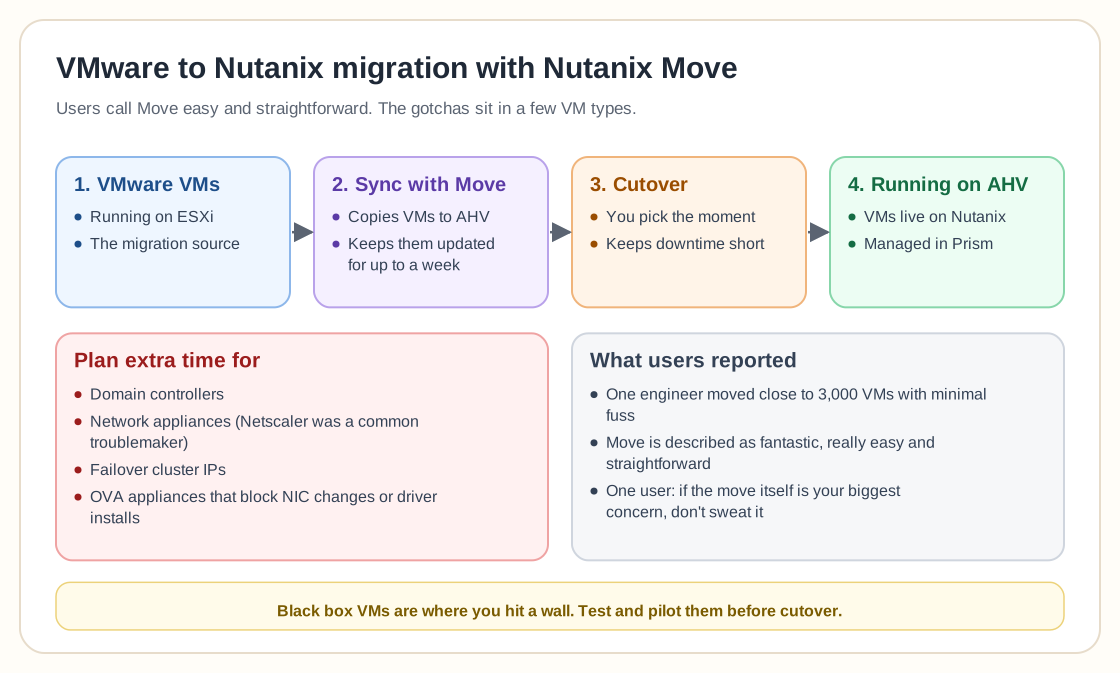
The tool everyone talks about is Nutanix Move, Nutanix's native migration tool. Multiple users who've gone through this journey describe Move as "fantastic," "really easy," and "straightforward." You don't hear that often in enterprise IT, especially about migration utilities.
According to one engineer who's migrated "close to 3,000 VMs," Move does its job with minimal fuss, syncing VMware VMs to AHV and keeping them updated for up to a week before you hit the cutover switch. That helps a lot when you're trying to minimize downtime. Another user summed it up this way: "If the move itself is your biggest concern, I wouldn't sweat it."
It's not all autopilot, though. Gotchas exist, especially when it comes to:
- Domain controllers
- Network appliances (Netscaler was a common troublemaker)
- Failover cluster IPs
- OVA-based virtual appliances with restricted access
If you're running black-box VMs that don't let you tweak NICs or install drivers, you'll likely hit a wall, or at least a speed bump.
Performance: better, but not always
Performance talk is where things get spicy. One user noted they "saw performance improvement when running AHV instead of ESXi on the same tin." That's a bold claim, though not unheard of. AHV is tightly integrated with Nutanix's own HCI layer, so there's less overhead in certain setups.
On the flip side, there are horror stories too. A team with 48-core hosts reportedly had to throw 24 cores and 64GB of RAM just at each Nutanix CVM (Controller VM) to make things tolerable. That wasn't a happy customer. They bailed for Hyper-V and said the experience was far smoother. Others pushed back, saying that 24-core CVMs are overkill and "for NVMe nodes, 16 cores is standard."
So what gives? Like anything in IT, performance comes down to tuning and expectation management. Some environments run lean and fast, and others will need support tickets and tuning marathons. Plan accordingly.
Licensing and cost: it's complicated
If you thought VMware's licensing was confusing, Nutanix may not exactly feel like a breath of fresh air. One user bluntly said: "Licensing isn't straightforward depending on features you want to use." Others pointed out Nutanix's strong push toward bundling hardware and software together under their HCI umbrella, which can make cost comparisons a bit of a nightmare.
One person broke it down like this: "30K server + 30K Nutanix licensing = 60K investment." Ouch. It can still be worth it, since Nutanix's support and ease of use often justify the spend, but it's definitely not the budget option.
A practical tip: work through which features are must-haves and which are nice-to-haves, and don't skip the cost comparison. Nutanix licensing tends to scale with capacity as well as feature sets.
Support: a bright spot
The high point in most people's Nutanix stories is support.
Almost everyone who mentioned Nutanix support had good things to say, which is rare in tech forums. From fast ticket responses to smooth handoffs between time zones, Nutanix seems to have cracked the code that Microsoft and VMware often fumble.
One user put it this way: "It was really refreshing after fighting with the likes of MS support." Another said support was quick to escalate, and even "handed off cases cleanly outside normal hours."
In a high-stakes migration, knowing there's actual human help on the other end of the line is a big deal.
Management and daily use: mostly good, some quirks
Once you're in the Nutanix ecosystem, life is generally easier. Updates are largely "one-click", according to multiple users, assuming your environment is set up right. The interface is modern and cohesive compared to vCenter's aging UI, although if you're doing advanced scripting or automation, PowerShell cmdlets aren't as capable as VMware's PowerCLI.
Other nitpicks:
- Migrating VMs between Prism Centrals isn't as seamless as with linked vCenters
- If you're using GPUs, expect extra manual work during updates
- Some users still pine for the split-stack approach (SANs + servers), especially in large-scale or custom environments
That said, for most mid-size to enterprise use cases, Nutanix strikes a good balance between simplicity and control.
Not a 1:1 swap, and that's OK
Multiple users echoed the same piece of advice: "Don't expect VMware and Nutanix to be 100% alike."
You'll run into different workflows, different terminology, and a different mindset. That isn't a bad thing, just something to be aware of. If you've been living in the VMware ecosystem for a decade, this is like switching from iPhone to Android. There's a learning curve, but also new tricks waiting on the other side.
Final thought: is Nutanix worth it?
Here's the TL;DR from people who've done the migration:
- The Move tool works really well.
- Performance can be great, but test thoroughly.
- Costs are real, so do the math.
- Support is excellent, possibly the best part.
- Be ready to unlearn a few VMware habits.
In the end, Nutanix might not be perfect, and it isn't pretending to be VMware. That might just be the point.
Thinking of switching? Test, pilot, and benchmark, and talk to the folks who've already made the leap. In this game, the best lessons come from the trenches.