

UniFi Controller vs CloudKey: Should You Host UniFi on Proxmox?
A UniFi network needs a management system, often still called the UniFi Controller, to adopt access points, configure switches, collect statistics and apply network policies. You can run it on dedicated Ubiquiti hardware, such as a CloudKey, or host it on Proxmox or other infrastructure you already operate.
For Proxmox users, self hosting UniFi can appear to be the obvious choice. A small virtual machine requires few resources, can be backed up with the rest of the environment and avoids buying another appliance.
A CloudKey offers a simpler ownership model. Ubiquiti supplies the hardware, operating system, update process and integrated backup workflow. It can also run UniFi applications that a self hosted server does not support.
Hosting UniFi on Proxmox makes sense when you only need UniFi Network and already maintain reliable virtualization infrastructure. A CloudKey is usually better when you want the complete UniFi application suite, simpler support and less administrative work.
Is it still called the UniFi Controller?
Many administrators still call the software the UniFi Controller, although Ubiquiti's product names have changed.
The older self hosted product was called the UniFi Network Server or UniFi Network Application. Ubiquiti now describes UniFi OS Server as the new standard for self hosting. It replaces the legacy Network Server and adds UniFi OS features such as Organizations, identity provider integration, Site Magic SD WAN and centralized access through Site Manager.
UniFi OS Server is free to use. On Linux, Ubiquiti currently lists Ubuntu 24.04 or later and Debian 13 or later among the supported systems. The minimum published requirements include an x86 64 processor, 2 GB of memory, 10 GB of free storage and a wired network connection. These requirements fit comfortably inside a modest Proxmox virtual machine.
What does a CloudKey provide?
A CloudKey is a dedicated UniFi Console designed to host UniFi applications.
The current CloudKey+ includes support for UniFi Network, Protect, Access, Talk and Connect. It has 3 GB of memory, internal system storage, a user replaceable 2.5 inch drive bay and a Gigabit Ethernet connection that can receive power through Power over Ethernet.
This broader application support is one of the largest differences between a CloudKey and a Proxmox hosted UniFi OS Server.
A self hosted UniFi OS Server can run UniFi Network and provide the related UniFi OS management features. It cannot self host Protect, Access, Talk or Connect. Those applications require compatible UniFi hardware, such as a CloudKey, Cloud Gateway or Network Video Recorder.
If your site only uses UniFi access points and switches, this restriction may not matter. If you plan to add cameras, door access equipment or UniFi phones, the CloudKey becomes the more useful choice.
Which is easier to install?
The CloudKey is easier. You connect it to the network, complete the UniFi setup process and adopt the devices. The hardware and operating system are already designed for the application.
A Proxmox deployment requires several decisions. You must create a compatible Linux virtual machine, allocate resources, install the required dependencies, install UniFi OS Server, configure networking and make sure the necessary discovery and adoption ports are available.
Ubiquiti states that self hosting is fully self managed. The administrator is responsible for installation, maintenance and uptime. The company recommends a CloudKey or another UniFi Console when continuous operation cannot be maintained on the self hosted system.
The Proxmox process is manageable for an experienced Linux administrator, though it does not give you an appliance experience.
Should you use a VM or LXC on Proxmox?
A small virtual machine is the safer choice for the current UniFi OS Server.
The current Linux installation uses system services and Podman related components. Ubiquiti also says UniFi OS Server is a complete solution that requires services on the host and will not be provided as a standalone Docker or Podman container.
A Debian 13 or Ubuntu 24.04 virtual machine provides the conventional operating environment expected by the installer. It also gives UniFi its own kernel and separates the management application from the Proxmox host.
An LXC container may work with sufficient configuration, but it introduces another compatibility layer. The small amount of memory saved is unlikely to justify additional troubleshooting for a network management service.
Do not install UniFi directly on the Proxmox host. The hypervisor should remain focused on virtualization, storage and cluster management.
Which is more reliable?
A CloudKey has a simpler failure domain. It remains available when the Proxmox host is rebooting, receiving an update or experiencing a storage problem.
A Proxmox hosted UniFi server depends on the hypervisor, its storage, its virtual networking and the physical server. If any of those components fail, UniFi management becomes unavailable.
Adopted access points and switches do not immediately stop operating when the UniFi server goes offline. They continue using their last applied configuration. However, administrators lose current statistics, alerts and the ability to make changes until the server returns. Ubiquiti recommends keeping the server running continuously.
Proxmox can improve resilience when the UniFi VM runs on reliable storage and can be restored or restarted on another node. The dependency on the virtualization environment remains.
If UniFi manages the same switches and networks required for accessing Proxmox, keep an independent management path. You should still be able to reach the Proxmox console when the UniFi VM is unavailable.
Which has better backups?
Both approaches can provide strong backups, but they protect the system differently.
CloudKeys support complete system configuration backups covering the operating system, applications and device settings. Automated cloud backups can be created weekly and before major updates. Administrators can also download local backup files and restore all or selected application settings.
A self hosted UniFi environment uses Network specific backups for migration and recovery. Ubiquiti supports exporting a backup file and restoring it to a new UniFi host.
Proxmox adds another protection layer by backing up the complete virtual machine. This can preserve the operating system, UniFi installation, configuration and local database together. Proxmox Backup Server can protect virtual machines through block level backups.
The strongest self hosted design uses both methods. Keep UniFi application backups and Proxmox VM backups, with at least one copy stored outside the Proxmox server.
Which is easier to update?
The CloudKey offers the simpler update experience. Ubiquiti controls the hardware and UniFi OS environment, so application and system updates are coordinated through the console. Automatic backups can also be created before major updates.
UniFi OS Server can update its applications through Site Manager or the local control plane. However, the administrator remains responsible for the underlying Linux system, required packages, storage capacity and VM availability.
A Proxmox snapshot or backup can make rollback easier, but you must still test the full process. Avoid updating Proxmox, the Linux guest and UniFi OS Server in the same maintenance window. Separating these changes makes failures easier to identify.
Which is more flexible?
Proxmox provides greater infrastructure flexibility. You can assign more processor capacity, memory or storage as the environment grows. The VM can be placed on enterprise storage, included in Proxmox backup jobs and migrated between compatible nodes.
Self hosting is also attractive for consultants and managed service providers that already operate centralized Proxmox infrastructure. Several UniFi sites can be managed through the UniFi software without installing a small appliance at every location, provided connectivity and adoption are designed correctly.
The CloudKey provides less infrastructure customization but more application flexibility inside the UniFi ecosystem. It can run Protect, Access, Talk and Connect, while self hosted UniFi OS Server remains limited to UniFi Network and related control plane features.
Which costs less?
Self hosting may avoid the purchase price of a CloudKey when spare Proxmox capacity already exists.
The actual cost still includes storage, backups, electricity, monitoring and administrator time. A virtual machine that costs nothing to create still costs time when someone must maintain the operating system and recover it after failure.
A CloudKey adds dedicated hardware but reduces the number of software layers the administrator controls. For a small business without a full time infrastructure team, that simplicity can be worth more than the hardware savings.
Should you host UniFi on Proxmox?
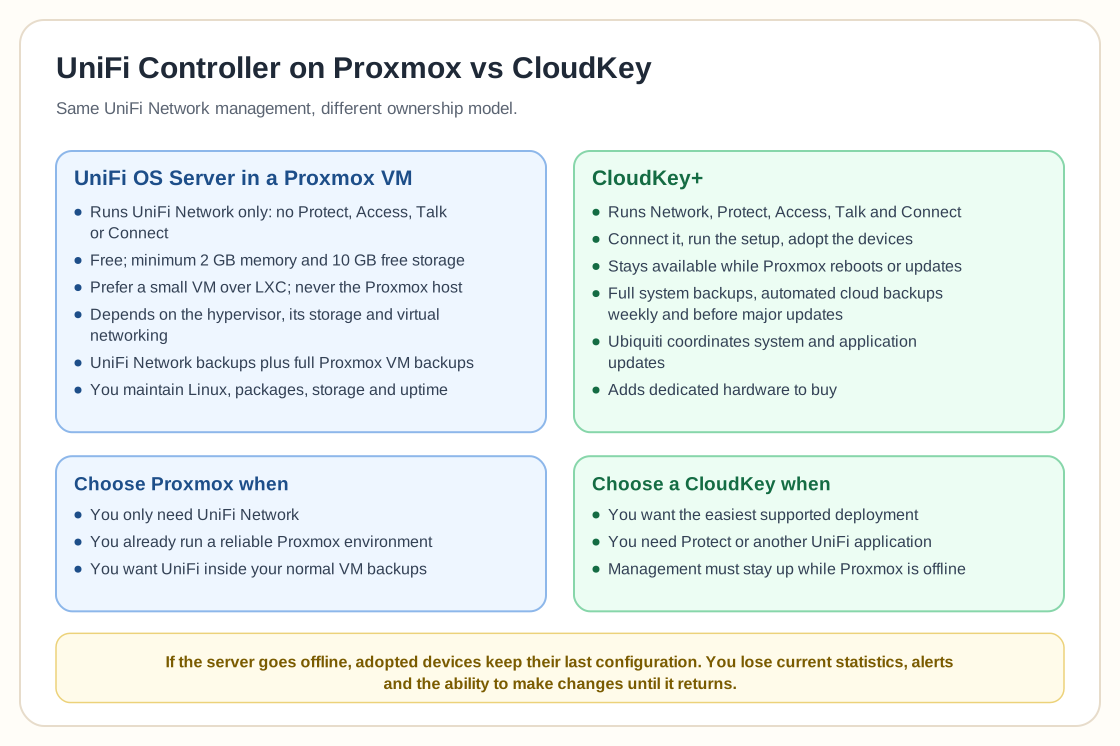
Host UniFi on Proxmox when you only need UniFi Network, already maintain a reliable Proxmox environment and want the controller included in your normal VM backup and recovery process.
Use a dedicated Linux VM, give it a stable address and keep independent UniFi backups. Avoid cloning an active UniFi OS Server casually because Ubiquiti warns that cloned systems can retain duplicate remote access tokens and create unexpected management behaviour.
Choose a CloudKey when you want the easiest supported deployment, need UniFi Protect or another UniFi application, or want network management to remain available while the Proxmox environment is offline.
For a technical homelab or a business already operating redundant Proxmox infrastructure, self hosting is reasonable and efficient. For a site where simplicity and appliance level support matter most, the CloudKey is the safer operational choice.