

S3 vs B2 vs Wasabi: The Real Cost Is Getting Your Files Back
S3, Backblaze B2 and Wasabi all look cheap per terabyte until you need your files back. Take a remote media company pushing 7 to 15 jobs a month, and each one clocks in at 300 to 600GB. Editors are scattered, footage is uploaded from home offices, and no one wants to touch a spinning disk in a closet somewhere.
On paper, this is exactly what cloud storage was built for. In practice, it's where the cloud starts charging you for every assumption you didn't think through.
When people start comparing Amazon Web Services S3, Backblaze B2, and Wasabi Technologies Wasabi, the conversation usually begins with price per terabyte. That's the wrong place to start, because storage isn't the expensive part anymore. Getting your files back is.
The illusion of "cheap" storage
At first glance, B2 and Wasabi look like rebels in a hyperscaler world, with lower per-terabyte costs, simpler pricing pages, and no sprawling 40-tab pricing calculator.
Then there's S3, the heavyweight, with more tiers than your local wedding cake: Standard, Intelligent-Tiering, Glacier Instant Retrieval, Glacier Flexible Retrieval, Deep Archive. On paper, Glacier Deep Archive can feel almost free, and that's where things get interesting.
Cloud providers assume something very specific about your behavior: if you put something in archive storage, you're not touching it next week, or next month, and maybe not for years. If you violate that assumption, the bill reminds you.
Hot, cold, and "oh no, we need that file"
Picture how this plays out. You finish a client project, final delivery is done, and everyone's happy. The footage, 400GB of 4K source material, goes into "long-term storage." You move it from hot storage to the archive tier, which is a smart move, and monthly costs drop dramatically.
Three months later, the client wants a cut-down, or a new aspect ratio, or social clips, or they lost their masters. Now you're pulling that 400GB back, and the difference between S3, B2, and Wasabi stops being theoretical.
S3: powerful, flexible, and brutally honest
S3 is expensive if you don't understand it and cost-efficient if you do.
With S3, you can automate lifecycle policies and move files from Standard to Glacier automatically after 30 or 60 days. You can design a pipeline where a completed project gets its backup verified, moves to Glacier, and has its hot copy deleted. That's clean, and it scales.
Retrieval from Glacier isn't instant, though, unless you pay for the Instant Retrieval tier. Standard Glacier restore can take minutes to hours, and Deep Archive can take 12 hours or more. Retrieval isn't free either: you pay per GB to pull it back.
Even worse are early deletion fees. Archive tiers assume minimum retention periods, so if you delete or move too early, you're billed for the time you didn't store it.
S3 isn't trying to trick you; it's built for people who plan.
B2: simple pricing and fewer traps, but mind the egress
Backblaze B2 is often the darling of smaller media teams. Pricing is easier to understand, there's less tier complexity, and it feels friendlier.
The catch is egress. Download fees can add up quickly if you're constantly pulling large projects back for revisions, and in media, "archive" doesn't always mean "never touched again." It often means "probably touched again in six months."
If your workflow includes frequent restores, B2 can still work, but the math shifts fast.
Wasabi: no egress fees, with strings
Wasabi's big headline feature is no egress fees. For media companies, no download charges sounds like magic.
However, Wasabi enforces minimum storage durations (typically 90 days), so if you delete before that, you're paying anyway. There are also minimum storage object sizes and billing nuances that can surprise teams moving lots of small assets.
If your workflow is stable and projects stay archived for long periods, Wasabi can be incredibly predictable. If your workflow is chaotic, it's still better than surprise egress fees, though not immune to billing quirks.
A proxy layer in front of the archive
One engineer in the discussion described migrating a massive media archive, hundreds of petabytes, into S3 Glacier tiers after retiring tape. They even created lightweight proxy files in standard storage so teams could screen footage without restoring full-resolution masters.
So don't treat archive like a freezer you constantly open. Treat it like deep storage, and put a middle layer in front of it.
The proxy trick most teams ignore
Here's what sophisticated media teams do:
- Store full-res masters in cold/archive tiers.
- Generate small proxy files (1080p or even lower).
- Keep proxies in hot storage.
- Editors can review, search, and preview instantly.
- Only when full-res media is absolutely required do you restore the archive copy.
That one architectural decision can cut retrieval costs dramatically. It also changes how often you panic-click "Restore."
The cloud-to-cloud question
One of the biggest pain points for remote teams is moving data from something like Google Drive to S3 or B2 without downloading everything locally. You don't want 20TB flowing through someone's home fiber line.
Cloud-to-cloud transfer tools solve that. Many storage providers support direct transfers, or you can use third-party sync tools to move data server-side. That's essential if your active storage lives in one place and archive in another, because the minute you start downloading and re-uploading manually, your "cheap cloud" strategy collapses under bandwidth and time costs.
Do you even need a NAS?
This question always pops up: should you just buy a massive on-prem NAS and be done with it?
For fully remote teams, a NAS introduces friction, since you need a VPN, infrastructure, and someone responsible for hardware. It can be cheaper long-term for pure storage, but it doesn't solve global collaboration unless you layer more tech on top.
Cloud storage is expensive monthly, and hardware is expensive upfront. The right answer depends on how often you retrieve archived material and how critical instant access really is.
The real cost model
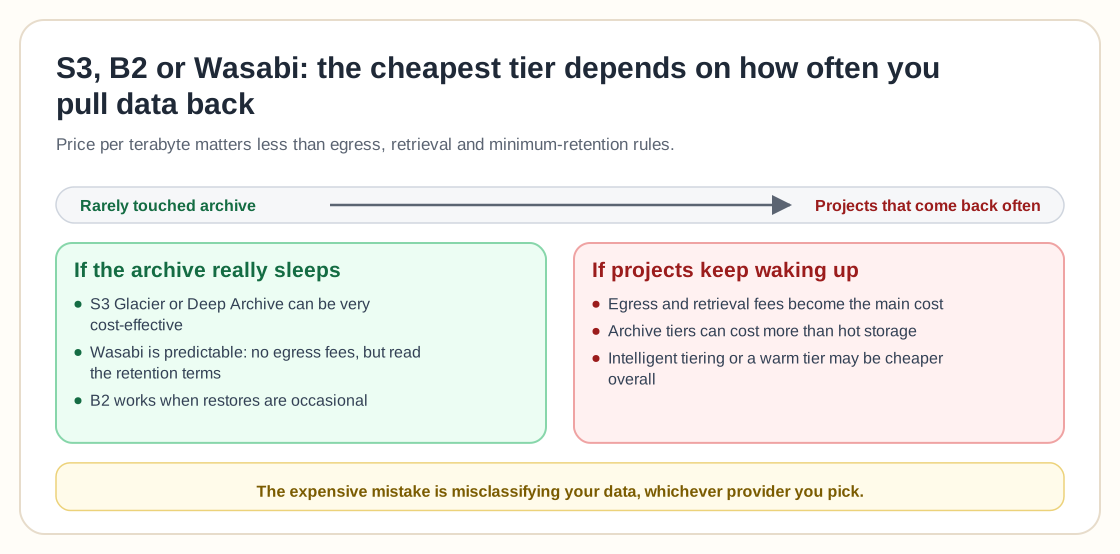
To simplify, if your archive projects are rarely touched:
- S3 Glacier or Deep Archive can be extremely cost-effective.
- Wasabi can be predictable and safe.
- B2 works if restores are occasional.
If your "archive" is more like "sleeping projects":
- Egress and retrieval costs become the dominant factor.
- Archive tiers may cost more in practice than hot storage.
- Intelligent tiering or even staying in a warm tier may be cheaper overall.
The costly mistake is usually misclassifying your data, whichever provider you pick.
Media workflows aren't static
Corporate IT thinks in decades, while media teams think in revisions. Clients come back, formats change, and social platforms demand new cuts. You may consider something "done," but the market doesn't.
That's why lifecycle automation, testing restore workflows, and running actual cost simulations based on retrieval frequency all matter. Cloud pricing punishes guesswork.
So, S3, B2, or Wasabi?
If you want maximum flexibility and long-term scalability, S3 wins. It's complex, but you can design exactly what you need.
If you want simplicity and reasonable pricing without getting deep into hyperscaler mechanics, B2 is attractive.
If you hate egress fees and value predictability, Wasabi can be compelling, especially if your archive truly sits untouched.
There's no universal winner, only the provider that fits how often you need your files back.
Plan the retrieval side
Cheap cloud storage is easy. Designing a retrieval strategy isn't.
If you're pushing 15TB+ per month through a remote team, your biggest problem is the cost of moving data, more than the cost of storing it.
The teams that do well in this space compare more than price per terabyte. They map their workflow, measure restore frequency, build proxy layers, and automate lifecycle transitions. They also treat archive as archive, instead of "stuff we'll probably need next quarter."
The cloud will absolutely let you store everything forever. It just won't let you forget the bill when you want it back.