

Slow Proxmox iSCSI Storage: What Ex-VMware Users Need to Know
If you're coming from VMware, the first thing you'll probably try in your new Proxmox setup is to get your iSCSI storage talking to your hypervisor. That makes sense, since iSCSI is fast, reliable, and something you already know. Then everything breaks, or at least slows to a crawl, and you're stuck asking, "Why is my Proxmox iSCSI storage performance so bad?"
You're not the only one in this boat.
Why Proxmox iSCSI storage isn't like VMware
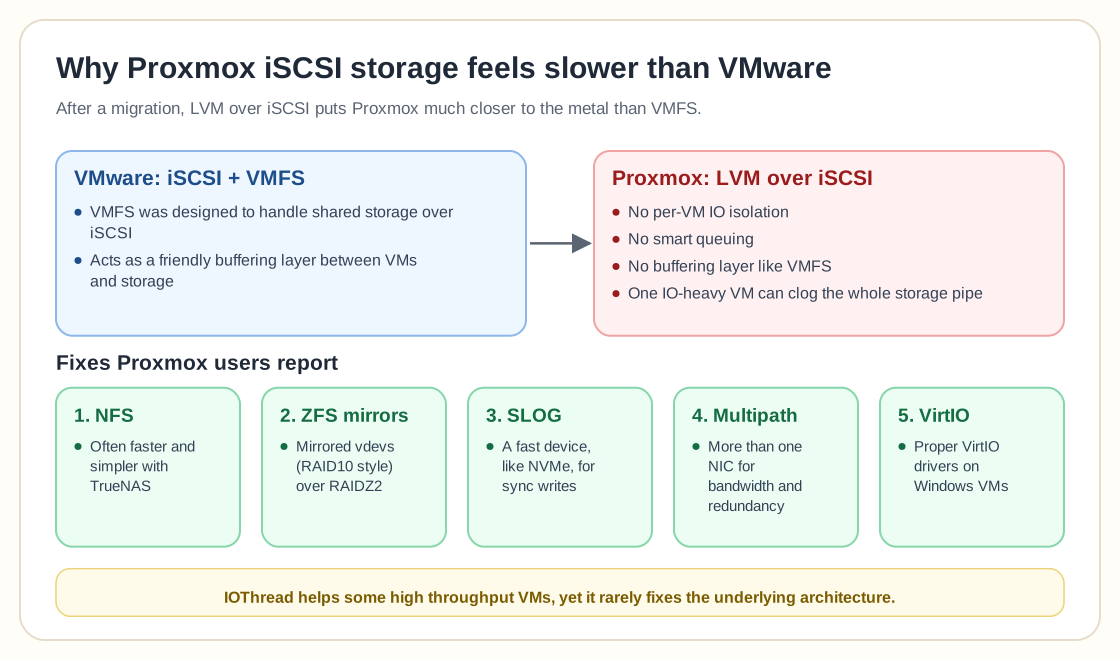
Proxmox doesn't treat iSCSI storage the same way VMware does. VMware's VMFS file system handles shared storage over iSCSI like a pro, because it was designed that way. In Proxmox, when you use LVM over iSCSI, you're flying much closer to the metal. That means:
- No per-VM IO isolation
- No smart queuing
- No "friendly" buffering layer like VMFS
As a result, one IO-heavy VM can clog the entire storage pipe.
Symptoms of poor Proxmox iSCSI storage performance
People are seeing this in real Proxmox environments using iSCSI storage:
- Backups (especially with PBS) tank all other VM performance
- Windows Updates spike IO wait across every VM
- A single VM's disk load slows everything else to a crawl
- Massive latency spikes during random write workloads
If any of that sounds familiar, your Proxmox iSCSI setup probably needs some love, or a rethink entirely.
The hardware setup isn't always the problem
Beefier gear doesn't always fix it. One user outlined this config:
- TrueNAS Core backend
- 4 mirrored SSD vdevs
- 10Gb SFP+ networking
- Jumbo frames at 9000 MTU
- LVM over iSCSI exported to Proxmox
It looks solid on paper, but IO performance was still a disaster, and the culprit was how Proxmox handles iSCSI storage and how that differs from VMware.
So… can IOThread fix it?
This gets tossed around a lot: "Just enable IOThread on your VM disk."
Unfortunately, that's rarely a silver bullet. IOThread can help with specific workloads, like high-throughput VMs, but it won't patch deeper architectural issues in your Proxmox iSCSI storage setup.
Top ways to fix Proxmox iSCSI storage bottlenecks
If your iSCSI performance in Proxmox sucks, here's what people have done to fix it.
1. Switch to NFS instead of iSCSI
This one came up over and over again. If you're using TrueNAS, NFS is often faster, simpler, and more reliable for Proxmox storage than iSCSI.
NFS abstracts away many of the block-level headaches and plays nicer with Proxmox's file-based storage model, so snapshots, backups, and VM migration all become smoother.
2. Rebuild your ZFS pool with mirrors
RAIDZ2 is great for resilience but terrible for random write IOPS. If you're using SSDs, consider setting up stripes of mirrored vdevs (RAID10 equivalent). That gives you the read/write performance VMs actually need.
3. Add a SLOG device
TrueNAS users often overlook this: if you're not using a fast SLOG (like an NVMe drive), your sync writes are probably dragging you down. Adding a SLOG can dramatically improve performance in ZFS when paired with iSCSI or NFS.
4. Use multipath for iSCSI (if possible)
If you have more than one NIC, multipath iSCSI can increase bandwidth and add redundancy. Even here, setup is tricky and doesn't always yield VMware-level smoothness, but it's a must-have for serious iSCSI deployments.
5. Install VirtIO drivers on Windows (properly)
If Windows won't see your VirtIO disks, you're not alone. Don't give up: check your driver version, ISO source, and install method. Without VirtIO, you're leaving performance on the table.
Common pitfalls with Proxmox iSCSI storage
A few other things often go wrong:
- PBS on iSCSI-backed spinning disks is a recipe for pain.
- DRAM-less SSDs take huge performance hits under load.
- With no local storage fallback, all IO goes over the network, even temp files.
- An MTU mismatch undoes jumbo frames: 9000 MTU won't help if any device in the chain is still at 1500.
Final word: don't force Proxmox to be VMware
Proxmox iSCSI storage just doesn't behave like VMware's iSCSI+VMFS model. If you try to replicate your old setup exactly, you'll likely end up disappointed, or worse, stuck with a system that falls over every time you run a backup.
Instead, rethink your architecture. Proxmox shines when you play to its strengths:
- ZFS local storage with snapshots and replication
- NFS over iSCSI when central storage is needed
- Smart VM placement to reduce IO bottlenecks
Making the jump from VMware? Then let go of the VMFS mindset. Once you embrace how Proxmox handles storage, quirks and all, you'll realize it's different from VMware without being worse.
TL;DR: key takeaways for Proxmox iSCSI storage
- Proxmox doesn't handle iSCSI like VMware; expect issues without tuning.
- LVM over iSCSI lacks isolation; one VM can throttle the whole cluster.
- NFS often outperforms iSCSI for Proxmox + TrueNAS setups.
- RAID10-style mirrored vdevs improve ZFS performance drastically.
- Use a SLOG and consider multipath networking if sticking with iSCSI.
Want Proxmox to run like a dream? Start by rethinking how you're using Proxmox iSCSI storage. It just might be time to let go of what worked in VMware.