

Proxmox 9.1 Can Run Docker Containers, but Not the Way You Think
Proxmox 9.1 can run Docker containers, but it does so by turning each OCI image into an LXC guest, with no Docker engine involved. On the morning the feature landed, a cluster admin somewhere probably leaned back in his chair, squinted at the Proxmox 9.1 changelog, and muttered, "No way they actually did it." For years, running Docker on Proxmox in any "native" capacity has been a kind of homelab daydream. People wrapped Docker inside LXCs, others tucked it inside lightweight VMs, and a few adventurous souls pretended everything was fine while ignoring the occasional kernel complaint. Everyone had their hack, and everyone had their scars.
Proxmox 9.1 rolled out a new trick: OCI-based containers that look like lightweight LXC guests spun directly from Docker images. Overnight, a corner of the infrastructure world lit up with posts, comments, and YouTube explainers. Some were excited, some confused, and some warned others to please, for the love of uptime, take a breath before diving in.
The best way to understand how the feature landed is to listen to the people who hammered on it during those first few hours. Proxmox technically gave users a way to "run Docker containers," but what they got is a very Proxmox-shaped hybrid: clever, promising, a little strange, and not a Docker replacement, at least not yet.
The initial reaction: hopeful, but cautious
One early response nailed the vibe: "I guess I won't replace my VMs just yet, but I like the idea and the direction." A lot of folks run containers using Portainer inside a dedicated VM because it gives them clean isolation, namespacing, and familiar Docker semantics, and those users aren't rushing to tear down that setup overnight.
Another admitted they liked Docker's namespace handling far too much to give it up. For them, stacking containers with neat network boundaries and ports grouped under a single IP is how their entire self-hosted design works, well beyond a convenience. On that note, multiple people were disappointed that Proxmox's OCI containers behave like LXCs, where each gets its own IP and that's the whole deal. Want a dozen services hanging off one IP with different ports? Too bad. A reverse proxy could help, but that wasn't the point.
Still, the crowd working with limited resources saw real promise. Running full VMs for tiny services feels wasteful, and LXCs hosting Docker can get weird depending on kernel features. Having Proxmox deploy a container-like workload without Docker, Podman, or an OS layer of any kind is a big deal for small machines.
Then came the question that set the tone for the rest of the thread: "What's the actual use case?" It turned out people had plenty of answers, and plenty of caveats.
The first wave of confusion: wait, how does this actually work?
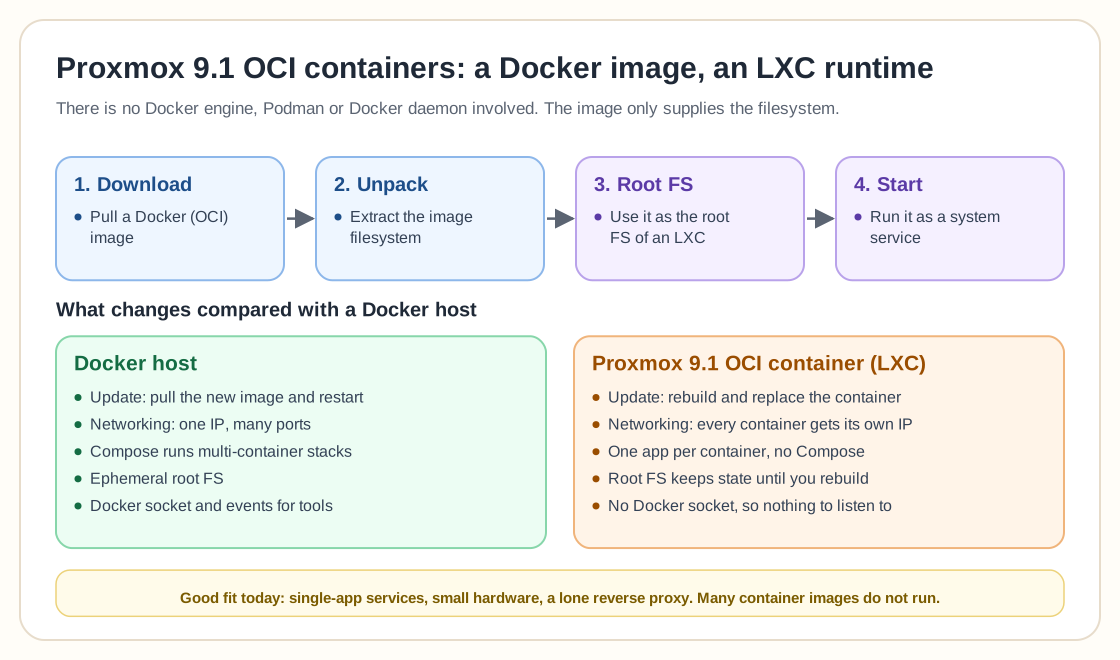
The most common misconception in the thread was that Proxmox was running "Docker inside containers." Several people tried to correct that, some gently and some less so.
Multiple commenters made the same core point: Proxmox converts an OCI image into an LXC. The container contents from the image become a lightweight filesystem for a privileged LXC guest. There is no Docker engine, Podman, or Docker daemon involved. You're not calling docker ps, watching the Docker socket, or running multi-container stacks.
It's closer to:
- Download a Docker image
- Unpack its filesystem
- Use that as the root FS of an LXC
- Start it as a system service
That's clever, but it invites trouble if the image expects behavior only a Docker runtime provides, such as ephemeral resets, consistent mounts, networking assumptions, or overlay filesystem behavior. Docker images were not built to be full root filesystems, and that can bite you.
That's why one commenter simply wrote: "Most docker containers don't work for me. That's why it's a technology review." Yep, there it is.
The updates problem
Almost everyone agreed on the biggest headache: updating OCI containers on Proxmox is awkward right now.
With a container in Docker, you just pull and restart. The runtime sweeps in the new layers, and the container's ephemeral design means you don't worry about what happened to the root FS underneath.
On Proxmox, your OCI-derived LXC behaves like any other LXC, which means it has state. Unless you're careful with mounted storage, updating means:
- Rebuilding a new instance
- Re-attaching mounts
- Copying config
- Replacing the old container
It's not elegant. One YouTuber recommended that approach for now, and honestly, that's how things have to be until Proxmox adds a true update workflow. One user summed up where we are: "Maybe I'll use SMB instead of volumes, if that even works, idk."
Mounting, networking, and the weird edges
Several users bumped into early limitations.
Shared mounts aren't obvious
Someone tried mounting SMB shares and hit a wall. Others pointed out that LXCs do support local bind mounts, just not in a way that cleanly imitates docker volume behavior.
Networking behaves like LXC instead of Docker
If you're used to Docker's "one IP, many ports" model, the switch to "every container has a full IP stack" feels harsh. Proxmox automatically assigns its OCI containers network configs like LXCs, including MAC addresses, bridges, and firewall rules. A reverse proxy fixes this, but that's extra plumbing people weren't expecting.
No multi-container setups
Immich fans asked about Compose and stacks. The answer was consistent: nope, not right now. No Docker daemon means no orchestration layer, so every OCI container is a single runtime environment with one app, one root FS, and one start command. That's great for small services and terrible for anything requiring complex orchestration.
The YouTube chaos: people trying to explain, and arguing about it
Naturally, the moment the feature dropped, YouTubers rushed to cover it. Some folks liked Techno Tim's overview. Others said the video caused confusion by implying containers were running inside containers. He later clarified, but the damage was done, and many viewers walked away with the wrong mental model. Others pointed people to a more technical breakdown, insisting it explained the architecture better.
That was the pattern across the thread. Every excited explanation was matched by someone running in behind with a fire extinguisher, shouting "NO! That's not how it works!" That's what happens when a feature is early, unusual, and poorly documented.
Practical use cases: where OCI containers actually shine
Beyond the debate, several real-world use cases emerged.
1. Replacing lightweight LXCs meant for single apps
Plenty of folks run apps in LXCs even though those apps were really built for containers. Think AdGuard, Unifi, small network tools, or service managers. LXCs still require patching, package management, and OS upkeep.
One person summed it up: "I don't want to cosplay as a 2000s sysadmin dealing with dependencies every update." With OCI containers, you can run an app from its Docker image without using Docker, and skip the OS maintenance tax.
2. Resource-constrained hardware
People running Proxmox on NUCs, mini PCs, or small home servers sometimes can't spare the RAM overhead of a VM just to hold a Docker daemon. OCI containers give them barebones overhead with service-specific isolation.
3. Cluster networking use cases
One user explained they have a dedicated SDN network isolated from their main LAN and run a VM purely to host a reverse proxy, which is overkill. They tried Docker inside an LXC but couldn't get it working cleanly. An OCI container built from the Traefik image solves that exact problem with minimal overhead. It's a niche use case, sure, but these are homelabbers, and everyone's use case is niche.
The dealbreakers: where it falls apart today
Even the optimists admitted some pain points.
1. Docker semantics just aren't there
If you track updates via the Docker socket, sorry, the socket doesn't exist. Projects that expect a Docker environment won't find one, and tools that rely on Docker events have nothing to listen to.
2. Many container images simply don't run
The more an image depends on Docker runtime features rather than just filesystem contents, the more likely it is to break.
3. Stateful LXCs behave differently than ephemeral Docker containers
Someone asked: "Wait, does the filesystem reset like Docker?" It doesn't. Anything that writes to the root FS stays there unless you rebuild or clean manually. That's not necessarily bad, but it's very different behavior.
4. Multi-container workflows are off the table
Compose-based apps like Immich, Home Assistant + add-ons, or databases paired with frontends are not going to be clean to manage.
The LXC crowd: "we've been doing this for years"
Some readers were almost amused. People have run Docker inside LXCs for a long time, and it works reasonably well, especially for non-critical homelab setups. A few mentioned small patches needed after certain updates, but overall the setup has been stable.
To them, Proxmox's OCI containers feel like a sideways version of what they already do, nice but hardly a revolution. They want true Docker or true Podman integrated at the host level, and this feature isn't that. If you're still weighing plain LXC against Docker-in-LXC against a full VM, our LXC vs VM vs Docker decision guide walks through the tradeoffs for each.
Where this feature actually stands
Taken together, the discussion describes a feature that is new, weird, powerful and misunderstood. It's not production-ready, and it's definitely not "Docker on Proxmox," not yet.
What Proxmox built is a way to take OCI images, one of the most widespread packaging formats in the tech world, and boot them as lightweight system containers without installing a container runtime. It's clever and useful, and it's going to evolve. For now it sits in a curious middle lane: too powerful to ignore, too unfinished to rely on, and too confusing to explain without starting an argument.
The future: when Proxmox might truly replace Docker hosts
Will this feature eventually grow into a real Docker replacement for homelab users? Maybe. Based on the conversation, it needs:
- Real update workflows
- Better image compatibility layers
- Multi-container orchestration
- Cleaner networking options
- More stable filesystem behavior
- Better documentation
- Less confusion in general
If Proxmox can pull that off, it would become a one-stop shop for virtualization, lightweight app hosting, and container workloads, something even TrueNAS is still figuring out. For now it's experimental and promising, and honestly pretty fun to watch unfold.
Final word
Proxmox 9.1 didn't make Docker obsolete. It didn't let you ditch your compose files or collapse your entire home stack into one hypervisor feature.
What it did was open a door to a future where Proxmox can run containerized apps without heavyweight runtimes or fragile hacks, where homelabbers can deploy small services quickly, skip OS maintenance, and avoid VMs for single-app workloads. It's early, messy and misunderstood, but it's something new, and in a world where everyone has an opinion about how containers should work, Proxmox just made the debate more interesting.