

Losing the Root Password on VMware ESXi Is a One-Way Door
Every infrastructure admin dreads losing the root password on a VMware ESXi host. You're standing in front of a host console, maybe physically, maybe through iLO, and the password you know should work… doesn't.
You try again, slower this time, with Caps Lock off and the keyboard layout checked, and it still fails. That's when it sinks in: you've lost the root password on an ESXi host, and all the muscle memory you built over years of Linux recovery tricks stops being useful, because ESXi doesn't play that game anymore.
If you're coming from older VMware versions, or from Linux-heavy environments, your instinct is to look for a reset path: a recovery shell, a boot-time trick, something undocumented but reliable. Surely there has to be a way in.
On modern ESXi, especially 7.x and 8.x, there usually isn't, and that's by design.
Why this is working as designed
When people ask how to recover a lost ESXi root password, the replies often feel cruelly repetitive: reinstall, preserve the datastore, re-register the VMs, and move on. It can sound lazy or dismissive, as if the community just doesn't want to help.
The blunt answer is that ESXi is designed so that losing root is supposed to hurt.
Over the last few major releases, VMware locked down host configuration aggressively. The shadow file is encrypted and configuration state is protected. Boot-time hacks that used to work now either fail silently or leave the host unbootable, and most of the old guides floating around assume a world that no longer exists.
VMware made a very clear tradeoff here, choosing host security and integrity over admin convenience. Once you understand that, the lack of a reset button makes grim sense.
Why "just reset it" stopped being a thing
In the ESXi 5.x and early 6.x days, there were… let's call them "creative" recovery options: live CDs, offline file edits, and boot flags that dropped you into a shell long enough to clean up a mess. Those methods were never officially supported, but they existed, and admins used them.
Modern ESXi doesn't trust you like that anymore. With features like secure boot, UEFI enforcement, encrypted configuration, and tighter coupling between host state and management tools, VMware effectively closed the door on offline tampering. Even if you can break in, you're often left with a host that won't rejoin inventory cleanly or behaves in subtle, terrifying ways.
That's why VMware's official guidance is so boring and so consistent. If you lose root access, you reinstall ESXi and preserve the VMFS datastore, and that's all there is to it.
When vCenter is down too, things get darker
The situation gets significantly worse when the VM running vCenter is powered off and you can't power it back on because, you guessed it, you need root. At that point, every "smart" option collapses:
- You can't use host profiles.
- You can't push a password change.
- You can't use PowerCLI.
- You can't authenticate through vCenter because it's not running.
What you can do is log into the physical host management interface, confirm that you are, in fact, locked out, and accept reality.
This is usually where admins start bargaining. "What if I join it to a domain?" "What if I boot into rescue mode?" "What if I spam keys during GRUB?"
You'll find people online who swear these tricks work. Sometimes they did, and sometimes they still do, under very specific conditions. None of them are supported, though, and many of them flat-out don't work on ESXi 8.x with UEFI and secure boot enabled. The more time you spend chasing those paths, the longer your outage lasts.
Reinstalling ESXi isn't the disaster it feels like
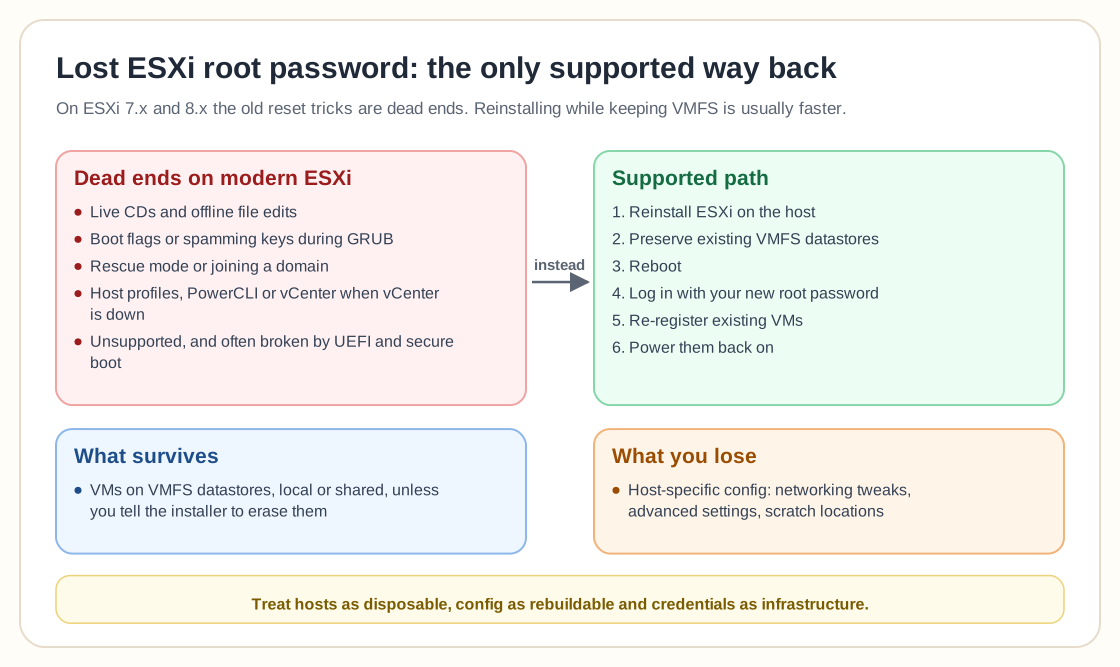
People who've never done this before are often surprised that reinstalling ESXi is usually faster than trying to recover it.
If your VMs live on VMFS datastores, local or shared, reinstalling the hypervisor doesn't erase them unless you explicitly tell it to. The installer even asks.
The general flow looks like this:
- Reinstall ESXi on the host.
- Preserve existing VMFS datastores.
- Reboot.
- Log in with your new root password.
- Re-register existing VMs.
- Power them back on.
This is how countless real-world recoveries actually end.
Yes, you lose host-specific config such as networking tweaks, advanced settings, and scratch locations. Compared to being permanently locked out, that's a trade most teams will take without hesitation, and if you had good documentation or backups of host config, even better.
The part admins would rather not admit
Losing the ESXi root password almost never happens in isolation. It usually shows up alongside other problems:
- Credentials stored in someone's head.
- No password vault.
- vCenter as a single point of failure.
- Hosts built once and never touched again.
The incident feels so catastrophic because it exposes how brittle the operational model was all along. ESXi isn't forgiving here. It assumes you're running it like an enterprise platform, not like a homelab you can poke at until it works again. That sounds harsh, but it's consistent.
Why VMware chose the "one-way door"
From a security perspective, allowing easy root recovery is a nightmare. Physical access plus a reboot shouldn't equal full control over production infrastructure.
VMware locked this down for the same reason modern Linux distros harden boot paths and cloud providers don't offer "just reset the hypervisor" buttons. If someone gets physical or out-of-band access, the blast radius should still be limited.
The cost of that decision is admin pain during rare but brutal mistakes, and VMware clearly decided that was acceptable. Whether you agree with that or not, it explains why the answer hasn't changed in years.
This is where the VMware-to-something-else conversation starts
These stories keep popping up at the same time teams are reevaluating their hypervisor strategy, and that's no coincidence.
When something goes wrong in ESXi, the recovery paths are narrow, rigid, and very opinionated. That works well when everything is healthy and feels unforgiving when it's not.
For many admins, losing root is the moment they start asking uncomfortable questions. VMware isn't "bad," but the operational contract is stricter than it used to be. Once you reinstall, get access back, and stabilize the environment, that question tends to linger.
The lesson goes beyond the technical
Losing the root password on VMware ESXi means you crossed a line, and there's no puzzle left to solve. On modern versions, there is no clean rollback and no clever shortcut that VMware secretly endorses. There is only recovery by replacement.
What you should take away from this is a change in mindset more than a command or a trick:
- Treat ESXi hosts as disposable.
- Treat configuration as something you can rebuild.
- Treat credentials as infrastructure, not trivia.
Once that password is gone, ESXi stops caring who you are and simply tells you to start over, through a door that only swings one way.