

Newsletter
Newsletter abonnieren
Neue Infrastruktur-Guides, Vergleichsberichte und Migrationshinweise direkt ins Postfach.
VMware vs Hyper-V (2026): Feature, Licensing & Performance Comparison
Updated October 2026
VMware vs Hyper-V in 2026: Hyper-V suits Windows-centred small and mid-size teams, because the hypervisor comes with a Windows Server licence and carries much less commercial risk. VMware suits large or mixed estates that need vSAN, NSX and the deepest feature set, but only under Broadcom's subscription-only, per-core licensing. In the VM Platform Ledger, VMware leads on capability (93.1 against 80.7).
Scores side by side
Capability and Ledger Index are out of 100. Credibility, commercial risk and lock-in are out of 25, AI is out of 20. For commercial risk and lock-in, lower is better. Microsoft is scored as a family: capability covers Windows Server Hyper-V and Azure Local, while risk and lock-in are scored for Azure Local.
| Platform | Ledger Index | Capability | Credibility | Commercial risk | Lock-in | AI |
|---|---|---|---|---|---|---|
| VMware vSphere / VCF | 63.9 | 93.1 | 14.5 | 23 | 15.5 | 15.5 |
| Microsoft Hyper-V / Azure Local | 64.5 | 80.7 | 15.5 | 12.0 | 16 | 9.5 |
Source: VM Platform Ledger 2026. Scorecards: VMware, Microsoft. The Microsoft scorecard also shows a second line for Windows Server Hyper-V on a perpetual licence: commercial risk 6.0 and lock-in 9.5.
The two come out close on the Ledger Index even though VMware is far ahead on capability, because VMware's commercial risk and lock-in scores pull it down. Hyper-V is the safer purchase and VMware is the more complete product.
Feature matrix: VMware vSphere vs Microsoft Hyper-V
| Area | VMware vSphere | Microsoft Hyper-V |
|---|---|---|
| Hypervisor licence model | Subscription only, per core, sold as vSphere Foundation (VVF) or Cloud Foundation (VCF) | Role included with Windows Server (per-core licence, perpetual or pay-as-you-go); Azure Local is a monthly subscription |
| Free option | Free ESXi 8.0 Update 3e, limited to 2 CPUs per host and 8 vCPUs per VM, no official support | No free standalone edition after Hyper-V Server 2019; Hyper-V also ships in Windows 11 Pro for desktop use |
| Central management | vCenter | Windows Admin Center, Hyper-V Manager, System Center Virtual Machine Manager |
| Live migration and HA | vMotion and vSphere HA | Live migration and Failover Clustering, up to 64 nodes per cluster |
| Hyperconverged storage | vSAN (0.25 TiB per core included in VVF, 1 TiB in VCF) | Storage Spaces Direct |
| Software-defined networking | NSX, part of the VCF bundle | Windows Server SDN stack with Network Controller |
| Disaster recovery | vSphere Replication and Live Recovery | Hyper-V Replica (RPO as low as 30 seconds) and Azure Site Recovery |
| Security features | vTPM, VM encryption, confidential VMs on AMD SEV-SNP and Intel TDX in vSphere 9 | Shielded VMs, Host Guardian Service, Generation 2 VMs with Secure Boot and vTPM |
| Automation | REST APIs, Terraform and Ansible | PowerShell, PowerShell Direct, Windows Admin Center |
Performance and scalability
Microsoft documents the following maximums for Windows Server 2025: a generation 2 VM can have up to 2,048 virtual processors and 240 TB of memory, a host can have 2,048 logical processors and run 1,024 VMs, and a failover cluster can have 64 nodes and 8,000 running VMs. These limits are well above what most estates use. We have not benchmarked either platform, and day-to-day performance depends more on storage, networking and drivers than on the hypervisor. The practical gap between the two is in scheduling and automation: VMware's DRS and vMotion are more mature, while Hyper-V relies on Failover Clustering plus System Center or Windows Admin Center.
Licensing and cost comparison (as of October 2026)
VMware licensing
- Subscription only, per core, according to Broadcom's June 2026 program documents
- Minimum of 16 cores licensed per processor, including cores disabled in the BIOS
- VVF includes vSphere, vCenter and 0.25 TiB of vSAN per core; VCF adds NSX and 1 TiB of vSAN per core
- No public price list; quotes come through Broadcom partners
- A refreshed vSphere Standard has been reported but not published
Hyper-V licensing
- Hyper-V role included in every Windows Server 2025 edition
- Per-core licence, minimum 8 cores per processor and 16 per server
- Standard covers 2 operating system environments, Datacenter covers unlimited
- Suggested retail for 16 cores: USD 1,176 Standard, USD 6,771 Datacenter, plus CALs
- Optional Azure Local, a per-core monthly subscription through Azure
We do not quote a total cost of ownership percentage. The result depends on core counts, how many Windows guests you run, and the discount you negotiate with either vendor.
Is Hyper-V free? Hyper-V vs Windows Server licensing
Hyper-V is included with Windows Server and Windows, so there is no separate hypervisor fee. The host still needs a Windows Server licence. Windows Server 2025 is licensed per physical core, with a minimum of 8 core licences per processor and 16 per server, sold in 2-core and 16-core packs. Every user or device that accesses the server also needs a Windows Server CAL.
The edition decides how many Windows VMs the licence covers. Standard allows two operating system environments on the licensed host, and you relicense the host with more cores to add more. Datacenter allows unlimited. Both can instead be licensed per VM with Software Assurance or a subscription, at least 8 cores per VM. Customers without unlimited virtualization can also buy pay-as-you-go capacity through Azure Arc, listed by Microsoft at USD 33.58 per core per month.
The old free Hyper-V Server did not continue. Microsoft lists Hyper-V Server 2019 with end of support on 9 January 2029, and we found no later version. If an article tells you to download free Hyper-V Server for a new deployment, it is out of date. The cheaper routes today are Windows Server Standard on a small host, Datacenter for dense hosts, or the Hyper-V feature in Windows 11 Pro for a test lab.
Hyper-V vs VMware for small business
Small businesses that already run Windows Server, Active Directory and Microsoft 365 usually find Hyper-V the natural fit. The hypervisor is part of the licence they already buy, management tools are familiar, and a two-node failover cluster gives live migration and automatic restart. The cost to watch is Windows guest licensing: with Standard, a third Windows VM on the same host means licensing the host again.
VMware makes sense for small sites that already have VMware skills, rely on a backup or monitoring product that only supports vSphere, or want one vendor for every layer. The obstacles are the 16-core minimum per CPU, the bundle structure and the lack of a published price. A two-socket server with two 8-core CPUs still needs 32 core subscriptions.
If neither fits, a third option may: see Proxmox vs VMware and Hyper-V vs Proxmox, or run the Hypervisor Advisor with your numbers.
Main features: VMware vs Hyper-V
VMware and Hyper-V are both Type 1 (bare-metal) hypervisors built for production virtualization.
VMware vSphere strengths
- Distributed Resource Scheduler (DRS) and vMotion for load balancing without interruption
- The most complete networking and storage stack through NSX and vSAN
- Multi-cloud footprint and the largest pool of certified engineers
- Strong GPU and private AI support, rated 5 out of 5 for GPU in the Ledger
Hyper-V strengths
- Native integration with Windows Server, Active Directory and Azure
- Live migration, storage migration and Hyper-V Replica for disaster recovery
- Failover Clustering, Shielded VMs and Storage Spaces Direct
- Dynamic Memory and built-in PowerShell automation
Thinking of switching?
Read our guide to migrating from VMware to other platforms, including Proxmox and Hyper-V.
When to choose VMware vs Hyper-V
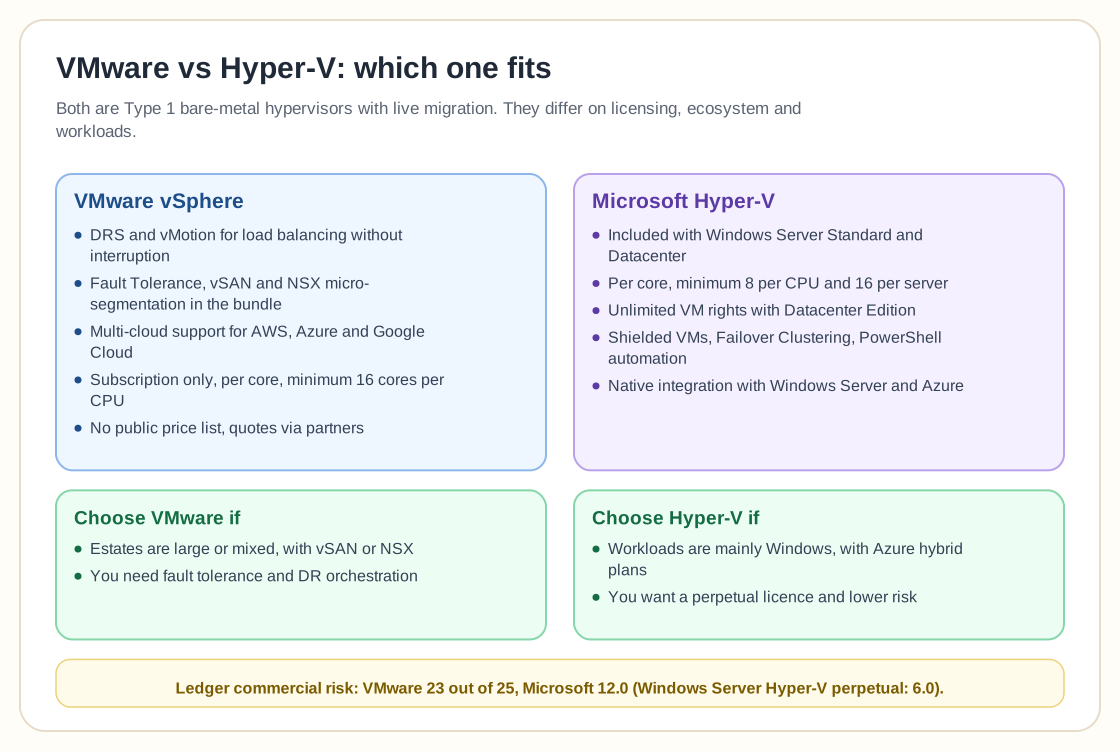
Choose VMware if:
- You depend on NSX, vSAN or the largest third-party ecosystem
- You run thousands of VMs, or mixed Linux and Windows estates at scale
- You need the deepest automation, DR orchestration and GPU support
- You can absorb subscription pricing and renewal risk
Choose Hyper-V if:
- You are invested in Windows Server, Active Directory and Azure
- You want a perpetual licence and low commercial risk
- Your workloads are mostly Windows-based and your team knows PowerShell
- You want to avoid a separate hypervisor bill
Related guides
More comparisons and migration resources for checking your virtualization plans.
Proxmox vs VMware
Subscription prices, feature equivalents and a migration checklist.
OpenShift Virtualization vs VMware
Kubernetes-native virtualization compared with vSphere.
Oracle Linux vs VMware
Oracle Linux Virtualization Manager as a VMware alternative.
VMware Migration Report
Migration patterns, risks, and platform decision framework.
Hyper-V vs Proxmox
Considering an open-source alternative instead of Microsoft's hypervisor?
The Unexpected Nuances of Making the Leap
What actually changes day-to-day when you switch from VMware to Hyper-V.
What Happens When VMware License Expires?
Understand operational impact before renewal and migration decisions.
Hypervisor Advisor
Enter your workloads and get a ranked shortlist from the Ledger data.
Frequently asked questions
Sources: Microsoft Learn and the Windows Server 2025 pricing and licensing pages, Broadcom VVF and VCF program documents (June 2026), VM Platform Ledger 2026. Mr.PlanB is not paid by any vendor.